Spring Sale Limited Time 70% Discount Offer - Ends in 0d 00h 00m 00s - Coupon code: simple70

Pass the Microsoft Microsoft 365 Certified: Enterprise Administrator Expert MS-102 Questions and answers with CertsForce

Viewing page 1 out of 7 pages
Viewing questions 1-10 out of questions
Questions # 1:

(You have a Microsoft 365 E5 subscription that contains 1,000 Windows devices.

You need to review the exposure score of the devices.

Which portal should you use?)

Options:

A.

the Microsoft Intune admin center


B.

the Microsoft Purview portal


C.

the Microsoft Defender portal


D.

the Microsoft 365 admin center


Expert Solution
Questions # 2:

: 220 DRAG DROP

Your network contains an on-premises Active Directory domain that syncs to Azure Active Directory (Azure AD). The domain contains the servers shown in the following table.

Question # 2

You use Azure Information Protection.

You need to ensure that you can apply Azure Information Protection labels to the file stores on Server1.

Which three actions should you perform in sequence? To answer, move the appropriate actions from the list of actions to the answer area and arrange them in the correct order.

Question # 2


Expert Solution
Questions # 3:

You have a Microsoft 365 E5 subscription that contains the labels shown in the following table.

Question # 3

You have the items shown in the following table.

Question # 3

Which items can you view in Content explorer?

Options:

A.

File1 only


B.

File1 and File2 only


C.

File1 and Mail! only


D.

File2 and Mail2 only


E.

File1, File2, Mail1, and Mail2


Expert Solution
Questions # 4:

Your company has on-premises servers and an Azure AD tenant.

Several months ago, the Azure AD Connect Hearth agent was installed on all the servers.

You review the health status of all the servers regularly.

Recently, you attempted to view the health status of a server named Server1 and discovered that the server is NOT listed on the Azure AD Connect Servers list.

You suspect that another administrator removed Server1 from the list.

You need to ensure that you can view the health status of Server1.

What are two possible ways to achieve the goal? Each correct answer presents a complete solution.

NOTE: Each correct selection is worth one point.

Options:

A.

From Azure Cloud shell, run the Connect-Azure AD cmdlet.


B.

From Server1, change the Azure AD Connect Health Services Startup type to Automatic (Delayed Start)


C.

From Server1, change the Azure AD Connect Health Services Startup type to Automatic


D.

From Windows PowerShell, run the Rejister-ArureADConnectHealthsyncAgent cmdlet.


E.

From Server1, reinstall the Azure AD Connect Health agent


Expert Solution
Questions # 5:

You have a Microsoft 365 E5 subscription that uses Microsoft Defender for Endpoint.

When users attempt to access the portal of a partner company, they receive the message shown in the following exhibit.

Question # 5

You need to enable user access to the partner company ' s portal.

Which Microsoft Defender for Endpoint setting should you modify?

Options:

A.

Alert notifications


B.

Alert suppression


C.

Custom detections


D.

Advanced hunting


E.

Indicators


Expert Solution
Questions # 6:

Note: This question is part of a series of questions that present the same scenario. Each question in the series contains a unique solution that might meet the stated goals. Some question sets might have more than one correct solution, while others might not have a correct solution.

After you answer a question in this section, you will NOT be able to return to it. As a result, these questions will not appear in the review screen.

Your network contains an on-premises Active Directory domain. The domain contains domain controllers that run Windows Server 2019. The functional level of the forest and the domain is Windows Server 2012 R2.

The domain contains 100 computers that run Windows 10 and a member server named Server1 that runs Windows Server 2012 R2.

You plan to use Server1 to manage the domain and to configure Windows 10 Group Policy settings.

You install the Group Policy Management Console (GPMC) on Server1.

You need to configure the Windows Update for Business Group Policy settings on Server1.

Solution: You upgrade Server1 to Windows Server 2019.

Does this meet the goal?

Options:

A.

yes


B.

No


Expert Solution
Questions # 7:

You have a Microsoft 365 IS subscription and use Microsoft Defender for Cloud Apps.

From Policy management you open Information protection as shown in the following exhibit.

Question # 7

Which type of policy can you create?

Options:

A.

file policy


B.

access policy


C.

activity policy


D.

OAuth app policy


E.

session policy


Expert Solution
Questions # 8:

You have a Microsoft 365 subscription that contains the users shown in the following table.

Question # 8

You have the named locations shown in the following table.

Question # 8

You create a conditional access policy that has the following configurations:

• Users or workload identities:

o Include: Group1

o Exclude: Group2

• Cloud apps or actions: Include all cloud apps

• Conditions:

o Include: Any location

o Exclude: Montreal

• Access control: Grant access, Require multi-factor authentication

User1 is on the multi-factor authentication (MFA) blocked users list.

For each of the following statements, select Yes if the statement is true. Otherwise, select No.

NOTE: Each correct selection is worth one point.
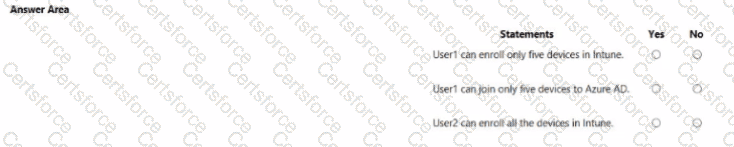
Question # 8


Expert Solution
Questions # 9:

You have a Microsoft 365 subscription that contains a user named User1.

You need to ensure that User1 can search the Microsoft 365 audit logs from the Security & Compliance admin

center.

Which role should you assign to User1?

Options:

A.

View-Only Audit Logs in the Security & Compliance admin center


B.

View-Only Audit Logs in the Exchange admin center


C.

Security reader in the Azure Active Directory admin center


D.

Security Reader in the Security & Compliance admin center


Expert Solution
Questions # 10:

You need to configure Microsoft Entra Connect Sync to support the planned changes for the Montreal Users and Seattle Users OUs.

What should you do?

Options:

A.

From PowerShell, run the Add-ADSyncConnectorAttributeInclusion cmdlet.


B.

From the Microsoft Entra Connect wizard, select Customize synchronization options.


C.

From PowerShell, run the Start-ADSyncSyncCycle cmdlet.


D.

From the Microsoft Entra Connect wizard, select Manage federation.


Expert Solution
Viewing page 1 out of 7 pages
Viewing questions 1-10 out of questions