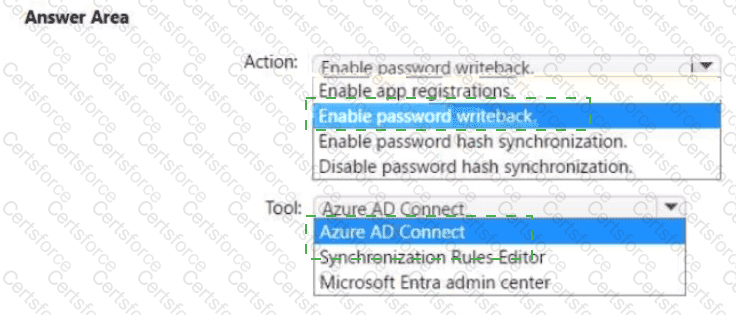
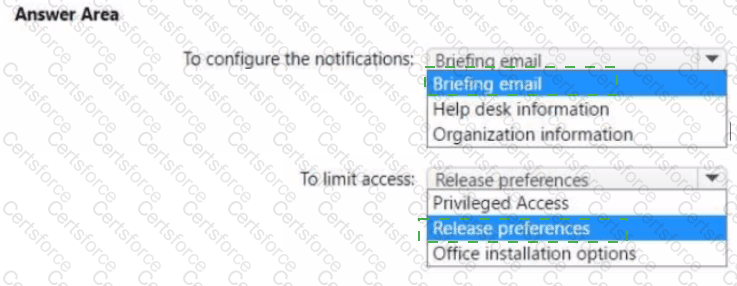
Note: This question is part of a series of questions that present the same scenario. Each question in the series contains a unique solution that might meet the stated goals. Some question sets might have more than one correct solution, while others might not have a correct solution.
After you answer a question in this section, you will NOT be able to return to it as a result, these questions will not appear in the review screen.
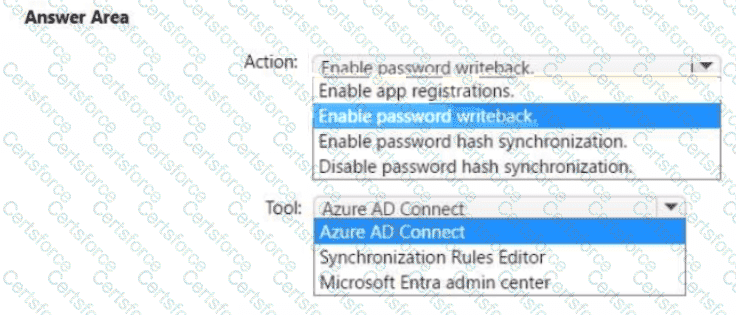
Your network contains an Active Directory domain.
You deploy an Azure AD tenant.
Another administrator configures the domain to synchronize to Azure AD.
You discover that 10 user accounts in an organizational unit (OU) are NOT synchronized to Azure AD. All the other user accounts synchronized successfully.
You review Azure AD Connect Health and discover that all the user account synchronizations completed successfully.
You need to ensure that the 10 user accounts are synchronized to Azure AD.
Solution: From Azure AD Connect, you modify the filtering settings.
Does this meet the goal?
You have a Microsoft 365 E5 subscription that contains two security groups named Group1 and Group2.
You need to enable multi-factor authentication (MFA) for the members of Group1 and Group2. The solution must meet the following requirements:
• The Group1 members must be prompted for MFA only when authenticating to Microsoft Entra ID from Android devices.
• The Group2 members must be prompted for MFA only when accessing Microsoft Exchange Online from outside the corporate network.
• Administrative effort must be minimized.
What should you configure for each group? To answer, select the appropriate options in the answer area.
NOTE: Each correct selection is worth one point.
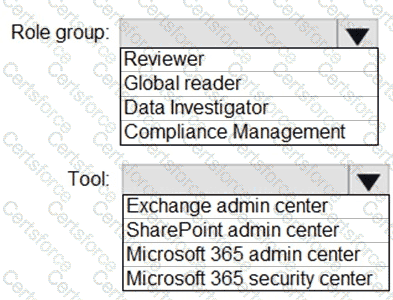
You have a Microsoft 365 tenant that contains the compliance policies shown in the following table.

The tenant contains the devices shown in the following table.

For each of the following statements, select Yes if the statement is true. Otherwise, select No.

Note: This question is part of a series of questions that present the same scenario. Each question in the series contains a unique solution that might meet the stated goals. Some question sets might have more than one correct solution, while others might not have a correct solution.
After you answer a question in this section, you will NOT be able to return to it as a result these questions will not appear in the review screen.
Your network contains an Active Directory forest.
You deploy Microsoft 365.
You plan to implement directory synchronization.
You need to recommend a security solution for the synchronized identities. The solution must meet the following requirements:
• Users must be able to authenticate successfully to Microsoft 365 services if Active Directory becomes unavailable.
• User passwords must be 10 characters or more.
Solution: Implement pass-through authentication and configure password protection in the Azure AD tenant. Does this meet the goal?
You have three devices enrolled in Microsoft Endpoint Manager as shown in the following table.

The device compliance policies in Endpoint Manager are configured as shown in the following table.

The device compliance policies have the assignments shown in the following table.

For each of the following statements, select Yes if the statement Is true. Otherwise, select No.
NOTE: Each correct selection is worth one point.

Your company has 10,000 users who access all applications from an on-premises data center.
You plan to create a Microsoft 365 subscription and to migrate data to the cloud.
You plan to implement directory synchronization.
User accounts and group accounts must sync to Azure AD successfully.
You discover that several user accounts fail to sync to Azure AD.
You need to resolve the issue as quickly as possible.
What should you do?
You have a Microsoft 365 E5 subscription that contains two users named user1@contoso.com and user2@contoso.com and a Microsoft SharePoint site named Site1.
You create a data loss prevention {DLP) policy named DLP1 that has the advanced DLP rules shown in the following table.

DLP1 is applied to Site1.
You have the files shown in the following table.

You copy the files to Site1.
low many notifications will each user receive? To answer, select the appropriate options in the answer area.
NOTE: Each correct selection is worth one point.
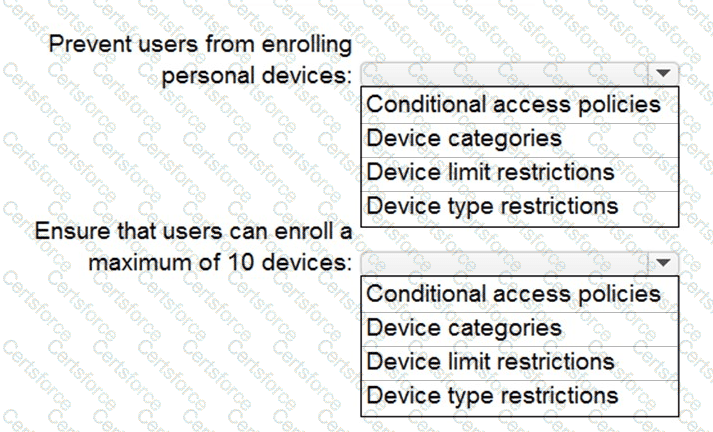
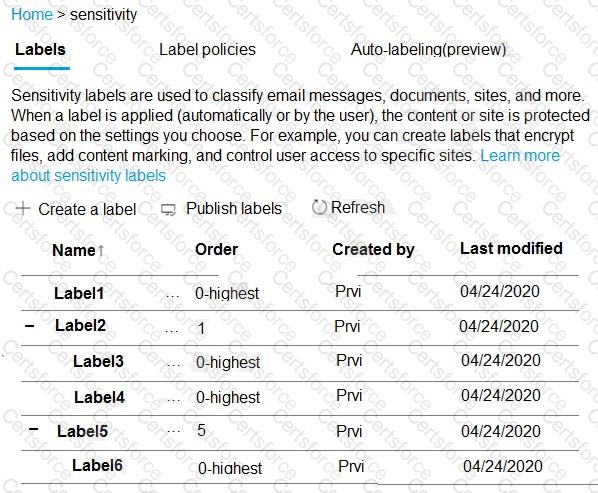
You have a Microsoft 365 E5 subscription that contains the groups shown in the following exhibit.

To which groups can you assign Microsoft 365 E5 licenses?
You have a Microsoft 365 E5 subscription.
You define a retention label that has the following settings:
• Retention period 7 years
• Start the retention period bated on: When items were created
You need to prevent the removal of the label once the label K applied to a lie What should you select in the retention label settings?
You have a Microsoft 365 E5 subscription that contains the security groups shown in the following table.

The subscription contains the users shown in the following table.

You have a Conditional Access policy that has the following settings:
• Assignments
o Users
■ Include: Group1
■ Exclude: Group2. Group3
o Target resources
■ Cloud apps
■ App1
■ Access controls
■ Grant
■ Block access
For each of the following statements, select Yes if the statement is true. Otherwise, select No.
NOTE: Each correct selection is worth one point.