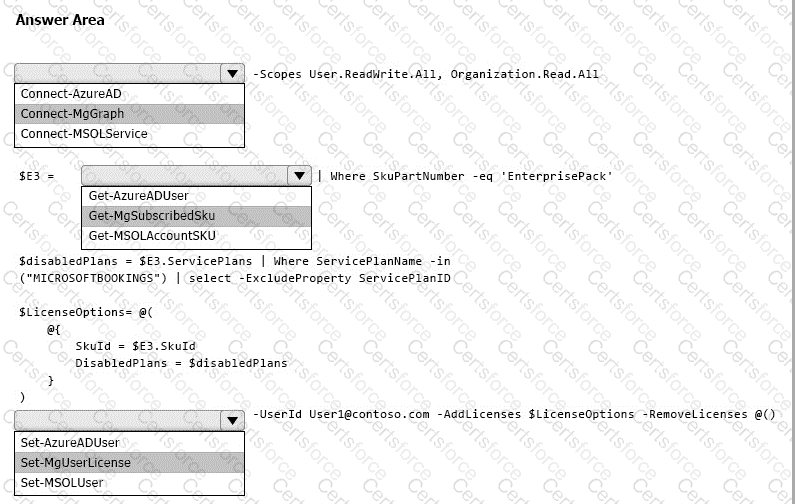
Box 1: Connect-MgGraph
Assign Microsoft 365 licenses to user accounts with PowerShell
Use the Microsoft Graph PowerShell SDK
First, connect to your Microsoft 365 tenant.
Assigning and removing licenses for a user requires the User.ReadWrite.All permission scope or one of the other permissions listed in the ' Assign license ' Microsoft Graph API reference page.
The Organization.Read.All permission scope is required to read the licenses available in the tenant.
Connect-MgGraph -Scopes User.ReadWrite.All, Organization.Read.All
Box 2: Get-MgSubscribedSku
Run the Get-MgSubscribedSku command to view the available licensing plans and the number of available licenses in each plan in your organization. The number of available licenses in each plan is ActiveUnits - WarningUnits - ConsumedUnits.
Box 3: Set-MgUserLicense
Assigning licenses to user accounts
To assign a license to a user, use the following command in PowerShell.
Set-MgUserLicense -UserId $userUPN -AddLicenses @{SkuId = " < SkuId > " } -RemoveLicenses @()
This example assigns a license from the SPE_E5 (Microsoft 365 E5) licensing plan to the unlicensed user belindan@litwareinc.com:
$e5Sku = Get-MgSubscribedSku -All | Where SkuPartNumber -eq ' SPE_E5 '
Set-MgUserLicense -UserId " belindan@litwareinc.com " -AddLicenses @{SkuId = $e5Sku.SkuId} -RemoveLicenses @()
[Reference:, https://learn.microsoft.com/en-us/microsoft-365/enterprise/assign-licenses-to-user-accounts-with-microsoft-365-powershell, , , , ]



Submit