Comprehensive Detailed Explanation
The requirement is to report profitability by business line (cash & carry vs. brokered). In Business Central, the way to achieve this is by creating a Global or Shortcut Dimension (for example, a dimension called Business Line) and ensuring that it is captured on every sales, purchase, and general ledger transaction.
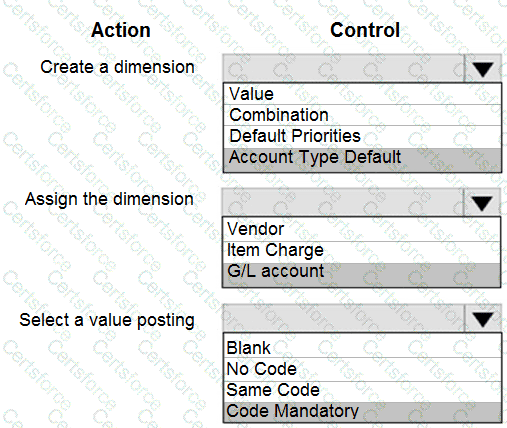
Create a dimension → Value
The correct choice is Value because profitability reporting is driven by dimension values such as Cash & Carry and Brokered.
Combination, Default Priorities, and Account Type Default are used for control and automation of dimensions, not for the initial creation of reporting dimensions.
[References: Work with Dimensions in Business Central., Assign the dimension → Vendor, The Vendor (broker) or Customer (business line source) can carry the dimension. In this scenario, commissions, sales, and profitability by business line depend on whether the transaction comes from a brokered channel (vendor/broker) or cash & carry/customer source., Assigning the dimension at the Vendor level ensures all transactions related to that broker/vendor automatically carry the correct business line dimension., References: Set Up Default Dimensions for Vendors and Customers., Select a value posting → Code Mandatory, To ensure that every transaction posted against a vendor (or customer) must have a business line dimension, you use Code Mandatory., Other options:, Blank = no control (not suitable)., No Code = prevents assigning a dimension, which contradicts reporting needs., Same Code = used when a specific dimension value must always be used, but here we want to allow different values (Cash & Carry, Brokered, etc.)., Therefore, Code Mandatory enforces dimension entry and ensures consistent profitability reporting., References: Dimension Value Posting Settings., ]



Submit