The case study mentions reconciliation issues caused by manual entries being made directly into certain G/L accounts, which led to discrepancies between subledger balances (like customers, vendors, or inventory) and the General Ledger. To resolve this, Business Central allows you to restrict how accounts are posted.
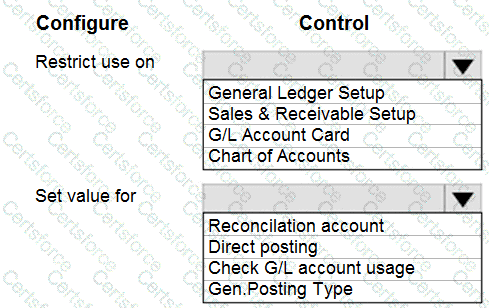
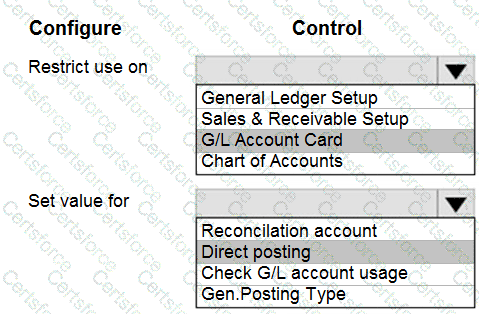
Restrict use on → G/L Account Card
The most appropriate place to restrict usage of specific accounts (such as control accounts for A/R, A/P, or Inventory) is on the G/L Account Card.
Here, you can configure posting restrictions for each account individually (e.g., Accounts Receivable account should only be posted through the customer subledger, not by manual G/L journals).
Other options:
General Ledger Setup → Controls global accounting settings, not account-specific restrictions.
Sales & Receivable Setup → Defines control accounts but does not enforce restrictions.
Chart of Accounts → Displays accounts but restrictions are managed per account card.
Set value for → Direct posting
On the G/L Account Card, the field Direct Posting determines whether users can post manual entries directly into the account.
To prevent reconciliation issues, Direct Posting must be disabled (unchecked) for accounts controlled by subledgers (e.g., A/R, A/P, Inventory).
This ensures that postings only come from system-generated entries (like sales invoices, purchase invoices, or inventory adjustments) and not from manual journals that could break reconciliation.
Other options:
Reconciliation account → Relevant in SAP, not BC.
Check G/L account usage → Not a standard control in BC.
Gen. Posting Type → Defines how entries are posted (Sale, Purchase, Inventory), but does not enforce direct posting restrictions.
With this setup:
Reconciliation issues are avoided because control accounts cannot be posted to manually.
Users are guided to post through the proper subledger processes (sales, purchasing, inventory, etc.).
Financial integrity between subledgers and the G/L is maintained.
Microsoft References
G/L Account Card - Direct Posting Field
Prevent Direct Posting to Control Accounts
Chart of Accounts in Business Central
Contribute your Thoughts:
Chosen Answer:
This is a voting comment (?). You can switch to a simple comment. It is better to Upvote an existing comment if you don't have anything to add.



Submit