
A team of CRM Analytics developers has been working on an existing recipe to add new derived fields. The edited version has been failing ever since, and management is requesting that the dashboard show refreshed data while they work on the edits.
How can the developers add new fields while keeping the dataset refreshed?
Universal Containers (UC) has a "Sales Manager” dashboard. UC has a compare table that has multiple groupings and columns added showing the Total and Subtotals of the numeric values. A consultant is
asked to add additional groups to enhance details about UC's customers.
Which feature should the consultant use to make the navigation of the compare tables easier for the end user?
A CRM Analytics administrator is working on deploying a dashboard and a dataset from a developer sandbox to a full sandbox. They have deployed the dataset via change set and manually copy-pasted the dashboard JSON into the target org. However, they notice that the conditional formatting and the widget-specific number formats have been lost in the target environment.
What is causing this issue?
A CRM Analytics consultant is adding direct data into an existing recipe. When trying to click on the input node, data preview is taking a long time to show any results.
How should the consultant resolve this?
Cloud Kicks' Salesforce org has multiple currencies enabled. This company's business intelligence team uses CRM Analytics to build a dataflow/recipe that creates a dataset, "OpportunityDataSet", which is populated with data extracted from Opportunity. One of the extracted fields is the standard field, Amount.
Which currency will the Amount values be shown in "OpportunityDataSet"?
Cloud Kicks uses CRM Analytics for its sales reporting. A new manager needs access to CRM Analytics to see specific dashboards.
How should the system administrator give access to the Analytics
Studio app in the App Launcher?
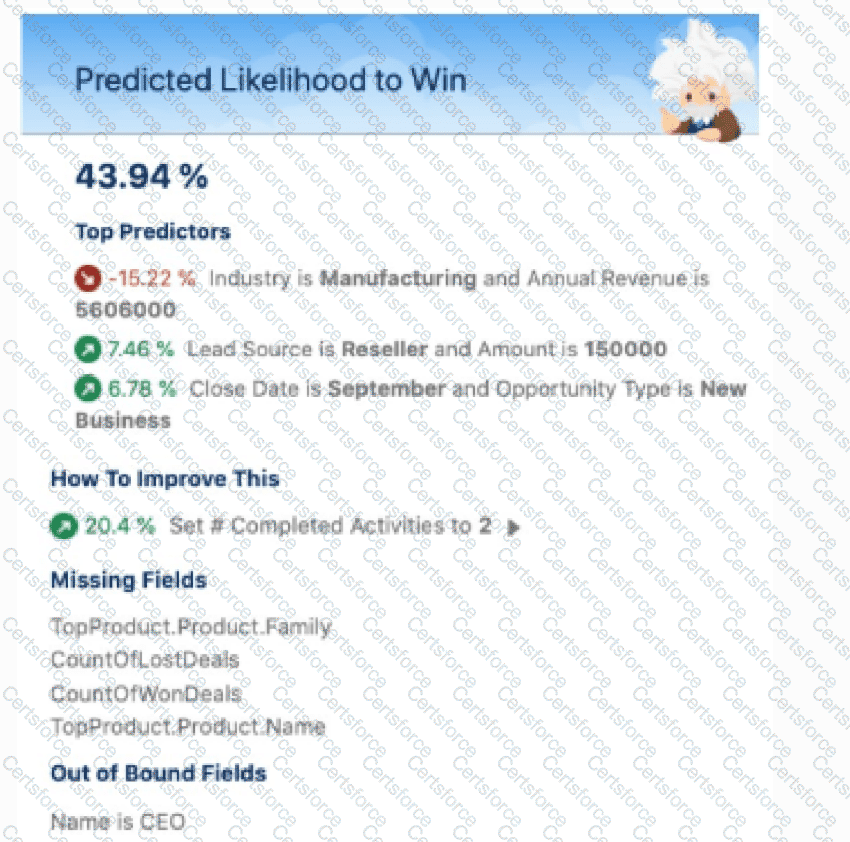
For a story created using multiple data sources (Salesforce, CSV, and external data), what is a possible fix for the issue shown in the prediction?
CRM Analytics uses permissions of the Integration User to extract data from Salesforce objects and fields when a dataflow/recipe job runs.
Why should a consultant be cautious while syncing objects and fields containing sensitive data?
A manager at Cloud Kicks asks for data in a dashboard to be refreshed after the sync of an external connection to Google BigQuery.
How should the consultant accomplish this?
CRM Analytics team plans to enable data sync.
Which limit specific to data syne should the team consider before enabling the feature because it may impact existing jobs?
