Winter Sale Limited Time 65% Discount Offer - Ends in 0d 00h 00m 00s - Coupon code: pass65

Pass the Pegasystems PCRSA PEGACPRSA22V1 Questions and answers with CertsForce

Viewing page 3 out of 3 pages
Viewing questions 21-30 out of questions
Questions # 21:

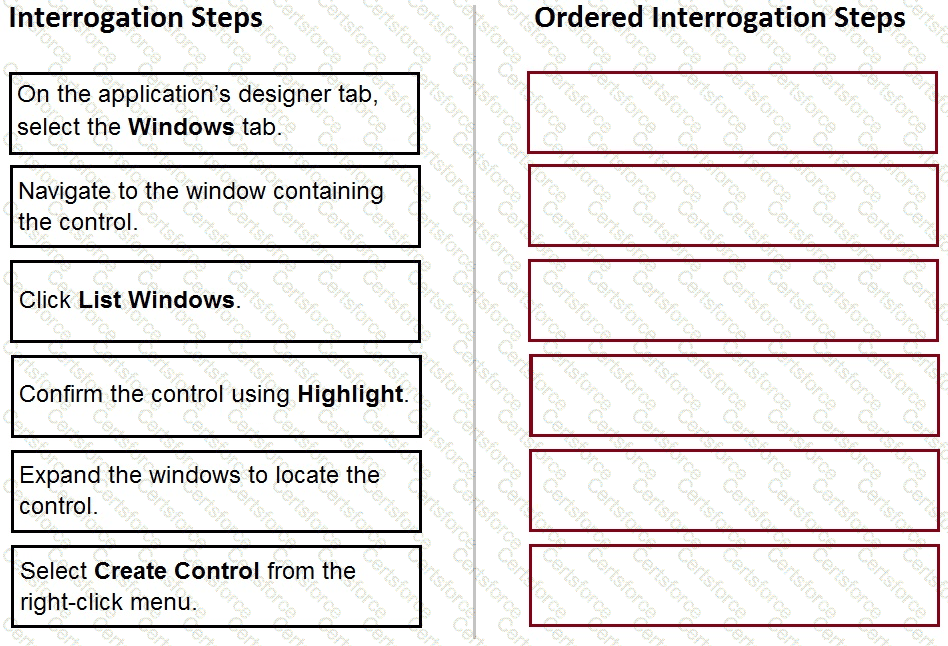
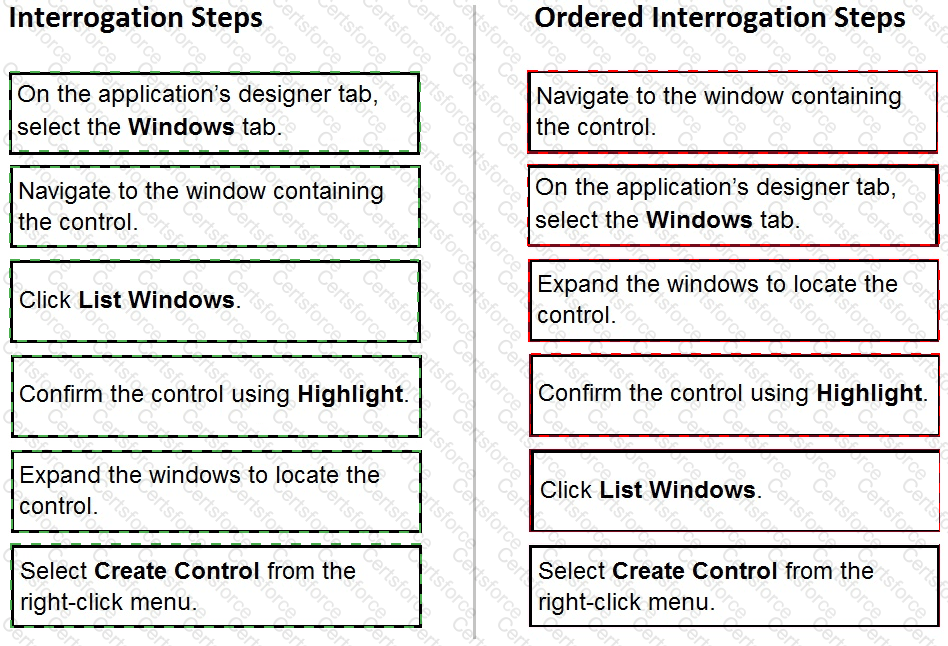
When interrogating a Windows control, the drag and drop Default interrogation method does not work. You decide to use the Create Control option to interrogate the control.

From the Interrogation Steps list, move all of the options to the Ordered Interrogation Steps column and place them in the correct order.
Question # 21


Expert Solution
Questions # 22:

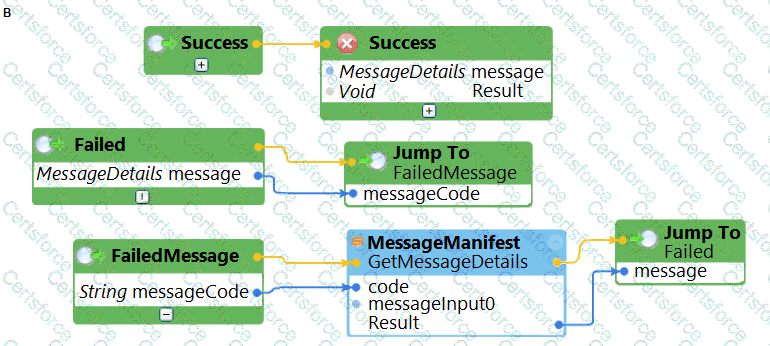
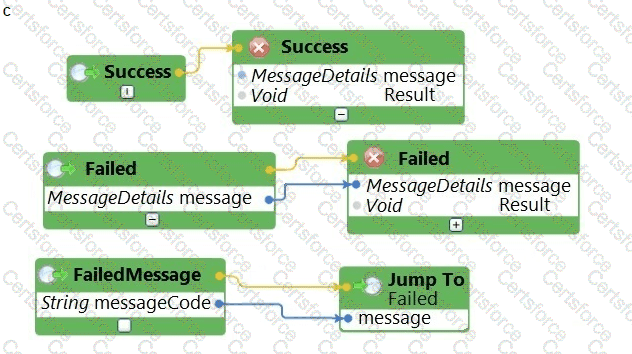
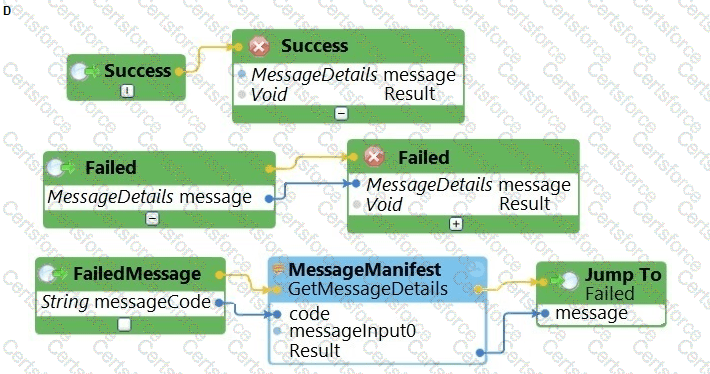
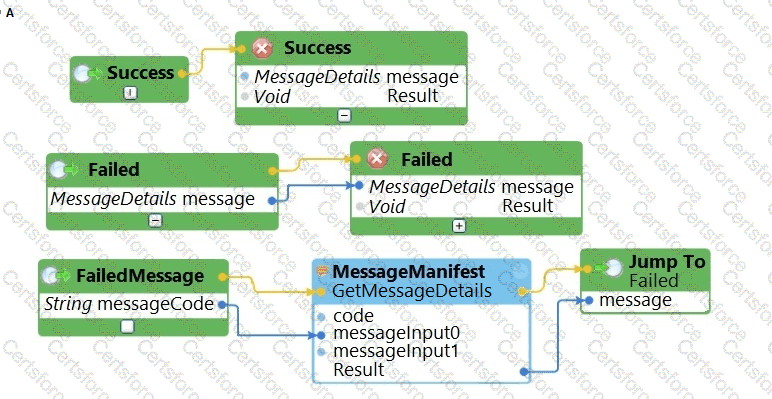
The business requirements states that the login automation creates a Success or Failed response when attempting to log in to the finance application. If a failure occurs, the automation should pass a message code with the Message Manifest before exiting the automation.

Which image represents the exit logic?
Question # 22

Question # 22

Question # 22

Question # 22

Options:

A.

Exhibit A


B.

Exhibit B


C.

Exhibit C


D.

Exhibit D


Expert Solution
Questions # 23:

Which interrogation option provides a pop-up window to choose the interrogated control’s HTML tags?

Options:

A.

Select Element


B.

Replace Control


C.

Create Global Web Page


D.

HTML Table Designer


Expert Solution
Questions # 24:

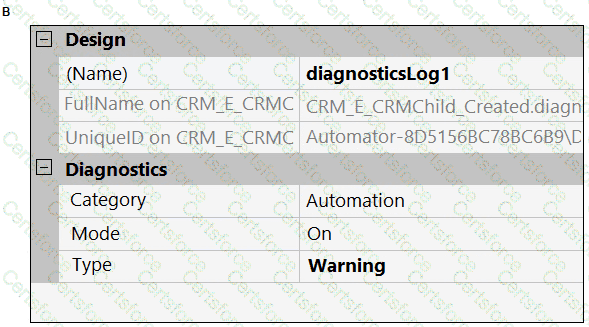
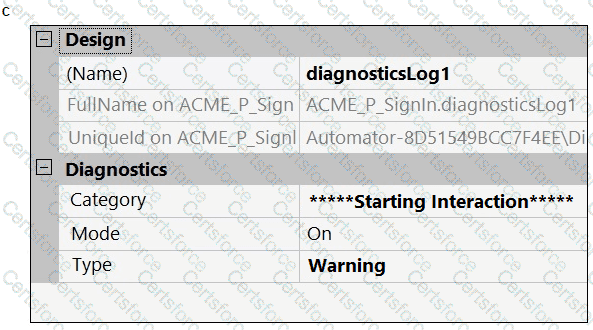
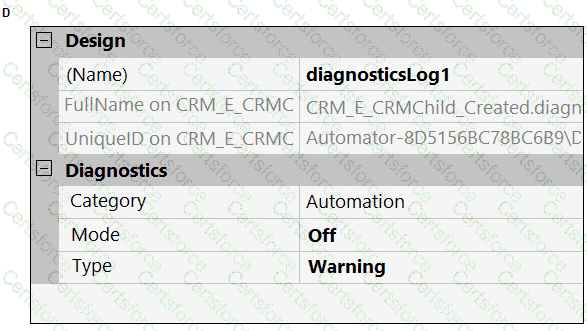
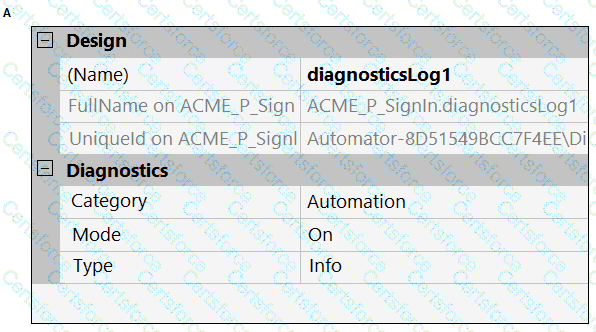
A developer adds a diagnostic log component to an automation and checks the log file.

Question # 24

Based on the image, how did the developer configure the diagnostic log component settings?
Question # 24

Question # 24

Question # 24

Question # 24

Options:

A.

Exhibit A


B.

Exhibit B


C.

Exhibit C


D.

Exhibit D


Expert Solution
Questions # 25:

In an automation that contains an ExcelRange component, you make a change to the data within the range, and you want to save those changes to the Excel file on disk.

Which of the following statements is valid?

Options:

A.

Call the Commit method of ExcelRange component and then Save on the ExcelConnector.


B.

The changes save to the Excel file automatically.


C.

Call the Commit method of the ExcelConnector and reload the Excel file.


D.

Call the Save method of ExcelConnector and reset the state of Excel file.


Expert Solution
Questions # 26:

You are debugging a script component for your project. When the automation executes your script, the intended result does not occur. You suspect that one or more variables within your script are not being set to the proper value. Your version of Pega Robot Studio does not support the use of breakpoints within the script designer.

In what two ways can you debug the script? (Choose two.)

Options:

A.

Enable Runtime logging and enter a diagnostic message to log the variable values during script execution.


B.

Add a breakpoint before calling the script so that you can assign a watch for the variable(s) used within the script.


C.

Check with the Support team to upgrade Robotic Automation Studio to the version which contains script debugging.


D.

Modify the script so that the variable values are returned in the automation.


Expert Solution
Questions # 27:

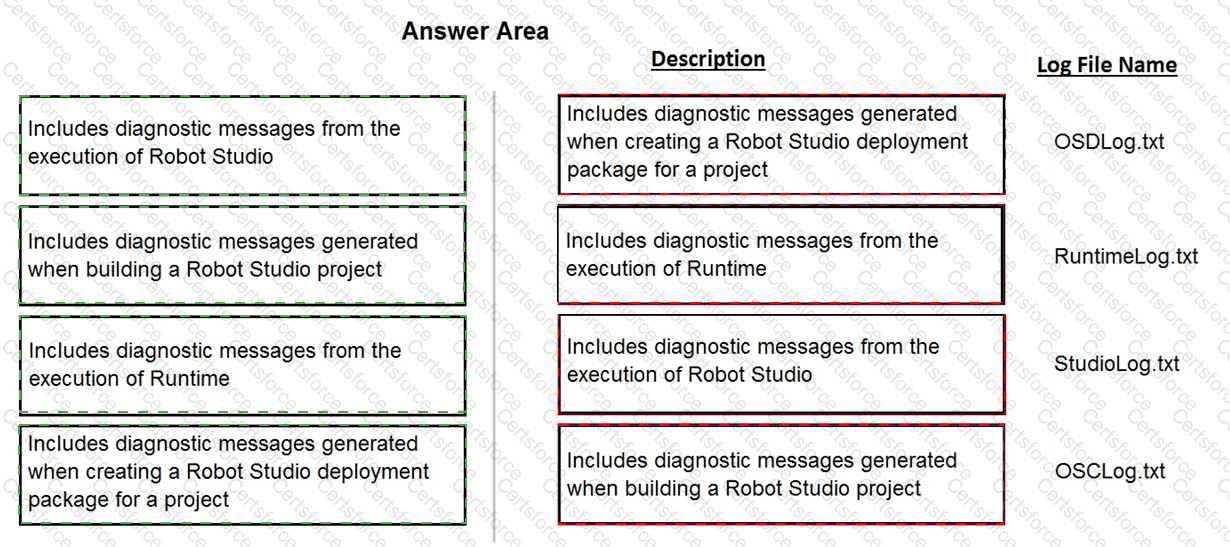
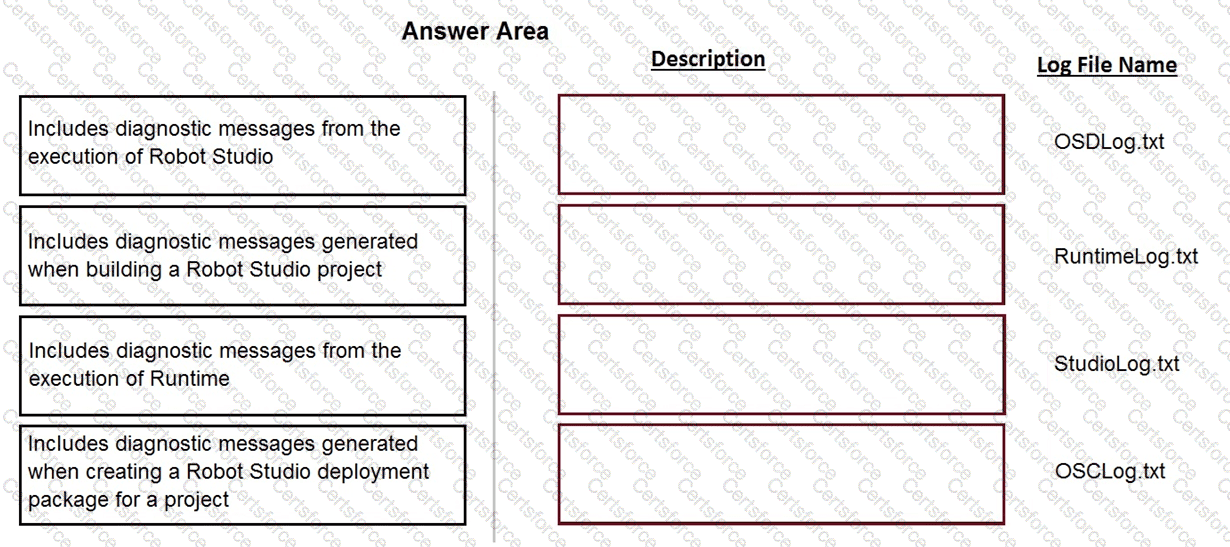
Pega Robot Studio produces several log files during the opening, building, debugging, and deployment of a solution.

In the Answer Area, drag the description of the log file on the left to its correct log file name.
Question # 27


Expert Solution
Questions # 28:

When performing application discovery, it is important that you __________________________ and __________________________ . (Choose two.)

Options:

A.

utilize test methods to validate that you can interact with representatives of the controls in the use case


B.

write automations to accomplish the basic search functionality of the application


C.

interrogate all controls required for the use case


D.

interrogate 100 percent of the controls in the application


Expert Solution
Questions # 29:

While interrogating a web application, you come across a hidden menu item: AddressType. The AddressType menu item activates when the pointer hovers over the control; the menu displays a drop-down list.

How do you interrogate this hidden drop-down list control?

Options:

A.

Access the Virtual Controls tab on the adapter tab.


B.

Choose HTML Table Editor from the Interrogation Form dialog box.


C.

Choose Select Element from the Interrogation Form dialog box.


D.

From the Web Controls tab, select the browser and frame, then select List Web controls.


Expert Solution
Questions # 30:

You are designing an automation that adds new customers to an online insurance web site. If a customer exists, a pop-up window is displayed with an error message, which closes automatically after 35 seconds.

While debugging the automation, you notice that you are receiving a control not created exception message in the Add Customer procedure after a page navigation occurs.

How do you resolve the exception?
Options:

A.

Add a missing created event in the Add Customer procedure.


B.

Ensure the waitForCreate timeout is longer than 35 seconds in the Add Customer procedure.


C.

Ensure the isCreated timeout is longer than 35 seconds in the Add Customer procedure.


D.

Add a missing waitForEvent.Exists method in the Add Customer procedure.


Expert Solution
Viewing page 3 out of 3 pages
Viewing questions 21-30 out of questions