Winter Sale Limited Time 65% Discount Offer - Ends in 0d 00h 00m 00s - Coupon code: pass65

Pass the Pegasystems PCRSA PEGACPRSA22V1 Questions and answers with CertsForce

Viewing page 1 out of 3 pages
Viewing questions 1-10 out of questions
Questions # 1:

While interrogating a web application, you discover a hidden menu item: AddressType. The AddressType menu item activates when the pointer hovers over the control, and the menu displays a drop-down list.

Which two options can you use to interrogate this hidden drop-down list control? (Choose Two)

Options:

A.

In the Interrogation Form dialog box, select HTML Table Editor.


B.

On the Web Controls tab, select the page, and then click List Web Controls.


C.

Use the Delay option on the Interrogation Form.


D.

On the Interrogation Form, select Select Element.


E.

On the Application tab, click the Virtual Controls tab.


Expert Solution
Questions # 2:

What is the scope of a const_msgID variable that you add to the project from the Toolbox tab of the Globals designer?

Options:

A.

A const_msgID variable has a global scope, which means that it is accessible from every automation of the project.


B.

A const_msgID variable has a local scope but you can change the scope by right-clicking and selecting Move to Globals.


C.

A const_msgID variable has a local scope, which means that it is accessible from the automation in which you created it.


D.

A const_msgID is a constant variable, which means that it has a local scope.


Expert Solution
Questions # 3:

You are developing a project for a financial company that implements a branding strategy for every application and webpage used by its customers. How do you ensure consistent formatting for all toast notifications in your project?

Options:

A.

In the Globals tab, expand the Utilities section of the Toolbox, select the Messages section and adjust the display settings in its property grid.


B.

In the project explorer, click the Information icon next to the project name, and adjust the toast notification settings in the project's property grid.


C.

Create an automation setting up the toast notification properties that runs automatically before proceeding to execute the project.


D.

Add a toast notification to the Globals tab and adjust the display settings in its property grid. To add a formatted toast notification to an automation, use a Show method from the Globals section of the Palette.


Expert Solution
Questions # 4:

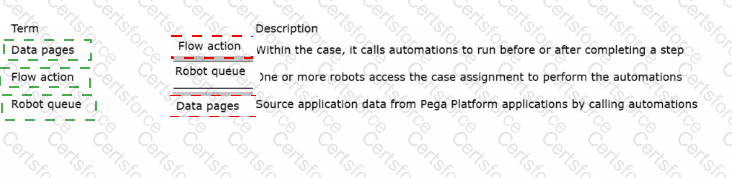
Match the term on the left with its description on the right.
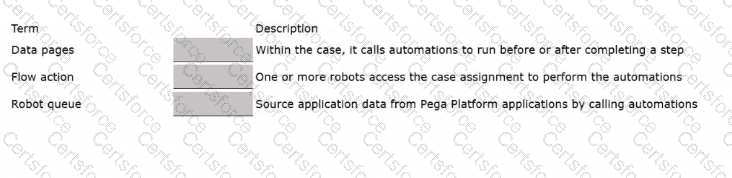
Question # 4


Expert Solution
Questions # 5:

Which step allows you to add a Watch to an automation variable?

Options:

A.

Right-click the execution link (yellow execution line) coming from the variable, and select Add Watch.


B.

Right-click the data link (blue propagate line) coming from the variable, and select Add Watch.


C.

Right-click the incoming/outgoing execution port (yellow dot) of the variable, and select Add Watch.


D.

Right-click the input/output data port (blue dot) of the variable, and select Add Watch.


Expert Solution
Questions # 6:

When evaluating business requirements and reviewing each application in a project, before you interrogate the application, what three actions do you perform during application discovery? (Choose Three)

Options:

A.

Verify the number of application instances accessed by the user simultaneously.


B.

Verify that the automation works as intended.


C.

Verify how the application opens outside of Pega Robot Studio.


D.

Verify the interactions between all applications in the project.


E.

Identify the technology on which the application is built (web, Windows, text).


F.

Verify the match rules on all interrogated controls.


Expert Solution
Questions # 7:

Which two of the following statements describe robotic automation assets? (Choose Two)

Options:

A.

The assets streamline the development process across an enterprise.


B.

The assets are customizable for robotic projects after developers download them into a robotic project.


C.

The assets ensure consistency of development across an enterprise and robotic projects.


D.

The assets increase the upload and download time for the developer who uses Pega Robot Studio.


Expert Solution
Questions # 8:

You must configure an application to store encrypted login credentials in the user's local profile. You also need to automate the login using the encrypted credentials. How do you fulfill this requirement without creating an automation?

Options:

A.

Create a robot activity that performs the application login.


B.

Set the necessary application credential properties before interrogating the target controls.


C.

Interrogate the target controls and set the necessary application credential properties.


D.

Interrogate the target controls and create a script to perform the login functionality.


Expert Solution
Questions # 9:

Which two statements about the Excel Connector are true? (Choose Two)

Options:

A.

Excel Connector allows you to work with data ranges.


B.

Excel Connector requires installation of Microsoft Office 2010 or later.


C.

You need to interrogate a workbook before using it with Excel Connector.


D.

You can modify and read from Excel workbooks using Pega Robot Studio without an Excel application being installed in the environment.


E.

Use the Excel Connector in scenarios where the user needs to interact with the workbook in Excel.


Expert Solution
Questions # 10:

The variable varInput is a String that holds the value What is the output?
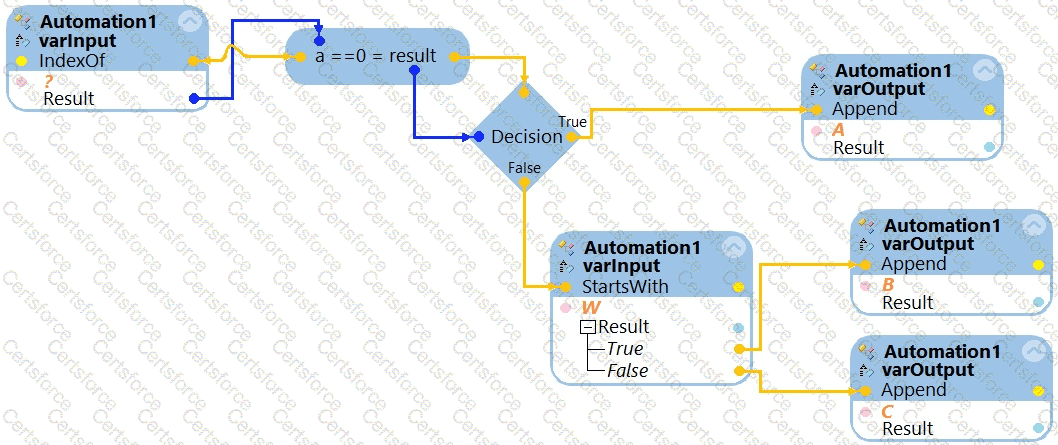
Question # 10

What is the outcome of the above automation?
Options:

A.

An exception is thrown.


B.

The variable varOutput ends with C.


C.

The variable varOutput ends with A.


D.

The variable varOutput ends with B.


Expert Solution
Viewing page 1 out of 3 pages
Viewing questions 1-10 out of questions