In OSPF, the election of a Designated Router (DR) and a Backup Designated Router (BDR) is mandatory on broadcast and non-broadcast multi-access (NBMA) network types to manage link-state database synchronization efficiently.
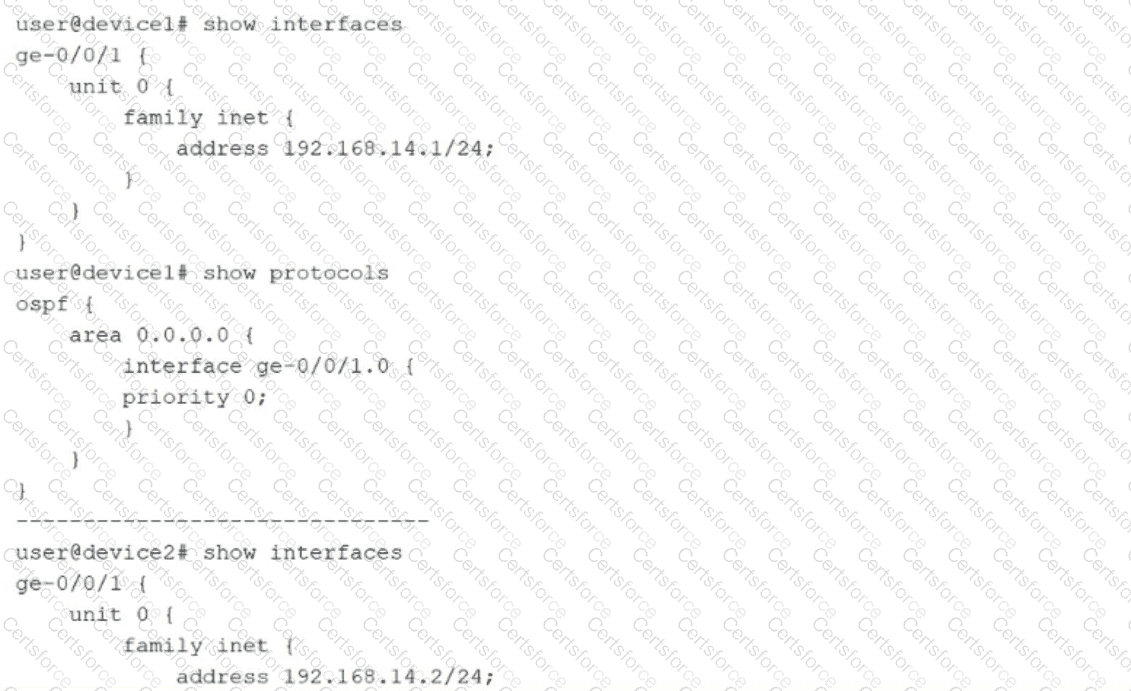
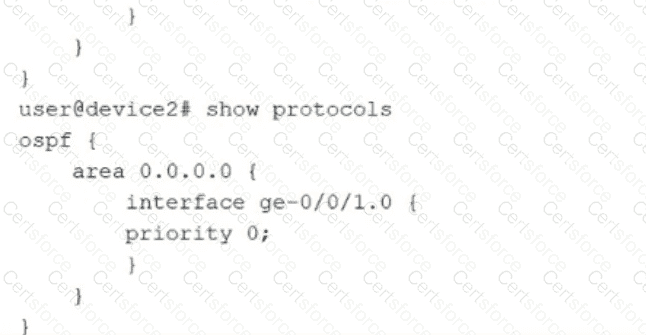
The exhibit shows that both device1 and device2 have their OSPF interface priority explicitly set to 0. According to the Junos OS 24.4 OSPF implementation:
Ineligibility (Priority 0): A router with a priority of 0 is strictly ineligible to be elected as a DR or BDR for that segment.
No Election Possible: When every router on a broadcast segment has a priority of 0, the election process cannot complete because there are no eligible candidates to fill the required roles.
State Behavior (Stuck in 2-Way): In OSPF adjacency formation, the 2-Way state indicates that bidirectional communication has been established (each router has seen itself in the other ' s Hello packets). However, to progress to the Exstart and Exchange states on a multi-access network, routers must first identify a DR and BDR.
Result: Since neither router can become the DR, they both wait indefinitely for a third party (with priority > 0) to take the lead. Consequently, the OSPF adjacency will be stuck in the 2-Way state. Adjacencies only reach the Full state with the DR and BDR; routers in a " DROther " role remain in 2-Way with each other.
Option A and D are incorrect because the router ID (IP address) only acts as a tiebreaker if priorities are equal and greater than 0. Option B is incorrect because routers cannot reach the Exstart state (where they negotiate master/slave for database exchange) without first having a DR/BDR elected.


Submit