A BIG-IP Administrator configures a Virtual Server to handle HTTPS traffic. Users report that the application is NOT working. Which additional configuration is required to resolve this issue?
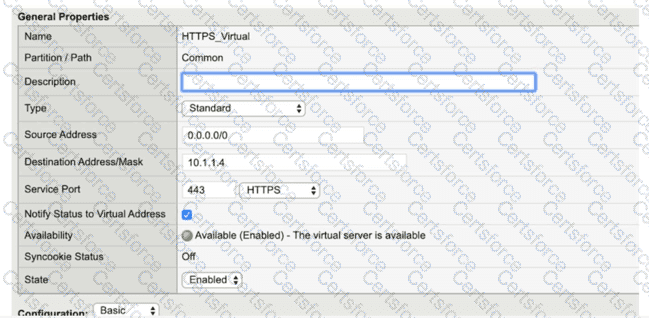
According to the provided exhibit, the " SSL Profile (Client) " section in the Virtual Server configuration is empty. For a BIG-IP system to process HTTPS traffic, it must act as an SSL/TLS endpoint. This process, known as SSL Termination or SSL Offload, requires the assignment of a Client SSL Profile to the Virtual Server. Without this profile, the BIG-IP does not have the necessary certificate and private key information to perform the SSL handshake with the client ' s browser. Consequently, when a user attempts to connect via HTTPS, the TCP connection may establish, but the SSL handshake will fail because the BIG-IP will not know how to decrypt the incoming encrypted packets.
A Client SSL profile defines the ciphers, certificates, and keys that the BIG-IP uses to communicate securely with the client. In a standard HTTPS deployment, the BIG-IP decrypts the traffic and can then send it to the backend pool members either as plain text (header insertion/manipulation) or re-encrypt it using a Server SSL profile. While a Server SSL profile (Option C) is needed if the backend servers themselves require HTTPS, the initial failure for a user reaching a Virtual Server is almost always the lack of a Client SSL profile to terminate the user ' s connection. Changing the Service Port to HTTP (Option D) would be incorrect because the goal is to handle HTTPS traffic (typically port 443). Assigning the " clientssl " or a custom client-side profile from the " Available " list to the " Selected " list in the GUI is the mandatory step to make the Virtual Server operational for secure web traffic.
Contribute your Thoughts:
Chosen Answer:
This is a voting comment (?). You can switch to a simple comment. It is better to Upvote an existing comment if you don't have anything to add.


Submit