You have a population of workers who have put multiple names in their Legal Name - First Name Workday delivered field. Your third-party vendor only accepts one-word first names. For workers that have included a middle name, the first and middle names are separated by a single space. You have been asked to implement the following logic:
* Extract the value before the single space from the Legal Name - First Name Workday delivered field.
* Count the number of characters in the extracted value.
* Identify if the number of characters is greater than.
* If the count of characters is greater than 0, use the extracted value. Otherwise, use the Legal Name - First Name Workday delivered field.
What functions are needed to achieve the end goal?
You are configuring an EIB that uses a custom report as its data source. When attempting to transfer ownership of the report to the Integration System User (ISU), the ISU does not appear as an option for new report owners. You confirm that the ISU already has the necessary access to the report data source and related fields.
Within the Custom Report Creation domain, which security configuration should you update to allow the ISU to appear as a valid report owner?
Refer to the following scenario to answer the question below.
You are configuring a filename sequence generator for a connector. Below are common pattern tokens for timestamps ranging from the year to the millisecond.
Define the sequence format using a combination of string constants and pattern tokens to create a unique identifier. Note the example tokens include the square brackets.
For the next sequence number: [Seq] or [seq]
Assume date of September 21, 2022, 12:35:59:123 PM. Some common tokens:
Year: [yyyy] = 2022, [yy] = 22
Month: [MMM] = Sep, [MM] = 09, [M] = 9
Day: [d] = 21, [E] = Wed, [D] = 265
Hours: [k] = 13, [h] = 1
Minutes: [m] = 35
Seconds: [s] = 59
Milliseconds: [S] = 123
What pattern will generate the hour minute second timestamp format of “4:35:15”?
When creating an ISU, what should you do to ensure the user only authenticates via web services?
You have been asked to create an integration using the Core Connector: Worker with DIS template. The vendor has requested that you only include employees who are based in the San Francisco area that are on leave.
How do you configure your integration so that only workers who meet the requirements are included in the output file?
Refer to the following scenario to answer the question below.
An external system needs a file containing data for recent worker job changes. They would like to receive a file routinely at 5 PM eastern standard time, every 48 hours. The file should show job changes since the last integration run.
What is the run frequency of the integration schedule?
What is the purpose of the < xsl:template > element?
What is the workflow to upload an XSLT file for a brand new Document Transformation system?
You are configuring the Core Connector: Location to send location data to a new global facilities management system. You must meet three specific requirements:
Task A: The facilities system requires that in addition to the default public address, the private address should also be included.
Task B: The facilities system uses the status codes “A” for Active and “I” for Inactive. You need to translate Workday’s “Active” and “Inactive” values from the Location Status field.
Task C: The facilities system requires a “Building Manager” value. You have already built a Calculated Field that retrieves the Facilities Manager role for each location, and you need to send this data in the integration.
How do you configure these tasks in the integration system?
Refer to the following XML to answer the question below.
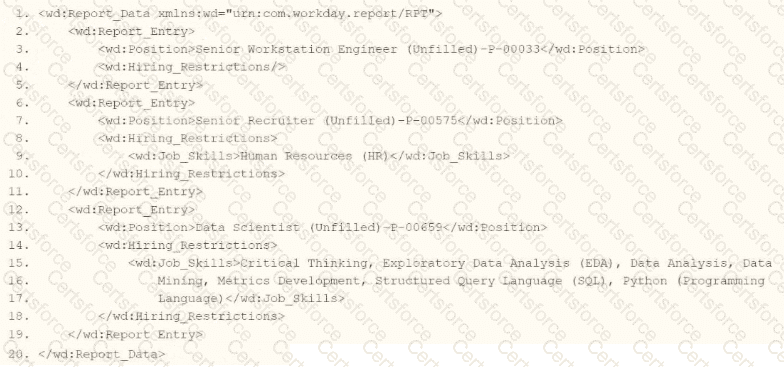
You are an integration developer and need to write X8LT to transform the output of an ElB which is using a web service enabled report to output position data along with hiring restrictions around skills. You currently have a template which matches on wd:Report Data/wd: Report .Entry for creating a record from each report entry.
Within the template which matches on wd:Report_Entry you would like to conditionally process the wd:Job_Skills element by using a series of < xsl:if > elements so as to categorize the job skills data.
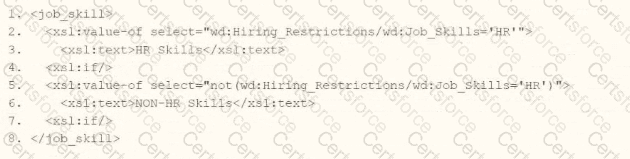
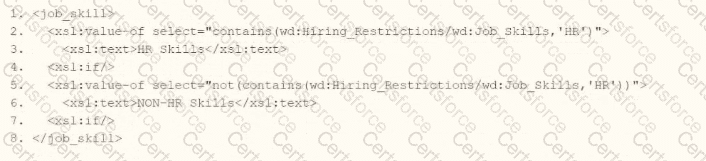
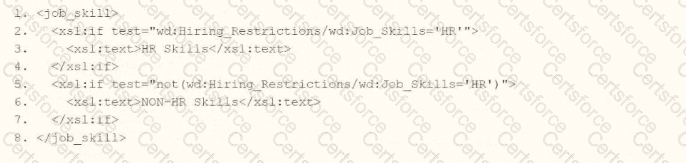
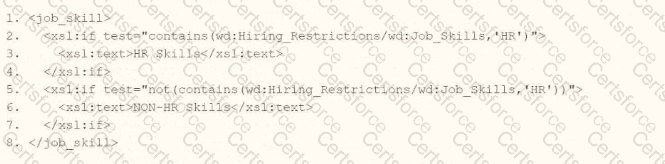
Assuming all jobs will have the wd:Job_Skills element, what XSLT syntax would be used to output the text HR Skills if the value of wd:Job_Skills contains the text HR and output NON-HR Skills if the value of wd:Job_Skills does not contain the text HR?