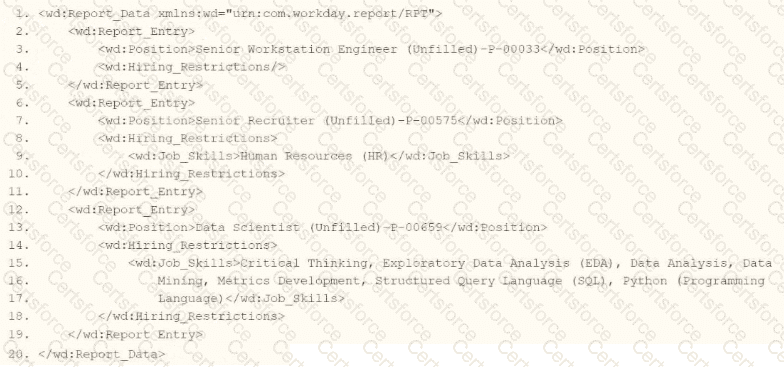
The task is to write XSLT within a template matching wd:Report_Data/wd:Report_Entry to categorize wd:Job_Skills data, outputting " HR Skills " if the value contains " HR " and " NON-HR Skills " if it does not, using a series of < xsl:if > elements. The correct syntax must use the contains() function to check for the substring " HR " within wd:Job_Skills, as the question implies partial matching (e.g., " HR Specialist " or " Senior HR " ), not exact equality.
Let’s analyze each option:
xml
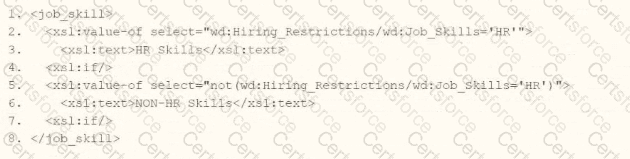
< job_skill >
< xsl:value-of select= " wd:Hiring_Restrictions/wd:Job_Skills= ' HR ' " >
< xsl:text > HR Skills < /xsl:text >
< xsl:if/ >
< xsl:value-of select= " not(wd:Hiring_Restrictions/wd:Job_Skills= ' HR ' ) " >
< xsl:text > NON-HR Skills < /xsl:text >
< xsl:if/ >
< /job_skill >
xml
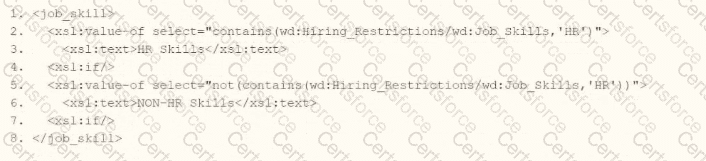
< job_skill >
< xsl:value-of select= " contains(wd:Hiring_Restrictions/wd:Job_Skills, ' HR ' ) " >
< xsl:text > HR Skills < /xsl:text >
< xsl:if/ >
< xsl:value-of select= " not(contains(wd:Hiring_Restrictions/wd:Job_Skills, ' HR ' )) " >
< xsl:text > NON-HR Skills < /xsl:text >
< xsl:if/ >
< /job_skill >
xml
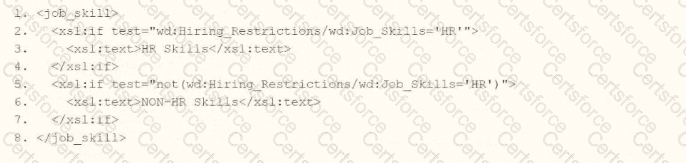
< job_skill >
< xsl:if test= " wd:Hiring_Restrictions/wd:Job_Skills= ' HR ' " >
< xsl:text > HR Skills < /xsl:text >
< /xsl:if >
< xsl:if test= " not(wd:Hiring_Restrictions/wd:Job_Skills= ' HR ' ) " >
< xsl:text > NON-HR Skills < /xsl:text >
< /xsl:if >
< /job_skill >
xml
< job_skill >
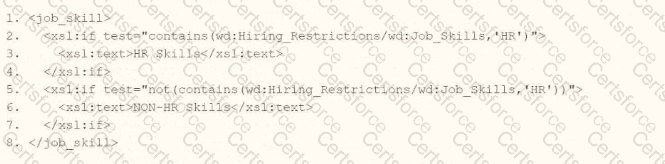
< xsl:if test= " contains(wd:Hiring_Restrictions/wd:Job_Skills, ' HR ' ) " >
< xsl:text > HR Skills < /xsl:text >
< /xsl:if >
< xsl:if test= " not(contains(wd:Hiring_Restrictions/wd:Job_Skills, ' HR ' )) " >
< xsl:text > NON-HR Skills < /xsl:text >
< /xsl:if >
< /job_skill >
Correct Implementation in Context:
xml
< xsl:template match= " wd:Report_Data/wd:Report_Entry " >
< job_skill >
< xsl:if test= " contains(wd:Hiring_Restrictions/wd:Job_Skills, ' HR ' ) " >
< xsl:text > HR Skills < /xsl:text >
< /xsl:if >
< xsl:if test= " not(contains(wd:Hiring_Restrictions/wd:Job_Skills, ' HR ' )) " >
< xsl:text > NON-HR Skills < /xsl:text >
< /xsl:if >
< /job_skill >
< /xsl:template >
Example Input: < wd:Job_Skills > Senior HR Analyst < /wd:Job_Skills > → Output: < job_skill > HR Skills < /job_skill >
Example Input: < wd:Job_Skills > IT Specialist < /wd:Job_Skills > → Output: < job_skill > NON-HR Skills < /job_skill >
Workday Pro Integrations Study Guide: " Configure Integration System - TRANSFORMATION " section, detailing < xsl:if > and contains() for conditional XSLT logic in Workday.
Workday Documentation: " XSLT Transformations in Workday " under EIB, confirming wd: namespace usage and string functions.
W3C XSLT 1.0 Specification: Section 9.1, " Conditional Processing with < xsl:if > , " and Section 11.2, " String Functions " (contains()).
Workday Community: Examples of substring-based conditionals in XSLT for report transformations.


Submit