How does the FortiSASE security dashboard facilitate vulnerability management for FortiClient endpoints? (Choose one answer)
It automatically patches all vulnerabilities without user intervention and does not categorize vulnerabilities by severity.
It shows vulnerabilities only for applications and requires endpoint users to manually check for affected endpoints.
It displays only critical vulnerabilities, requires manual patching for all endpoints, and does not allow viewing of affected endpoints.
It provides a vulnerability summary, identifies affected endpoints, and supports automatic patching for eligible vulnerabilities.
According to theFortiSASE 7.6 Administration Guideand theFCP - FortiSASE 24/25 Administratortraining materials, the security dashboard is a centralized hub for monitoring and remediating security risks across the entire fleet of managed endpoints.
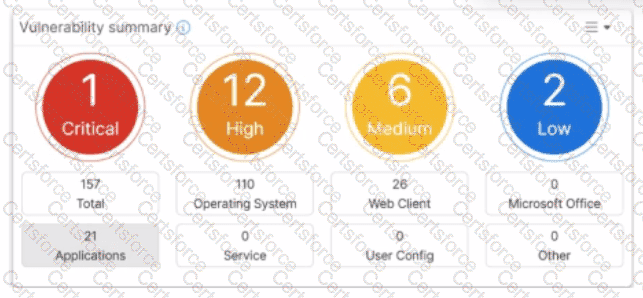
Vulnerability Summary: The dashboard includes a dedicatedVulnerability summary widgetthat categorizes risks by severity (Critical, High, Medium, Low) and by application type (OS, Web Client, etc.).
Identifying Affected Endpoints: The dashboard is fully interactive; an administrator candrill downinto specific vulnerability categories to view a detailed list ofCVE dataand, most importantly, identify the specificaffected endpointsthat require attention.
Automatic Patching: FortiSASE supportsautomatic patching for eligible vulnerabilities(such as common third-party applications and supported OS updates). This feature is configured within theEndpoint Profile, allowing the FortiClient agent to remediate risks without requiring the user to manually run updates.
Why other options are incorrect:
Option A: While it supports automatic patching, it does not do so forallvulnerabilities (only eligible/supported ones), and it specificallydoescategorize them by severity.
Option B: The dashboard shows vulnerabilities for theOperating Systemas well as applications, and it allows theadministratorto identify affected endpoints rather than requiring the end-user to check.
Option C: The dashboard displaysall levels of severity(not just critical) and explicitly allows the viewing of affected endpoints.
What is the purpose of the on/off-net rule setting in FortiSASE?
To enable or disable user authentication for external network access.
To define different traffic routing rules for on-premises and cloud-based resources.
To determine if an endpoint is connecting from a trusted network or untrusted location.
To configure different access policies for users based on their geographical location.
According to theFortiSASE 24.4 Administration Guideand theFortiSASE Core Administratortraining materials, theOn-net detectionrule setting is a critical component for determining the "trust status" of an endpoint's physical location.
Endpoint Location Verification: On-net rule sets are used to determine if FortiSASE considers an endpoint to beon-net(trusted) oroff-net(untrusted). An endpoint is considered on-net when it is physically located within the corporate network, which is assumed to already have on-premises security measures (like a FortiGate NGFW).
Operational Impact: When an endpoint is detected as on-net, FortiSASE can be configured toexemptthe endpoint from automatically establishing a VPN tunnel to the SASE cloud. This optimization prevents redundant security inspection and conserves SASE bandwidth since the user is already protected by the local corporate firewall.
Detection Methods: To classify an endpoint as on-net, administrators configure rule sets that look for specific environmental markers, such as:
Known Public (WAN) IP: If the endpoint's public IP matches the corporate headquarters' egress IP.
DHCP Server: If the endpoint receives an IP from a specific corporate DHCP server.
DNS Server/Subnet: Matching internal DNS infrastructure or specific internal IP ranges.
Dynamic Policy Application: By accurately determining if an endpoint is on or off-net, FortiSASE ensures that theFortiClientagent only initiates its secure internet access (SIA) tunnel when the user is in an untrusted location (e.g., a home network or public Wi-Fi).
Why other options are incorrect:
Option A: User authentication is a separate process and is not controlled by the on/off-net detection rules, which focus on the network environment rather than user credentials.
Option B: While on-net status affectshowtraffic is routed (VPN vs. local), these rules specificallydetermine the statusitself rather than defining the routing tables for private vs. cloud resources.
Option D: Geographical location (Geo-location) is a different filtering criterion often used in firewall policies; on-net detection is specifically about the proximity to the trusted corporate perimeter.
Which statement about security posture tags in FortiSASE is correct?
Multiple tags can be assigned to an endpoint, but only one is used for evaluation.
Multiple tags can be assigned to an endpoint and used for evaluation.
Tags are static and do not change with endpoint status.
Only one tag can be assigned to an endpoint.
According to theFortiSASE 7.6 Administration GuideandFCP - FortiSASE 24/25 Administratorcurriculum, security posture tags (often referred to as ZTNA tags) are the fundamental building blocks for identity-based and posture-based access control.
Multiple Tag Assignment: A single endpoint can be assigned multiple tags at the same time. For example, an endpoint might simultaneously have the tags"OS-Windows-11","AV-Running", and"Corporate-Domain-Joined".
Evaluation Logic: During the policy evaluation process (for both SIA and SPA), FortiSASE or the FortiGate hub considers all tags assigned to the endpoint. Security policies can be configured to use these tags as source criteria. If an administrator defines a policy that requires both "AV-Running" and "Corporate-Domain-Joined," the system evaluates both tags to decide whether to permit the traffic.
Dynamic Nature: Contrary to Option C, these tags are highly dynamic. They are automatically applied or removed in real-time based on the telemetry data sent by theFortiClientto the SASE cloud. If a user disables their antivirus, the "AV-Running" tag is removed immediately, and the endpoint's access is revoked by the next policy evaluation.
Scalability: While the system supports many tags, documentation recommends a baseline of custom tags for optimal performance, though it confirms that multiple tags are standard for reflecting a comprehensive security posture.
Why other options are incorrect:
Option A: This is incorrect because the system does not pick just one tag; it evaluates the collection of tags against the policy's requirements (e.g., matching any or matching all).
Option C: This is incorrect because tags are dynamic and change as soon as the endpoint's status (like vulnerability count or software presence) changes.
Option D: This is incorrect because the architectural advantage of ZTNA is the ability to layer multiple security "checks" (tags) for a single user.
You have configured the performance SLA with the probe mode as Prefer Passive.
What are two observable impacts of this configuration? (Choose two.)
FortiGate can offload the traffic that is subject to passive monitoring to hardware.
FortiGate passively monitors the member if ICMP traffic is passing through the member.
During passive monitoring, the SLA performance rule cannot detect dead members.
After FortiGate switches to active mode, the SLA performance rule falls back to passive monitoring after 3 minutes.
FortiGate passively monitors the member if TCP traffic is passing through the member.
In theSD-WAN 7.6 Core Administratorcurriculum, the "Prefer Passive" probe mode is a hybrid monitoring strategy designed to minimize the overhead of synthetic traffic (probes) while maintaining link health visibility. According to theFortiOS 7.6 Administration Guideand theSD-WAN Study Guide, the behavior and impacts are as follows:
TCP Traffic Requirement (Option E):Passive monitoring relies on the FortiGate’s ability to inspect actual user traffic to calculate health metrics such as Latency, Jitter, and Packet Loss. Specifically, it usesTCP traffic(by analyzing TCP sequence numbers and timestamps to calculate Round Trip Time - RTT). If user traffic is flowing through the member interface, the FortiGate uses those real-world sessions for SLA calculations instead of sending its own probes.
Inability to Detect Dead Members (Option C):A significant limitation of passive monitoring is that it cannot distinguish between a "dead" link and an "idle" link. If there is no traffic, the passive monitor has no data to analyze. Consequently, while in passive mode, the SD-WAN enginecannot detect a dead member. To mitigate this, "Prefer Passive" includes a fail-safe: if no traffic is detected for a specific period (typically3 minutes), the FortiGate will automatically switch toActive mode(sending ICMP/TCP pings) to verify if the link is actually alive.
Why other options are incorrect:
Option A:Passive monitoring generallydisables hardware offloading (ASIC)for the monitored traffic. This is because the CPU must inspect every packet header to calculate performance metrics; if the traffic were offloaded to the Network Processor (NP), the CPU would not see the packets, rendering passive monitoring impossible.
Option B:While active probes often use ICMP,passive monitoringis specifically designed forTCP trafficbecause the TCP protocol's ACK structure allows for accurate RTT and loss calculation without synthetic packets.
Option D:The "3-minute" timer is actually the trigger to switchfrom passive to activewhen traffic is absent, not the fallback timer to return to passive. The fallback to passive happens as soon as valid TCP traffic is detected again.
According to theFortiSASE 7.6 Administration Guideand theFCP - FortiSASE 24/25 Administratorstudy materials, FortiSASE supports three primary external (remote) authentication sources to verify the identity of remote users (SIA and SPA users). These sources allow organizations to leverage their existing identity infrastructure for seamless onboarding and policy enforcement:
Security Assertion Markup Language (SAML) (Option A):This is the most common and recommended method for modern SASE deployments. FortiSASE acts as aSAML Service Provider (SP)and integrates withIdentity Providers (IdP)such as Microsoft Entra ID (formerly Azure AD), Okta, or FortiAuthenticator. This enables Single Sign-On (SSO) and Multi-Factor Authentication (MFA).
Lightweight Directory Access Protocol (LDAP) (Option C):FortiSASE can connect to on-premises or cloud-based LDAP servers (such as Windows Active Directory). This allows the administrator to map existing AD groups to FortiSASE user groups for granular security policy application.
Remote Authentication Dial-in User Service (RADIUS) (Option E):RADIUS is supported for organizations that use centralized authentication servers or traditional MFA solutions (like RSA SecurID). FortiSASE can query a RADIUS server to validate user credentials before granting access to the SASE tunnel.
Why other options are incorrect:
OpenID Connect (OIDC) (Option B):While OIDC is a modern authentication protocol similar to SAML, FortiSASE's primary integration for external Identity Providers is currently standardized onSAML 2.0.
TACACS+ (Option D):Terminal Access Controller Access-Control System Plus is primarily used foradministrative access(AAA) to network devices (like logging into a FortiGate CLI or FortiManager). It is not used for end-user VPN or SASE authentication in the Fortinet ecosystem.
Which two delivery methods are used for installing FortiClient on a user's laptop? (Choose two.)
Use zero-touch installation through a third-party application store.
Download the installer directly from the FortiSASE portal.
Send an invitation email to selected users containing links to FortiClient installers.
Configure automatic installation through an API to the user's laptop.
TheFortiSASE 7.6 Administration Guideoutlines the standard onboarding procedures for deploying theFortiClientagent to remote endpoints. There are two primary user-facing delivery methods:
Download from the FortiSASE portal (Option B):Administrators can provide users with access to the FortiSASE portal where they can directly download apre-configured installer. This installer is uniquely tied to the organization’s SASE instance, ensuring the client automatically registers to the correct cloud EMS upon installation.
Invitation Email (Option C):This is the most common administrative method. The FortiSASE portal (via its integrated EMS) allows administrators to send an invitation email to specific users or groups. This email contains direct download links for various operating systems (Windows, macOS, Linux) and the necessary invitation code for zero-touch registration.
Why other options are incorrect:
Option A:While third-party stores (like the App Store or Google Play) are used for mobile devices, "zero-touch installation through a third-party store" is not the standard curriculum-defined method forlaptops(Windows/macOS) in a SASE environment.
Option D:FortiSASE does not use a direct "API to the user's laptop" for automatic installation. While MDM/GPO (centralized deployment) is supported, it is not described as an API-based auto-installation in the core curriculum.
Which statement is true about FortiSASE supported deployment?
FortiSASE supports VPN mode and Agentless mode, based on user requirements.
FortiSASE supports both Endpoint mode and SWG mode, depending on deployment.
FortiSASE operates only in SWG mode, where all traffic is forced through FortiSASE POPs.
FortiSASE relies on ZTNA-only mode, which replaces SWG and endpoint functions.
According to theFortiSASE 7.6 Administration Guideand theFCP - FortiSASE 24/25 Administratorcurriculum, FortiSASE is designed with a hybrid deployment architecture to support various user and device requirements. It primarily operates in two modes:
Endpoint Mode (Agent-based): This mode requires the installation ofFortiClienton the user's laptop or device. The agent establishes an "always-up" secure VPN tunnel to the nearest FortiSASE Point of Presence (PoP), providing full Secure Internet Access (SIA), Secure Private Access (SPA), and endpoint posture checks (ZTNA).
Secure Web Gateway (SWG) Mode (Agentless): This mode is used for users or devices where installing an agent is not feasible (e.g., unmanaged devices or Chromebooks). It relies on explicit web proxy settings or a PAC (Proxy Auto-Configuration) file to redirect web traffic (HTTP/HTTPS) to the SASE PoP for inspection.
Why other options are incorrect:
Option A: While it supports VPN, "VPN mode" is not the formal name of the deployment type; it is "Endpoint mode".
Option C: FortiSASE is not limited to SWG; it is a full SSE (Security Service Edge) solution including FWaaS and ZTNA.
Option D: ZTNA is a capability within the platform, not a replacement for the overall endpoint or SWG functions.
How is the Geofencing feature used in FortiSASE? (Choose one answer)
To allow or block remote user connections to FortiSASE POPs from specific countries.
To restrict access to applications based on the time of day in specific countries.
To encrypt data at rest on mobile devices in specific countries.
To monitor user behavior on websites and block non-work-related content from specific countries
According to theFortiSASE 7.6 Administration Guideand theFCP - FortiSASE 24/25 Administratorstudy materials, theGeofencingfeature is a security measure implemented at the edge of the FortiSASE cloud to control ingress connectivity based on the physical location of the user.
Access Control by Location (Option A): Geofencing allows administrators toallow or block remote user connectionsto the FortiSASE Points of Presence (PoPs) based on the source country, region, or specific network infrastructure (e.g., AWS, Azure, GCP).
Scope of Application: This feature is universal across all SASE connectivity methods. It applies toAgent-based users(FortiClient),Agentless users(SWG/PAC file), andEdge devices(FortiExtender/FortiAP). If a user attempts to connect from a blacklisted country, the connection is dropped at the PoP level before the user can even attempt to authenticate.
Use Case Example: An organization operating exclusively in North America might configure geofencing toblock all connections originating from outside the US and Canada. This significantly reduces the attack surface by preventing brute-force or unauthorized access attempts from high-risk regions or countries where the organization has no legitimate employees.
Configuration Path: In the FortiSASE portal, this is managed underConfiguration > Geofencing. From there, administrators can create an "Allow" or "Deny" list and select the relevant countries from a standardized global database.
Why other options are incorrect:
Option B: While FortiSASE supportsTime-based schedulesfor firewall policies, geofencing is specifically an IP-to-Geography mapping tool for connection admission, not a time-of-day restriction tool.
Option C: Encryption of data at rest on mobile devices is a function of anMDM (Mobile Device Management)solution or local OS features (like FileVault or BitLocker), not a SASE network geofencing feature.
Option D: Monitoring web behavior and blocking non-work content is the role of theWeb FilterandApplication Controlprofiles, which operate on the trafficafterthe connection is allowed by geofencing.
Refer to the exhibits.

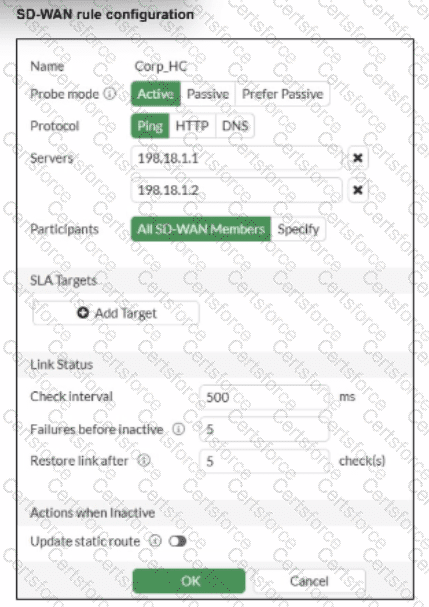
Two SD-WAN event logs, the member status, the SD-WAN rule configuration, and the health-check configuration for a FortiGate device are shown. Immediately after the log messages are displayed, how will the FortiGate steer the traffic based on the information shown in the exhibits? (Choose one answer)
FortiGate uses port1 or port2 to steer the traffic for SD-WAN rule ID 1.
FortiGate uses port1 to steer the traffic for SD-WAN rule ID 1.
FortiGate uses port2 to steer the traffic for SD-WAN rule ID 1.
FortiGate skips SD-WAN rule ID 1.
According to the SD-WAN 7.6 Core Administrator curriculum and the provided exhibits, the traffic steering decision is determined by the interaction between the Lowest Cost (SLA) strategy and the link health status reported in the event logs.
Rule Strategy (Lowest Cost SLA): The SD-WAN rule configuration for ID 1 (named Critical-DIA) is set to mode sla. In this mode, the FortiGate will only steer traffic through member interfaces that satisfy the assigned Performance SLA targets.
Member Preference: The rule defines priority-members 1 2. This means that under normal conditions (where both links are healthy), Member 1 (port1) is the preferred interface because it is listed first.
Event Log Analysis:
The first log message explicitly states: "Member status changed. Member out-of-sla." for Member 1. This indicates that port1 has exceeded one of the thresholds (latency, jitter, or packet loss) defined in the Corp_HC health check.
The second log confirms: "Number of pass member changed. New Value: 1, Old Value: 2". This verifies that while there were previously two links passing the SLA, now only one link (Member 2/port2) remains in a passing state.
Steering Decision: Because the rule strategy is mode sla and the primary preferred member (port1) is now out-of-sla, the FortiGate immediately disqualifies Member 1 from the selection pool for this specific rule. It then moves to the next available member in the priority list that does satisfy the SLA, which is Member 2 (port2).
Why other options are incorrect:
Option A: FortiGate will not load balance or choose between both links because port1 is currently ineligible due to the SLA failure.
Option B: Steering to port1 would violate the "Lowest Cost (SLA)" rule logic, as that link is no longer meeting the required health standards.
Option D: FortiGate does not "skip" the rule unless no members meet the SLA and there is no fallback configured; in this scenario, port2 is still passing and available.
Refer to the exhibit.

Which two statements about the Vulnerability summary dashboard in FortiSASE are correct? (Choose two.)
The dashboard shows the vulnerability score for unknown applications.
Vulnerability scan is disabled in the endpoint profile.
The dashboard allows the administrator to drill down and view CVE data and severity classifications.
Automatic vulnerability patching can be enabled for supported applications.
Based on theFortiSASE 7.6 (and later 2025 versions)curriculum and administration guides, the Vulnerability summary dashboard is a key component of the endpoint security posture management.
Drill Down Capability (Option C): According to theFortiSASE Administration Guide, the Vulnerability summary widget on the Security dashboard is interactive. An administrator can click on specific risk categories (e.g., Critical, High) or application types (e.g., Operating System, Web Client) todrill down. This action opens a detailed pane showing the specific affected endpoints, associatedCVE identifiers, and severity classifications based on the CVSS standard.
Automatic Vulnerability Patching (Option D): In theFortiSASE 7.6/2025feature sets, the endpoint profile configuration (underEndpoint > Configuration > Profiles) includes an "Automatic Patching" section. This feature allows the system to automatically install security updates for supported third-party applications and the underlying operating system (Windows/macOS) when vulnerabilities are detected. Furthermore, administrators can schedule these patches directly from theVulnerability Summarywidget by selecting specific vulnerabilities.
Why other options are incorrect:
Option A: The dashboard categories (Operating System, Web Client, Microsoft Office, etc.) are based on known software signatures. While there is an "Other" category, the dashboard primarily provides scores for recognized applications where CVE data is available.
Option B: The exhibit shows active data (157 total vulnerabilities), which indicates that thevulnerability scan is enabledand currently reporting data from the endpoints. If it were disabled, the widget would be empty or show zeros.
Which two statements about configuring a steering bypass destination in FortiSASE are correct? (Choose two.)
Subnet is the only destination type that supports the Apply condition
Apply condition allows split tunneling destinations to ae applied to On-net. off-net. or both types of endpoints
You can select from four destination types: Infrastructure, FQDN, Local Application, or Subnet
Apply condition can be set only to On-net or Off-net. but not both
According to theFortiSASE 7.6 Feature Administration Guide, steering bypass destinations (also known as split tunneling) allow administrators to optimize bandwidth by redirecting specific trusted traffic away from the SASE tunnel to the endpoint's local physical interface.
Destination Types (Option C): When creating a bypass destination, administrators can select from four distinct types:Infrastructure(pre-defined apps like Zoom/O365),FQDN(specific domains),Local Application(identifying processes on the laptop), orSubnet(specific IP ranges).
Apply Condition (Option B): The "Apply" condition is a flexible setting that allows the administrator to choose when the bypass is active. It can be applied to endpoints that areOn-net(inside the office),Off-net(remote), orBoth. This ensures that if a user is in the office, they don't use the SASE tunnel for local resources, but if they are home, they might still bypass high-bandwidth sites like YouTube to preserve tunnel capacity.
Why other options are incorrect:
Option A: Subnet is one of four types and is not the only type supporting these conditions.
Option D: The system explicitly supports "Both" to ensure consistency across network transitions.