According to the SD-WAN 7.6 Core Administrator curriculum and the provided exhibits, the traffic steering decision is determined by the interaction between the Lowest Cost (SLA) strategy and the link health status reported in the event logs.
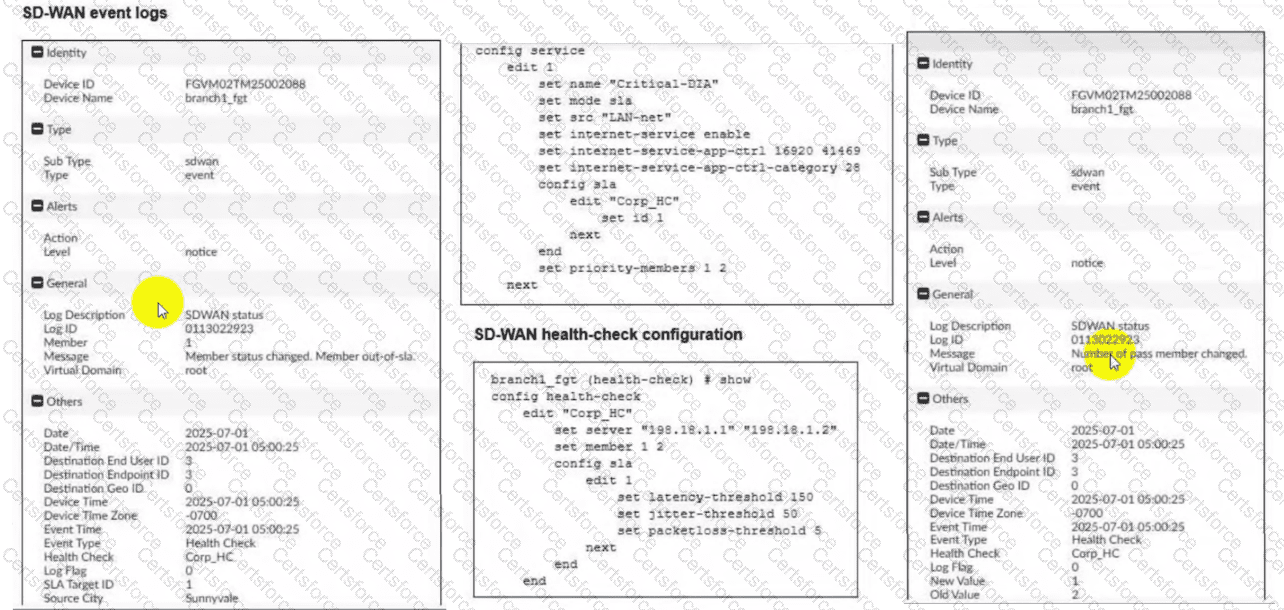
Rule Strategy (Lowest Cost SLA): The SD-WAN rule configuration for ID 1 (named Critical-DIA) is set to mode sla. In this mode, the FortiGate will only steer traffic through member interfaces that satisfy the assigned Performance SLA targets.
Member Preference: The rule defines priority-members 1 2. This means that under normal conditions (where both links are healthy), Member 1 (port1) is the preferred interface because it is listed first.
Event Log Analysis:
The first log message explicitly states: "Member status changed. Member out-of-sla." for Member 1. This indicates that port1 has exceeded one of the thresholds (latency, jitter, or packet loss) defined in the Corp_HC health check.
The second log confirms: "Number of pass member changed. New Value: 1, Old Value: 2". This verifies that while there were previously two links passing the SLA, now only one link (Member 2/port2) remains in a passing state.
Steering Decision: Because the rule strategy is mode sla and the primary preferred member (port1) is now out-of-sla, the FortiGate immediately disqualifies Member 1 from the selection pool for this specific rule. It then moves to the next available member in the priority list that does satisfy the SLA, which is Member 2 (port2).
Why other options are incorrect:
Option A: FortiGate will not load balance or choose between both links because port1 is currently ineligible due to the SLA failure.
Option B: Steering to port1 would violate the "Lowest Cost (SLA)" rule logic, as that link is no longer meeting the required health standards.
Option D: FortiGate does not "skip" the rule unless no members meet the SLA and there is no fallback configured; in this scenario, port2 is still passing and available.


Submit