According to the SD-WAN 7.6 Core Administrator study guide and FortiOS 7.6 Administration Guide, no configuration change is required to simply measure jitter.
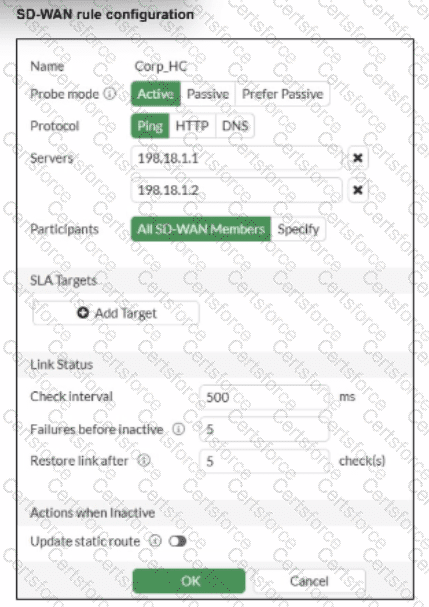
Implicit Measurement: In FortiOS, once a Performance SLA (Health Check) is configured with an Active probe mode (as seen in the exhibit with Ping selected), the FortiGate automatically begins calculating three key quality metrics for every member interface: Latency, Jitter, and Packet Loss.
Visibility: Even without an SLA Target defined, these real-time measurements are visible in the SD-WAN Monitor and via the CLI command diagnose sys virtual-wan-link health-check < SLA_Name > .
Active Probes: Because the probe mode is set to Active using the Ping protocol, the FortiGate sends synthetic packets at the defined Check interval (500ms in the exhibit). It calculates jitter by measuring the variation in the round-trip time (RTT) between these consecutive probes.
Why other options are incorrect:
Option B: Adding an SLA target and defining a jitter threshold is only necessary if you want the SD-WAN engine to make steering decisions based on that metric (e.g., " remove this link from the pool if jitter exceeds 50ms " ). It is not required just to measure the jitter.
Option C: While you can specify participants, the current setting is " All SD-WAN Members, " which means it is already measuring jitter for every member.
Option D: HTTP is an alternative probe protocol, but Ping (ICMP) is perfectly capable of measuring jitter and is often preferred for its lower overhead.


Submit