Summer Certification Special Limited Time 70% Discount Offer - Ends in 0d 00h 00m 00s - Coupon code: force70

Pass the Fortinet Fortinet Certified Solution Specialist FCSS_NST_SE-7.6 Questions and answers with CertsForce

Viewing page 1 out of 4 pages
Viewing questions 1-10 out of questions
Questions # 1:

Refer to the exhibit.

Question # 1

The output from a collector agent log is shown. The collector agent is showing the status of a workstation as Not Verified . What are two common causes for this message? (Choose two.)

Options:

A.

The workstation has come out of hibernate mode.


B.

The workstation remote registry service is not running.


C.

Traffic to ports 139 and 445 is blocked.


D.

DNS cannot resolve the workstation name.


Expert Solution
Questions # 2:

Refer to the exhibit, which shows the output of a diagnose command.
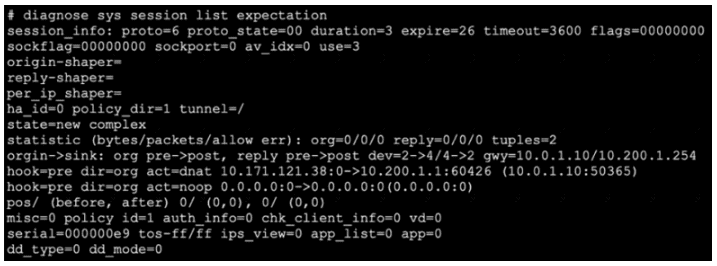
Question # 2

What two conclusions can you draw from the output shown in the exhibit? (Choose two answers)

Options:

A.

This is an expected session created by the IPS engine.


B.

Traffic in the original direction (coming from the IP address 10.171.121.38) will be routed to the next-hop IP address 10.0.1.10.


C.

Traffic in the original direction (coming from the IP address 10.171.121.38) will be routed to the next-hop IP address 10.200.1.1.


D.

This is a pinhole session created to allow traffic for a protocol that requires additional sessions to operate through FortiGate.


Expert Solution
Questions # 3:

Which two statements are true regarding heartbeat messages sent from an FSSO collector agent to FortiGate? (Choose two.)

Options:

A.

The heartbeat messages can be seen using the command diagnose debug authd fsso list.


B.

The heartbeat messages can be seen in the collector agent logs.


C.

The heartbeat messages can be seen on FortiGate using the real-lime FSSO debug.


D.

The heartbeat messages must be manually enabled on FortiGate.


Expert Solution
Questions # 4:

Refer to the exhibits, which contain the partial configurations of two VPNs on FortiGate.
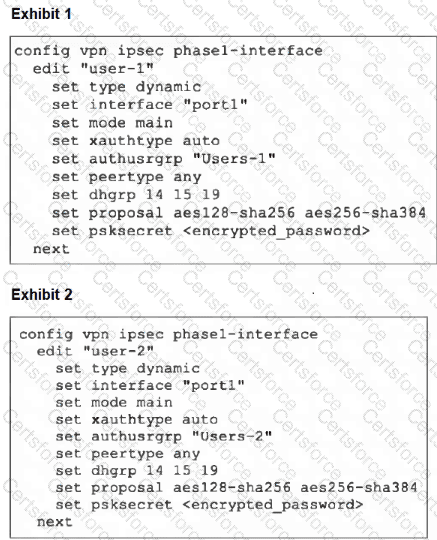
Question # 4

An administrator has configured two VPNs for two different user groups. Users who are in the Users-2 group are not able to connect to the VPN. After running a diagnostics command, the administrator discovers that FortiGate is not matching the user-2 VPN for members of the Users-2 group.

Which two changes must the administrator make to fix the issue? (Choose two.)

Options:

A.

Change to aggressive mode on both VPNs.


B.

Enable XAuth on both VPNs.


C.

Use different pre-shared keys on both VPNs.


D.

Set up specific peer IDs on both VPNs.


Expert Solution
Questions # 5:

Refer to the exhibit, which shows the output of a policy route table entry.

Question # 5

Which type of policy route does the output show?

Options:

A.

An ISDB route


B.

A regular policy route


C.

A regular policy route, which is associated with an active static route in the FIB


D.

An SD-WAN rule


Expert Solution
Questions # 6:

Refer to the exhibit, which shows a partial output from the get router info routing-table database command.
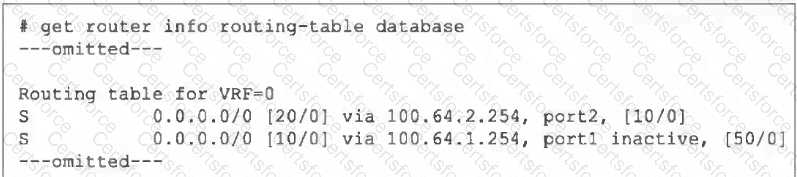
Question # 6

The administrator wants to configure a default static route for port3 and assign a distance of 50 and a priority of 0.

What will happen to the port1 and port2 default static routes after the port3 default static route is created?

Options:

A.

The port2 default static route will be injected into the forwarding information base (FIB).


B.

The port1 default static route will be injected into the FIB.


C.

Neither of the routes shown in the output will be injected into the FIB.


D.

Both default static routes shown in the output will be injected into the FIB.


Expert Solution
Questions # 7:

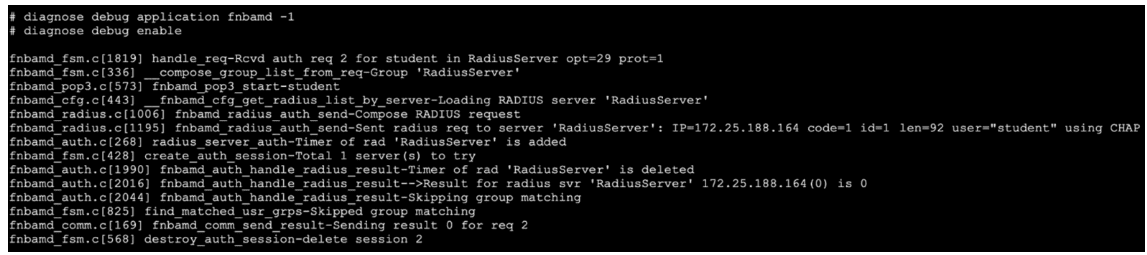
Refer to the exhibit, which shows a truncated output of a real-time RADIUS debug.
Question # 7

Which two statements are true? (Choose two answers)

Options:

A.

The RADIUS server queried for authentication is located at IP address 172.25.188.164.


B.

Authentication was unsuccessful.


C.

The authentication scheme used was pop3.


D.

Authentication was successful.


E.

Two-factor authentication was required.


Expert Solution
Questions # 8:

Refer to the exhibit showing a debug output.

Question # 8

An administrator deployed FSSO in DC Agent Mode but FSSO is failing on FortiGate. Pinging FortiGate from where the collector agent is deployed is successful.

The administrator then produces the debug output shown in the exhibit.

What could be causing this error message?

Options:

A.

The TCP port 445 is blocked between FortiGate and collector agent.


B.

The collector agent preshared password is mismatched.


C.

The FortiGate cannot resolve the active directory server name.


D.

The FortiGate and the collector agent are using different TCP ports.


Expert Solution
Questions # 9:

A VPN tunnel is up. To monitor traffic flow, the administrator enters the following CLI commands on an SSH session on FortiGate:

# diagnose debug enable

# diagnose sniffer packet any ' udp and port 500 ' 4

However, the sniffer does not show any output. Assuming default configuration values, what are two possible reasons there is no output? (Choose two answers)

Options:

A.

The filter should be modified to also capture packets for TCP port 443 or UDP port 4500 .


B.

NAT Traversal is enabled.


C.

The sniffer must be restricted to the remote peer IP address.


D.

The sniffer output will be ignored because running diagnose debug enable shows only application real-time debugs.


Expert Solution
Questions # 10:

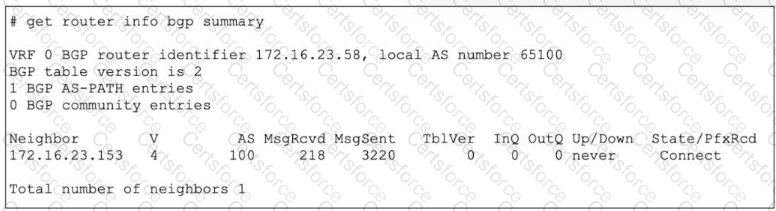
Refer to the exhibit.

Question # 10

The output of a BGP debug command is shown.

Why has the local router at 172.16.23.58 been unable to establish adjacency with its only neighbor?

Options:

A.

The neighbor router has become unreachable, which is evident by the low ratio of messages received to messages sent.


B.

The local router has not received an OPEN message from the neighbor.


C.

The local router has not received a SYN/ACK packet from the neighbor.


D.

There is no active route to the BGP neighbor.


Expert Solution
Viewing page 1 out of 4 pages
Viewing questions 1-10 out of questions