New Year Sale Limited Time 70% Discount Offer - Ends in 0d 00h 00m 00s - Coupon code: simple70

Pass the Fortinet Fortinet Certified Solution Specialist FCSS_LED_AR-7.6 Questions and answers with CertsForce

Viewing page 1 out of 2 pages
Viewing questions 1-10 out of questions
Questions # 1:

What is the expected behavior when enabling auto TX power control on a FortiAP interface?

Options:

A.

FortiGate monitors the signal strength of nearby AP interfaces and adjusts its own transmit power every 30 seconds to match the signal strength of the adjacent AP


B.

FortiGate measures the signal strength of nearby FortiAP interfaces every 30 seconds and adjusts their transmit power to ensure they remain detectable at -70 dBm.


C.

FortiGate periodically measures the signal strength of the weakest associated client and adjusts the AP radio power to align with the detected signal strength of that client.


D.

The AP periodically evaluates the signal strength of its own transmission from the client perspective and adjusts its power to ensure the signal is detected at -70 dBm.


Expert Solution
Questions # 2:

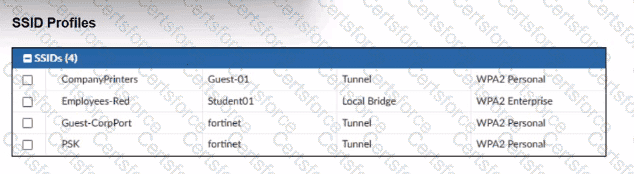
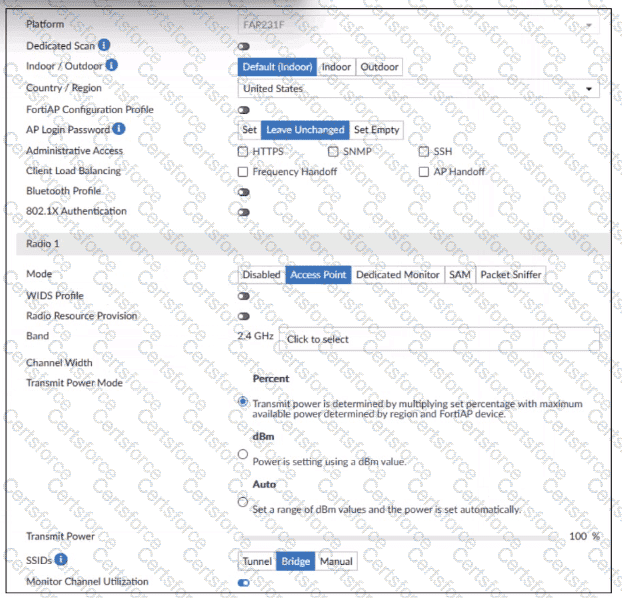
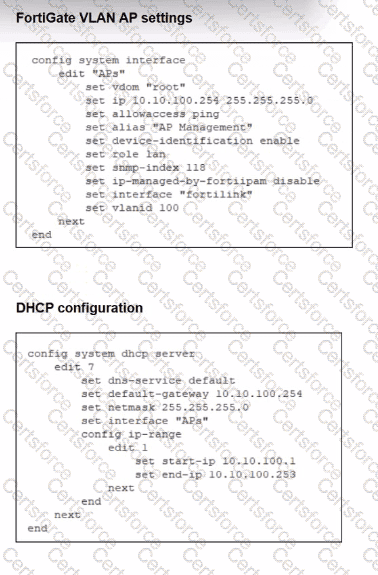
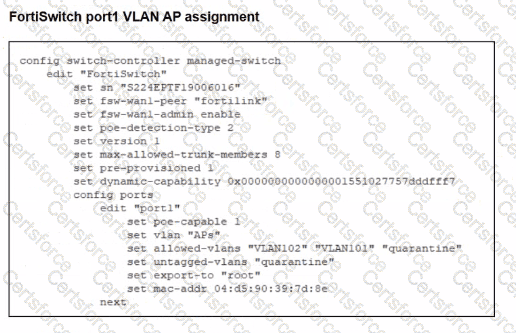
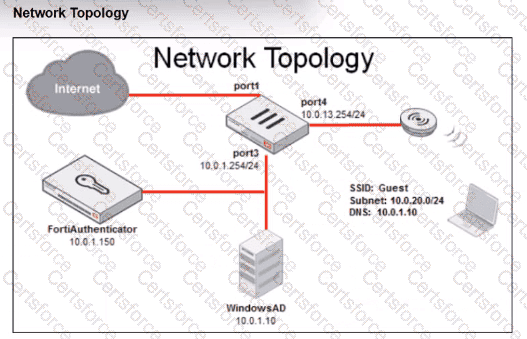
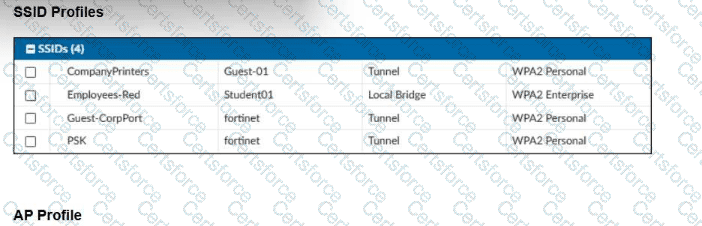
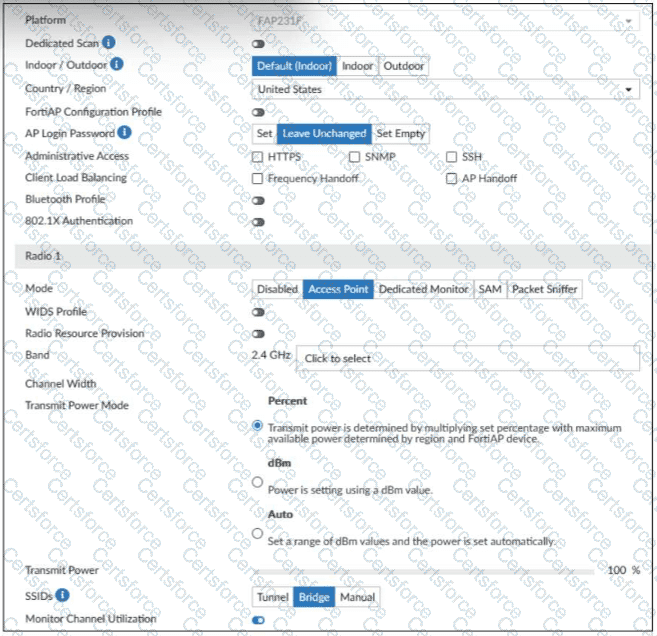
Refer to the exhibit.

Question # 2

Question # 2

Question # 2

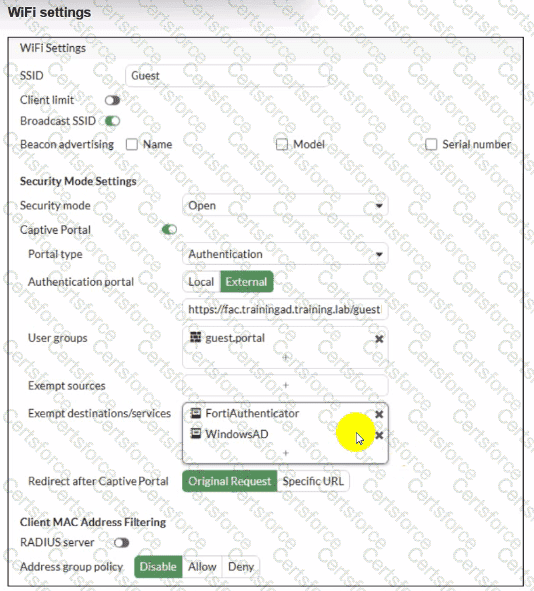
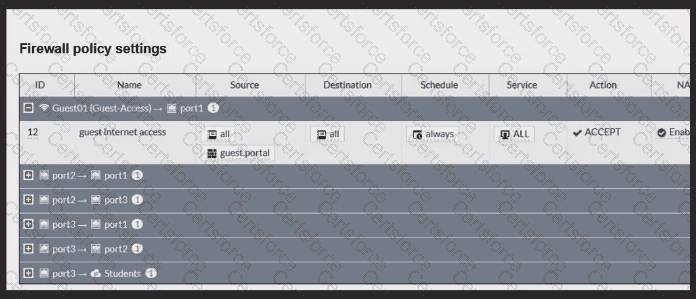
Review the exhibits to analyze the network topology, SSID settings, and firewall policies.

FortiGate is configured to use an external captive portal for authentication to grant access to a wireless network. During testing, it was found that users attempting to connect to the SSID cannot access the captive portal login page.

What configuration change should be made to resolve this issue to allow users to access the captive portal?

Options:

A.

Change the SSID security mode to WPA2-Enterprise for authentication.


B.

Disable HTTPS redirection for the captive portal authentication page.


C.

Exclude FortiAuthenticator and Windows AD address objects from filtering.


D.

A firewall policy allowing Guest SSID traffic to reach FortiAuthenticator and Windows AD.


Expert Solution
Questions # 3:

In a Windows environment using AD machine authentication, how does FortiAuthenticator ensure that a previously authenticated device is maintaining its network access once the device resumes operating after sleep or hibernation?

Options:

A.

It temporarily assigns the device to a guest VLAN until full reauthentication is completed.


B.

It sends a wake-on-LAN packet to trigger reauthentication.


C.

It uses machine authentication based on the device IP address.


D.

It caches the MAC address of authenticated devices for a configurable period of time.


Expert Solution
Questions # 4:

Which VLAN is used by FortiGate to place devices that fail to match any configured NAC policies? CRSPAN

Options:

A.

NAC


B.

segment


C.

Quarantine


D.

Onboarding


Expert Solution
Questions # 5:

APs have been manually configured to connect to FortiGate over an IPsec network, and FortiGate successfully detects and authorizes them. However, the APs remain unmanaged because FortiGate is unable to establish a CAPWAP tunnel with them.

What configuration change can resolve this issue and enable FortiGate to establish the CAPWAP tunnel over the IPsec connection?

Options:

A.

Configure a static route on FortiGate to reach the APs over the IPsec tunnel.


B.

Assign a custom AP profile for the remote APs with the set mpls-connection option enabled.


C.

Decrease the CAPWAP tunnel MTU size for APs to prevent fragmentation.


D.

Upgrade the FortiAP firmware image to ensure compatibility with the FortiOS version.


Expert Solution
Questions # 6:

Connectivity tests are being performed on a newly configured VLAN. The VLAN is configured on a FortiSwitch device that is managed by FortiGate. During testing, it is observed that devices

within the VLAN can successfully ping FortiGate. and FortiGate can also ping these devices.

Inter-VLAN communication is working as expected. However, devices within the same VLAN are unable to communicate with each other.

What could be causing this issue?

Options:

A.

Access VLAN is enabled on the VLAN.


B.

The FortiSwitch MAC address table is missing entries.


C.

The FortiGate ARP table is missing entries.


D.

The native VLAN configured on the ports is incorrect.


Expert Solution
Questions # 7:

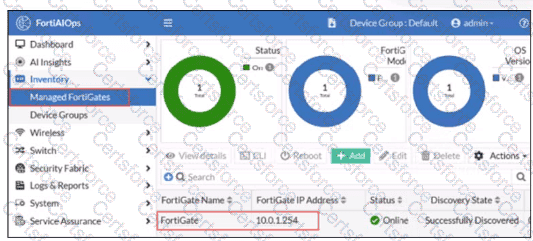
Refer to the exhibits.

Question # 7

Question # 7

Examine the FortiGate configuration, FortiAnalyzer logs, and FortiGate widget shown in the exhibits.

Security Fabhc quarantine automation has been configured to isolate compromised devices automatically. FortiAnalyzer has been added to the Security Fabric, and an automation stitch has been configured to quarantine compromised devices.

To test the setup, a device with the IP address 10.0.2.1 that is connected through a managed FortiSwitch attempts to access a malicious website. The logs on FortiAnalyzer confirm that the event was recorded, but the device does not appear in the FortiGate quarantine widget.

Which two reasons could explain why FortiGate is not quarantining the device? (Choose two.)

Options:

A.

The IOC action should include only the FortiSwitch in the quarantine.


B.

The SSL inspection should be set to deep-Inspection


C.

The malicious website is not recognized as an indicator of compromise (IOC) by FortiAnalyzer.


D.

The threat detection services license is missing or invalid under FortiAnalyzer.


Expert Solution
Questions # 8:

You are configuring FortiAuthenticator to integrate with FSSO for user identification. To enable FortiAuthenticator to extract user information from syslog messages and inject it into FSSO, you have configured syslog matching rules.

What is the role of syslog matching rules in the process of injecting user information into FSSO?

Options:

A.

To automatically update user group memberships in FSSO based on syslog events


B.

To enforce user authentication policies based on syslog message contents


C.

To define how syslog messages are parsed and extract user information, such as usernames and IP addresses


D.

To filter and block irrelevant syslog messages from being processed by the FortiAuthenticator


Expert Solution
Questions # 9:

You are deploying a FortiSwitch device managed by FortiGate in a secure network environment. To ensure accurate communication, you must identify which protocols are required for communication and control between FortiGate and FortiSwitch.

Which three protocols are used by FortiGate to manage and control FortiSwitch devices? (Choose three.)

Options:

A.

SNMP can be used by FortiGate to manage FortiSwitch devices by monitoring their status.


B.

UHTTPS is usea;by FortiGate to securely manage and configure FortiSwitch devices.


C.

FortiGate uses the Fortilink protocol to establish communication with FortiSwitch.


D.

CAPWAP is used to establish the control channel between FortiSwitch and FortiGate.


E.

IGMP is required for managing communication between FortiGate and FortiSwitch devices in multicast environments.


Expert Solution
Questions # 10:

You are setting up a captive portal to provide Wi-Fi access for visitors. To simplify the process, your team wants visitors to authenticate using their existing social media accounts instead of creating new accounts or entering credentials manually.

Which two actions are required to enable this functionality? (Choose two.)

Options:

A.

Set up a remote open authorization (OAuth) server for each selected social media platform.


B.

Configure only the email login option because a social media login cannot be used with captive portals.


C.

Enable Account Login as the authentication type and configure a remote LDAP server.


D.

Set up the FortiAuthenticator internal database as the primary source for user credentials


E.

Configure the social login profiles for the supported platforms.


Expert Solution
Viewing page 1 out of 2 pages
Viewing questions 1-10 out of questions