From the exhibits:
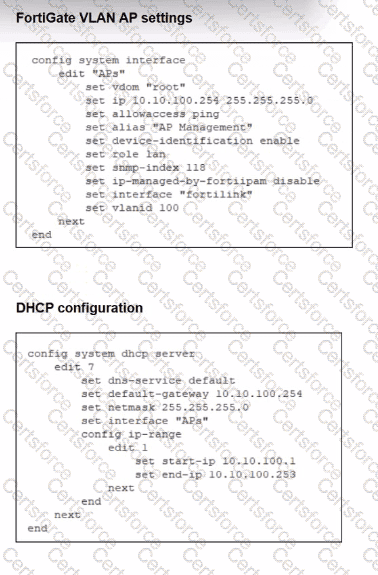
Interface“APs”is a VLAN sub-interface onfortilinkwith IP10.10.100.254/24and a DHCP server scope 10.10.100.1–10.10.100.253.
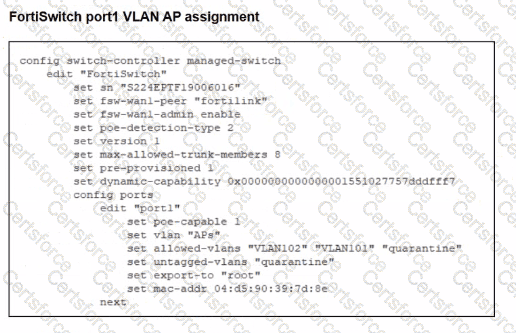
This VLAN is assigned toport1on the managed FortiSwitch for FortiAPs.
The interface config showsonly allowaccess ping—Security Fabric Connection is not enabled.
In LAN Edge designs, FortiAPs connected through FortiSwitch are discovered and managed asLAN edge devices of the Security Fabric. FortiOS documentation states that FortiAPs and FortiSwitches appear in the Fabric topologyonly when connected on an interface with Security Fabric Connection enabled.
If the VLAN/AP management interface lacksSecurity Fabric Connection:
FortiGate does not treat that network as aFabric connection segment.
CAPWAP discovery from FortiAPs on that VLAN will not result in the AP being onboarded and shown for management.
Therefore the key misconfiguration is:
✔A – Security Fabric is disabled on the VLAN interface used for AP management.
Why the others are not the root cause:
B. Firmware incompatibility– would usually show as a “Managed (upgrade required)” or similar status after discovery, not complete non-detection. The scenario specifically points to a configuration issue, not firmware.
C. VLAN not tagged correctly on uplink– The FortiSwitch uplink to FortiGate is the FortiLink trunk, and the VLAN sub-interface APs is already bound to fortilink, so tagging on the uplink is correct by definition.
D. CAPWAP ports not open– CAPWAP (UDP 5246/5247) is terminated locally on FortiGate and does not depend on any firewall policy; these ports are open on the FortiGate itself by default.


Submit