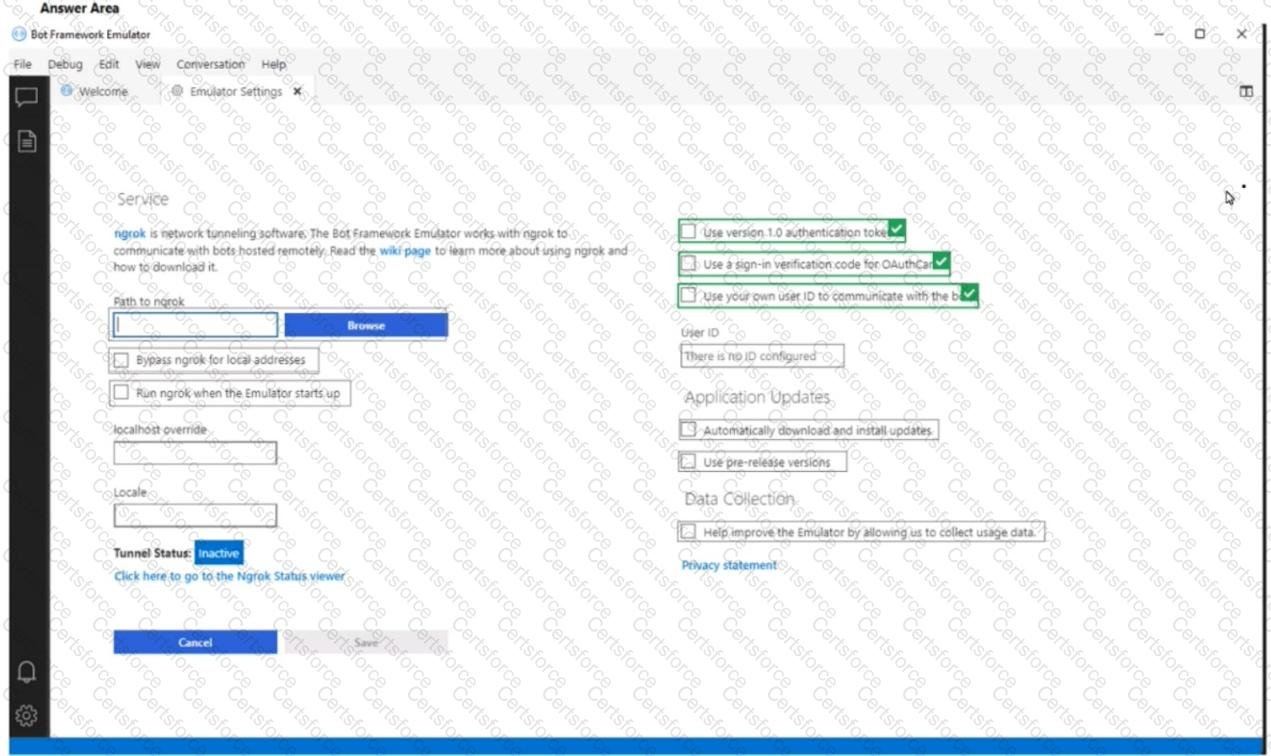
When testing a bot with the Bot Framework Emulator, especially if the bot uses authentication (OAuth), you need the Emulator to mimic real-world authentication flows. To do that:
Use version 1.0 authentication tokens
Ensures that authentication tokens are generated in the same format as Bot Framework v1.0, which is compatible with most OAuth flows.
Use a sign-in verification code for OAuthCard
Prompts the user with a verification code during sign-in flows, ensuring the emulator behaves like a real client app (e.g., mobile or Teams).
This is required to test sign-in prompts and enforce credential entry.
Use your own user ID to communicate with the bot
Ensures that the Emulator identifies you uniquely and triggers authentication properly.
Without this, the bot may treat sessions generically, and authentication prompts might not behave as expected.
Why not the others?
Application Updates (automatically download/install) → Related to emulator updates, not authentication.
Data Collection → Only for telemetry; does not affect authentication.
Ngrok settings → Used for tunneling remote bot connections; unrelated to credential prompts.
Correct Answer Selections:
Use version 1.0 authentication tokens
Use a sign-in verification code for OAuthCard
Use your own user ID to communicate with the bot
Microsoft References
Bot Framework Emulator - Authentication
Testing bots with Bot Framework Emulator


Submit