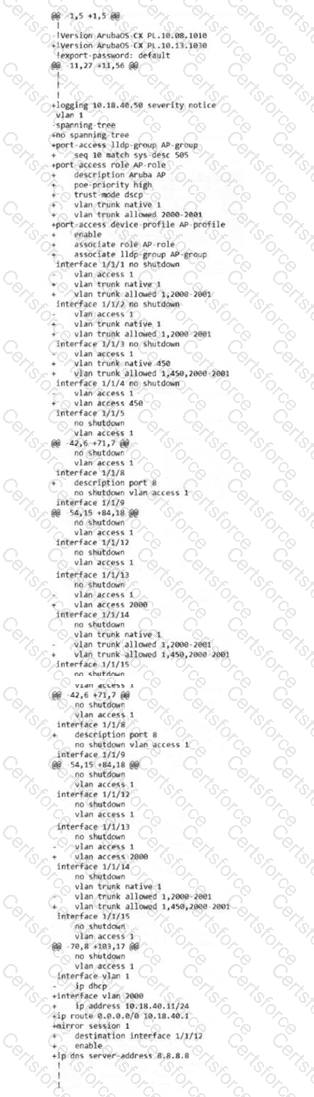
The output shown in the exhibit is a unified diff (indicated by the + and - signs and the @@ headers), which is the standard format AOS-CX uses to display differences between two configuration states.
AOS-CX Checkpoints: ArubaOS-CX switches use " checkpoints " to save snapshots of the configuration. These can be created manually by a user or automatically by the system (e.g., when a configuration change is pushed from Central or NetEdit).
The checkpoint diff Command: The command checkpoint diff < NAME1 > < NAME2 > is used to perform a line-by-line comparison. One of these names can be the running-config .
Lines with a -: These are present in the first configuration (the older checkpoint) but missing in the second (the newer config).
Lines with a +: These are present in the second configuration but were not in the first.
Analyzing the Exhibit: The output shows a comparison between a switch running version 10.08.1010 (the - line) and version 10.13.1030 (the + line), along with several configuration changes like adding an lldp-group, a port-access role, and IP addressing on vlan 2000.
Differentiating Command Syntax: * In the AOS-CX CLI, checkpoint diff is an " action " command used specifically for this analytical comparison.
While many diagnostic commands start with show, the diff utility is executed directly as checkpoint diff.
Terms like " saved-config revisions " are not standard AOS-CX terminology; the system uses " checkpoints " exclusively for this purpose.
Contribute your Thoughts:
Chosen Answer:
This is a voting comment (?). You can switch to a simple comment. It is better to Upvote an existing comment if you don't have anything to add.


Submit