Given the current software running on an HPE Aruba Networking CX 8320 VSX, what is the best way to upgrade the VSX cluster with minimal downtime? (Choose two.)
A.
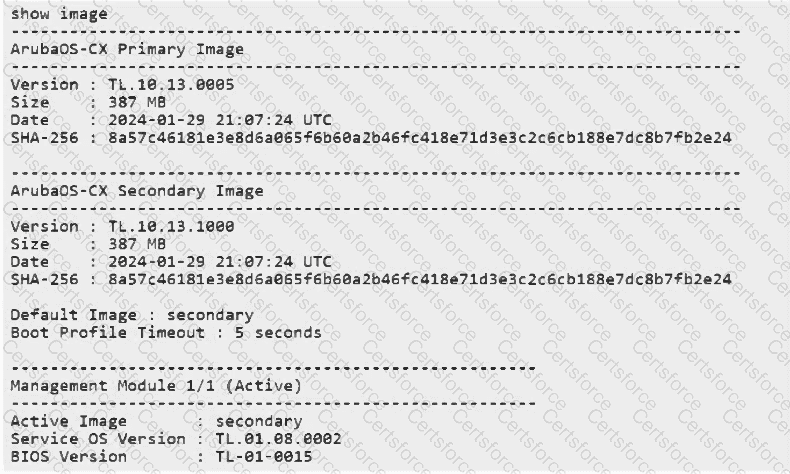
Upload new image to the secondary boot-bank on both switches.
For a CX 8320 VSX pair , the recommended low-disruption upgrade mechanism is to pre-stage the new AOS-CX image on both VSX members and then invoke the coordinated vsx update-software boot-bank procedure for the bank containing that image. In this workflow, the new software is placed in the secondary boot bank on both switches , and vsx update-software boot-bank secondary is then used to perform the coordinated upgrade.
The significant advantage of the VSX upgrade command is that it controls the reboot sequence automatically. HPE Aruba specifies that the VSX secondary peer is upgraded and rebooted first . After it returns and the VSX relationship is restored appropriately, the VSX primary peer is upgraded and rebooted . This sequential procedure allows the surviving VSX member to continue forwarding traffic, substantially reducing service interruption compared with simultaneously rebooting both switches. Aruba Networks
The software should be pre-staged when the maintenance window is limited, because doing so removes image-transfer time from the actual upgrade window. Aruba Networks
Option D is incorrect for the CX 8320 VSX procedure. issu update-software confirm merely confirms a previously completed supported ISSU operation and cancels its rollback timer; it does not initiate a VSX software upgrade . Aruba Networks
Chosen Answer:
This is a voting comment (?). You can switch to a simple comment. It is better to Upvote an existing comment if you don't have anything to add.


Submit