Summer Certification Special Limited Time 70% Discount Offer - Ends in 0d 00h 00m 00s - Coupon code: force70

Pass the Autodesk Autodesk Certified Professional BIM_MGT_101 Questions and answers with CertsForce

Viewing page 1 out of 2 pages
Viewing questions 1-10 out of questions
Questions # 1:

A BIM manager is preparing to onboard a group of subcontractors into Autodesk Forma for a large healthcare project. These subcontractors need access to a limited set of model files related only to interior partitions, but should not be able to view or modify structural, MEP, or scheduling content.

What two actions should the BIM manager take to manage data security in this scenario? (Select two.)

Options:

A.

Create and share a Package with specific set-up content.


B.

Provide access to the entire model set but watermark any non-applicable content.


C.

Assign full project access and ask team leads to verbally explain access limitations.


D.

Hide coordination issues from the subcontractors to limit liability.


E.

Assign role-based permissions and folder-level access aligned with the subcontractors’ scope.


Expert Solution
Questions # 2:

What is included in a BIM Execution Plan?

Options:

A.

Project schedule and design playbook.


B.

Modeling standards and technology ecosystem.


C.

LOD Matrix and project specifications.


D.

Collaboration protocols and project playbook.


Expert Solution
Questions # 3:

The BIM manager is working in an Architectural model that uses the phases Existing and New Construction . They have linked in a Structural model that uses only Phase 1 for existing and Phase 2 for new construction. After linking, they notice that demolition elements from the Structural model do not display correctly in the demolition views.

Which approach allows the BIM manager to display linked elements correctly based on this phase setup, without changing the phases in the linked model?

Options:

A.

Apply a phase-filter override to the linked model using Visibility/Graphics settings.


B.

Open the linked model and manually change its phase names to match the host model.


C.

Map the linked model’s phases to the host model’s phases in the Revit Link properties.


D.

Override the linked view’s phase settings using view templates in the host model.


Expert Solution
Questions # 4:

A project model, which includes multidisciplinary and DWG links, has been exhibiting problematic behavior. It takes a long time to save and synchronize, or crashes unexpectedly. Even though there are no imported DWGs, a scan of the model reveals a large number of IMPORT line patterns that typically come from DWG imports and links and are a possible cause of model-performance loss.

To remedy and prevent a repetition of this situation, the BIM manager is attempting to mentor the team on best practices for preparing DWGs for linking to a Revit model.

Which workflow steps will optimize the DWG files and prevent inefficiencies and loss of productive time due to repeated poor DWG-linking practices?

Options:

A.

Delete all XREFs; change all fonts to Arial.


B.

Delete all text; explode all geometry.


C.

PROXYGRAPHICS=0, PURGE, AUDIT, OVERKILL.


D.

PROXYGRAPHICS=1, PURGE ALL, AUDIT, OVERKILL.


Expert Solution
Questions # 5:

A project manager who is not familiar with Autodesk Forma has asked a BIM manager to lead clash detection for their Revit project. The project manager would like to review the issue lists weekly, by discipline, to track progress and coordinate with consultants as needed.

What should the BIM manager do to fulfil this request efficiently?

Options:

A.

Export the Autodesk Forma issues to an Excel file manually every week and email it to the project manager.


B.

Schedule weekly reports with appropriate filters in Autodesk Forma that are saved to the project files.


C.

Run the Interfere command in AutoCAD and email the Autodesk Forma issues every week.


D.

Use an Excel file to track issues instead of Autodesk Forma to accommodate the project manager.


Expert Solution
Questions # 6:

A regional user group raised awareness about a third-party add-on tool that enables a team to establish thresholds for model warnings. In addition, it automates suppressing warnings deemed negligible to a specific project.

Which two data points should a BIM manager gather to build a business case to have the tool approved for use across the firm? (Select two.)

Options:

A.

The cost per user multiplied by the number of entire office staff, including the cost of time to implement and train on the tool.


B.

How many of the firm’s competitors are already using the tool.


C.

The language that available training materials on the tool are in.


D.

The reliability of the tool creator and the time to install, test, and create training materials on the tool.


E.

The relevant user group, the projected cost to supply the group, and the anticipated time savings and/or risk mitigation that the tool would provide.


Expert Solution
Questions # 7:

During a weekly BIM health review, the BIM manager compares two versions of the same architectural Revit model submitted one month apart. The newer model’s file size has doubled, synchronization time has increased by 40%, and users report sluggish performance. A model audit reveals no major geometry changes, but warnings have increased from 600 to 750, and several Civil CAD files are now imported.

What is the most likely root cause of the model performance degradation?

Options:

A.

A rise in geometry complexity.


B.

An accumulation of audit history and backup data.


C.

The presence of imported Civil CAD files.


D.

The increase in model warnings.


Expert Solution
Questions # 8:

A client is seeking bids from a range of possible fabricators to determine which will win the contract to join the team.

What settings in Autodesk Forma allow a team to distribute files to a party that is not a project member?

Options:

A.

Audit and Compact the file and then save.


B.

Centralize the model and have the recipient create a local file.


C.

Set the permissions of the folder to allow Everyone to access.


D.

Enable the project for public sharing and send a transmittal from the files.


Expert Solution
Questions # 9:

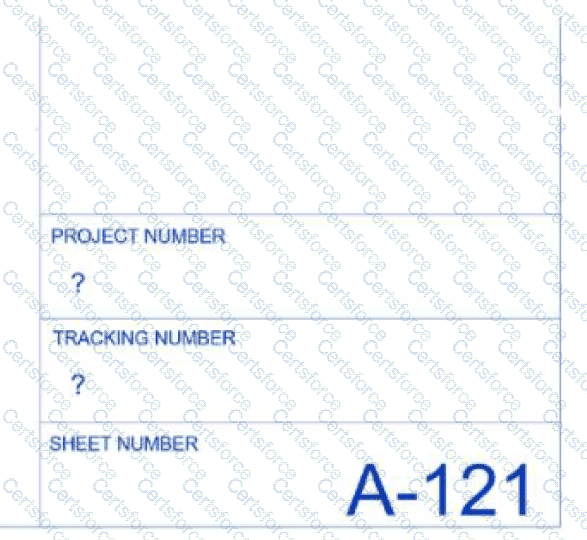
Refer to the exhibit.

Question # 9

A client has provided the design team with a title block family and a Shared Parameters file that must be used as part of their standards. Those provided parameters must be applied both in the Project Information area as well as the title block.

When the design team is in the project model and attempts to fill in information into the title block parameters, a question mark appears. What is the likely cause of this?

Options:

A.

The shared parameters were included in the title block family but were not loaded into the project file.


B.

The parameters were not included in the Shared Parameters file provided by the client.


C.

The Shared Parameters file was not added to the title block family and was using text instead of a label.


D.

The Sheet and Project Information fields were overwritten in the title block.


Expert Solution
Questions # 10:

When working with separate Revit templates for each discipline, which elements should be standardized to support collaboration and seamless coordination across the project?

Options:

A.

A coordinated set of title blocks, project units, specific view templates, and parameters that include both Project and Shared Parameters.


B.

Individually developed templates with custom levels and grids, allowing each discipline to organize models based on its own internal requirements and modelling preferences.


C.

A blank or out-of-the-box Revit template with no predefined standards, requiring each designer to set up views, parameters, and content from scratch on every project.


D.

A single template used across disciplines with shared settings, general workflows, and uniform file structure to simplify project setup and minimize variation.


Expert Solution
Viewing page 1 out of 2 pages
Viewing questions 1-10 out of questions