Spring Sale Limited Time 70% Discount Offer - Ends in 0d 00h 00m 00s - Coupon code: simple70

Pass the Nutanix Nutanix Certified Professional (NCP) NCP-CN Questions and answers with CertsForce

Viewing page 1 out of 4 pages
Viewing questions 1-10 out of questions
Questions # 1:

A Platform Engineer has a requirement for backup and recovery and would like to leverage an Out-Of-The-Box solution distributed with NKP. What is the backup and recovery solution distributed for NKP?

Options:

A.

Tar


B.

Kasten


C.

Velero


D.

Nutanix Snapshot


Expert Solution
Questions # 2:

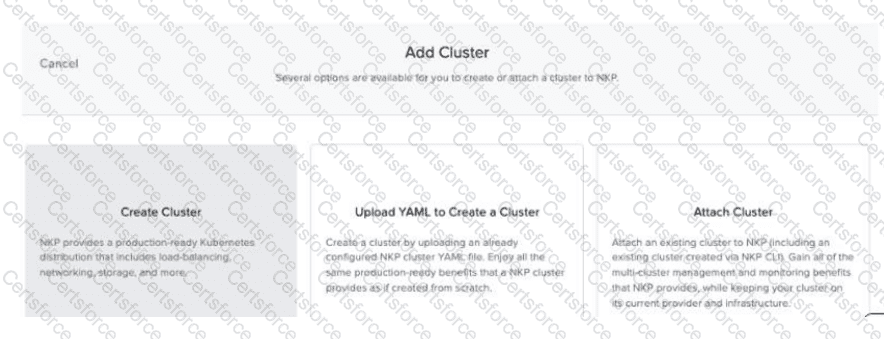
Refer to Exhibit:

Question # 2

Using an NKP Ultimate license, a Platform Engineer has created a new workspace and needs to create a new Kubernetes cluster within this workspace. However, the engineer discovers that the Create Cluster option is grayed out, as shown in the exhibit. How should the engineer resolve this issue?

Options:

A.

Create the cluster only using YAML and not the GUI.


B.

Attach existing clusters instead of creating a new cluster.


C.

Create an Infrastructure provider for the workspace.


D.

Ensure NKP is upgraded to a minimum version of 2.12.


Expert Solution
Questions # 3:

A Platform Engineer is deploying an NKP workload cluster using the nkp create cluster vsphere command. The cluster will be utilized by the company’s code-green team and the engineer has already created a code-green NKP workspace on the NKP management cluster.

After issuing the deploy command, the engineer monitored the build using the nkp describe cluster command and confirmed it completed successfully. However, a few hours later, after logging into the NKP UI, the engineer checked the code-green NKP workspace and saw that the NKP workload cluster was not there.

What is the likely reason the NKP workload cluster is not in the code-green NKP workspace?

Options:

A.

The vSphere cluster cannot be displayed in the NKP UI unless its Kubernetes version is within ‘N - 1’ versions of the NKP management cluster’s Kubernetes version.


B.

The vSphere service account credentials had expired prior to the engineer’s attempt to view the cluster in the NKP UI. Once the credentials are refreshed, the vSphere cluster will reappear in the NKP workspace.


C.

The engineer did not supply the --namespace code-green parameter as part of the nkp create cluster vsphere command, therefore it was created in the default workspace and needs to be manually attached.


D.

NKP vSphere clusters cannot be assigned NKP workspaces and instead are assigned the default NKP workspace. The cluster can be viewed from this workspace instead.


Expert Solution
Questions # 4:

A Platform Engineer needs to create an NKP cluster on vSphere infrastructure, using the vSphere provisioning method. The cluster needs to have 3 worker node pools:

    First node pool should consist of 6 worker nodes

    Second node pool should consist of 3 worker nodes

    Third node pool should consist of 3 worker nodesAdditionally, the worker nodes in the first node pool should be set to 10 CPUs, the second node pool workers should be set to 8 CPUs, and the third node pool workers should be set to 6 CPUs. What is the proper way to create the NKP cluster using the NKP CLI?

Options:

A.

First, execute the nkp create cluster vsphere command, including the following parameters:

--worker-replicas 6

--worker-cpus 10

Then, execute the nkp create nodepool vsphere command, including the following parameters:

--worker-replicas 3

--worker-cpus 8

Then, execute the nkp create nodepool vsphere command, including the following parameters:

--worker-replicas 3

--worker-cpus 6


B.

First, execute the nkp create cluster vsphere command, including the following parameters:

--worker-replicas 6

--worker-cpus 10

Then, execute the nkp create nodepool vsphere command, including the following parameters:

--replicas 3

--cpus 6


C.

When executing the nkp create cluster vsphere command, include the following parameters:

--node-pools 3

--worker-replicas 6,3,3

--worker-cpus 10,8,6


D.

First, execute the nkp create cluster vsphere command, including the following parameters:

--worker-replicas 6

--worker-cpus 10

Then, execute the nkp create nodepools vsphere command, including the following parameters:

--replicas 3,3

--cpus 8,6


Expert Solution
Questions # 5:

A Platform Engineer will be deploying an NKP cluster in a dark site with no Internet access. The Cloud Administrator has provided a Linux VM for this purpose, so the engineer needs to prepare this VM to be used as a bastion host. Which two actions should the engineer take to complete this task? (Choose two.)

Options:

A.

Install LDAP Server.


B.

Get or create SSH Keys.


C.

Install Docker.


D.

Enable NTP Service.


Expert Solution
Questions # 6:

A company has a new DevOps team that needs to be provided cloud native computing resources. This team will need to have access to multiple NKP clusters for development, testing and validation of an in-house application. However, they also need to be restricted to a specific namespace and a consistent level of access across the clusters within this namespace so that they do not adversely impact the environment of other user groups or the clusters themselves.

As a part of this consideration, the new team also needs to be limited to the amount of storage, CPU and memory they can consume on the clusters. A Platform Engineer has been tasked with providing the appropriate level of access to the team on these multiple NKP clusters.

How should the engineer best accomplish this task?

Options:

A.

1.Create an NKP project and assign the NKP clusters to it.

2.Create quotas for the NKP project.

3.Create an NKP group for the DevOps team.

4.Assign that NKP group the proper RBAC roles within that NKP project.


B.

1.Create an NKP workspace and assign the NKP clusters to it.

2.Create quotas for the NKP workspace.

3.Create an NKP group for the DevOps team.

4.Assign that NKP group the proper RBAC roles within that NKP workspace.


C.

1.Create an NKP group for the DevOps team.

2.Assign that NKP group the proper RBAC roles in the NKP UI.

3.Select the export to yaml option once the RBAC role assignment to that NKP group is complete.

4.Apply the exported manifest to each of the NKP clusters using kubectl.


D.

1.Enable Gatekeeper on the NKP clusters.

2.Create an NKP group for the DevOps team.

3.Assign Gatekeeper quota and authorization policies to that NKP group.


Expert Solution
Questions # 7:

Some time ago, an EKS cluster was attached to be managed with NKP (Fleet Management). Now, a Platform Engineer has been asked to disconnect the EKS cluster from NKP for licensing reasons. After disconnecting the cluster, the developers realized that application changes are still being reflected in the EKS cluster, despite the fact that the EKS cluster was successfully detached from NKP. How should the engineer resolve this issue?

Options:

A.

Forcefully detach EKS cluster: nkp detach cluster -c detached-cluster-name --force


B.

Detached cluster must also be deleted from NKP: nkp delete cluster -c detached-cluster-name


C.

Developers must have some bad configuration in the deployment config files. Ask for revision or call AWS technical support.


D.

Detached cluster’s Flux installation must be manually disconnected from the management Git repository: kubectl -n kommmander-flux patch gitrepo management -p '{"spec":{"suspend":true}}' --type merge


Expert Solution
Questions # 8:

A company uses an Artifactory private registry for development. The NKP deployment must use this private registry since the Security Administrator has the firewall configured to reject connections to public container registries. The first task is to push the NKP bundle to this private registry.

What options should be used to push the NKP bundle to this private registry?

Options:

A.

--registry-mirror-url, --registry-mirror-username and --registry-mirror-password


B.

--mirror-url, --mirror-username and --mirror-password


C.

--registry-url, --registry-username and --registry-password


D.

--to-registry, --to-registry-username and --to-registry-password


Expert Solution
Questions # 9:

A Platform Engineer has been tasked with backing up and restoring a production environment to ensure persistent data is available during a disaster at a primary site. What is recommended for backup and restore production use cases?

Options:

A.

Protection Domain


B.

Rook Ceph


C.

External Storage Class


D.

S3-compatible API


Expert Solution
Questions # 10:

Question # 10

A DevOps team faces a growing challenge of managing logs from multiple applications in an NKP cluster. With several teams working on different projects, it is essential to implement a Multi-Tenant Logging system that allows each team to access their own logs securely and efficiently. Initially, two namespaces have been configured for each project, as shown in the exhibit. Then a ConfigMap has also been configured for each tenant, which contains the logging configuration. Which YAML output corresponds to a retention period of 30 days for tenant-innovation and seven days for tenant-analytics?

Options:

A.

yaml

CollapseWrap

Copy

apiVersion: v1

kind: ConfigMap

metadata:

name: logging-innovation-config

namespace: tenant-innovation

data:

values.yaml: |

loki:

structuredConfig:

limits_config:

retention_period: 30d

---

apiVersion: v1

kind: ConfigMap

metadata:

name: logging-analytics-config

namespace: tenant-analytics

data:<


B.

yaml

CollapseWrap

Copy

apiVersion: v1

kind: ConfigMap

metadata:

name: logging-innovation-config

namespace: tenant-innovation

data:

values.yaml: |

loki:

structuredConfig:

limits_config:

retention_period: 30d

---

apiVersion: v1

kind: ConfigMap

metadata:

name: logging-analytics-config

namespace: tenant-innovation

data:


C.

yaml

CollapseWrap

Copy

apiVersion: v1

kind: ConfigMap

metadata:

name: logging-innovation-config

namespace: tenant-innovation

data:

values.yaml: |

loki:

structuredConfig:

limits_config:

retention_period: 30h

---

apiVersion: v1

kind: ConfigMap

metadata:

name: logging-analytics-config

namespace: tenant-analytics

data:<


D.

yaml

CollapseWrap

Copy

apiVersion: v1

kind: ConfigMap

metadata:

name: logging-innovation-config

namespace: tenant

data:

values.yaml: |

loki:

structuredConfig:

limits_config:

retention_period: 30d

---

apiVersion: v1

kind: ConfigMap

metadata:

name: logging-analytics-config

namespace: tenant

data:

values.yaml: |<


Expert Solution
Viewing page 1 out of 4 pages
Viewing questions 1-10 out of questions