Month End Certification Special Limited Time 75% Discount Offer - Ends in 0d 00h 00m 00s - Coupon code: CFsave75

Pass the Microsoft Microsoft Certified: AI Business Professional AB-730 Questions and answers with CertsForce

Viewing page 1 out of 3 pages
Viewing questions 1-10 out of questions
Questions # 1:

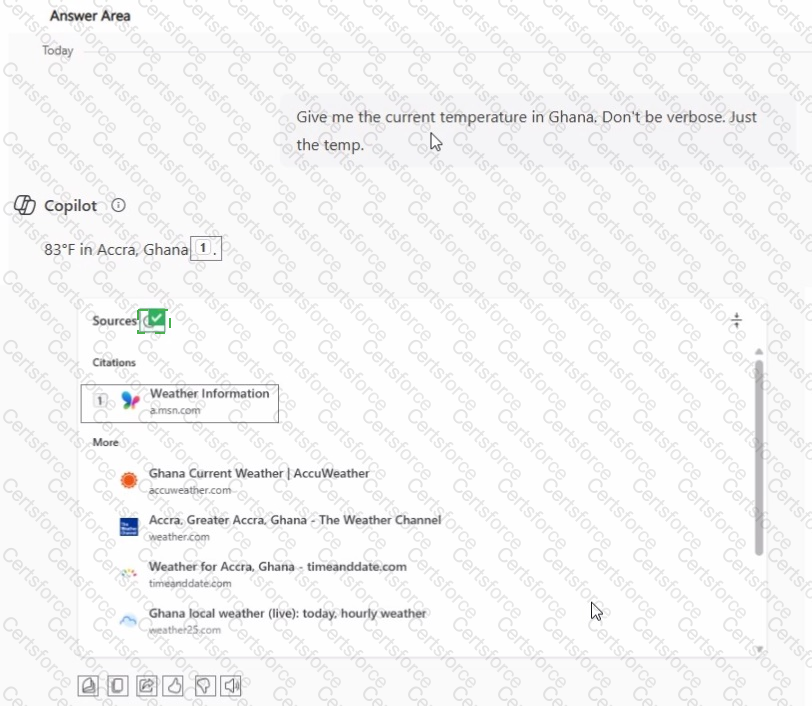
While using Microsoft 365 Copilot, content is returned from a website.

You need to verify the exact search query used to find the website.

What should you use? To answer, select the appropriate options in the answer area.
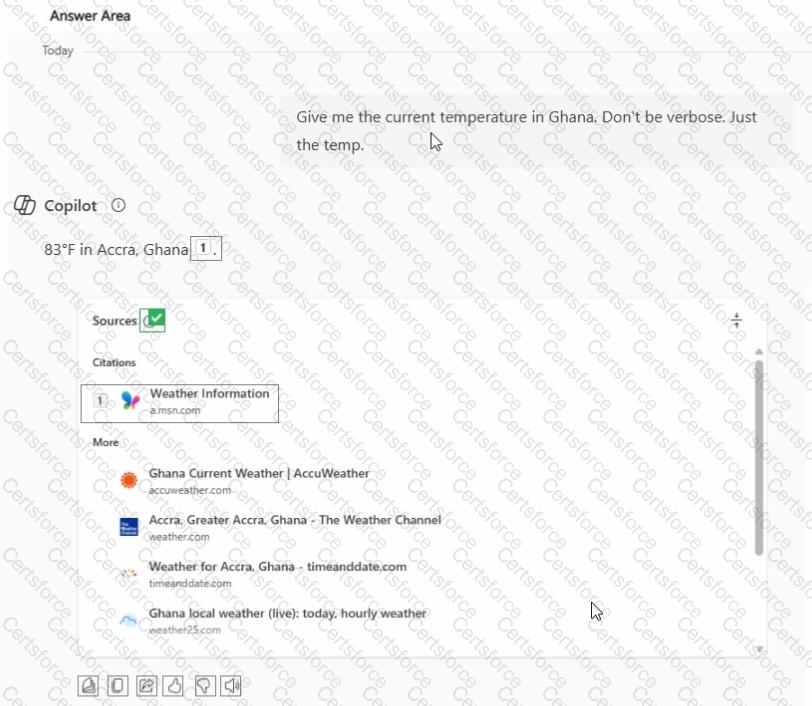
Question # 1


Expert Solution
Questions # 2:

You are a medical researcher.

You need to ensure that Microsoft 365 Copilot responds to you in a professional manner that is appropriate to your field. What is the best approach to achieve the goal?

Options:

A.

In the conversation, attach an example to your prompts.


B.

From Settings, configure Custom instructions.


C.

In the conversation, create a sample prompt and save it to the Copilot Prompt Gallery.


D.

From Settings, configure Copilot Memory.


Expert Solution
Questions # 3:

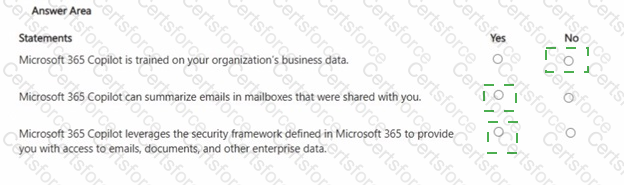
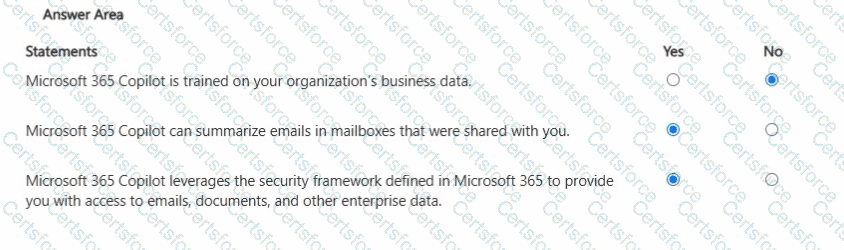
For each of the following statements, select Yes if the statement is true. Otherwise, select No. NOTE: Each correct selection is worth one point.
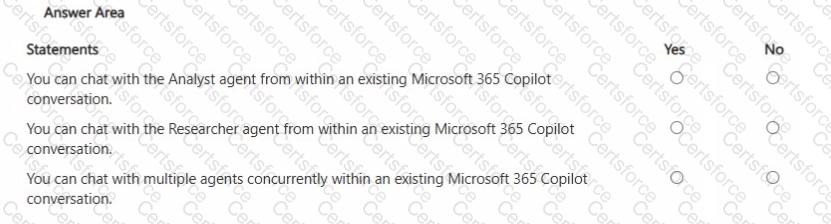
Question # 3


Expert Solution
Questions # 4:

You create a Microsoft Teams meeting that will only allow the use of Copilot during the meeting. The meeting will NOT be transcribed.

Which statement accurately describes how Copilot can be used during the meeting?

Options:

A.

Copilot must first be manually activated during the meeting. Copilot can only provide summaries of what was said by the user who activated Copilot.


B.

Copilot will activate automatically when the meeting starts. A complete recap of the meeting will be saved at the conclusion of the meeting.


C.

Copilot must first be manually activated during the meeting. Once activated, Copilot can provide summaries of what was said from that point forward.


D.

Copilot will activate automatically when the meeting starts. Copilot can provide summaries of what was said from the start of the meeting.


Expert Solution
Questions # 5:

You use Microsoft 365 Copilot.

You regularly upload the same five files to Copilot chats.

You need to simplify referencing the files in the chats.

What are two ways to achieve the goal?

Options:

A.

Send a prompt that includes the files, and then save the prompt.


B.

Create a notebook that references the files.


C.

Ask the data engineers to create a fine-tuned model.


D.

Create an agent that has a knowledge source.


E.

Zip the documents and upload the ZIP file to the chats.


Expert Solution
Questions # 6:

You sign in to the Microsoft 365 Copilot app by using your work account as shown in the exhibit.

A colleague tells you that when they open the Microsoft 365 Copilot app, they have access to the Researcher agent. You need to access the Researcher agent.

What should you do?

Options:

A.

From Microsoft Edge, use your work account to sign in to https://copilot.microsoft.com .


B.

Select Explore agents and then search for Researcher.


C.

Sign in to the Copilot app by using a personal account.


D.

Request a Microsoft 365 Copilot license from an administrator.


Expert Solution
Questions # 7:

Select the answer that correctly completes the sentence.

Question # 7


Expert Solution
Questions # 8:

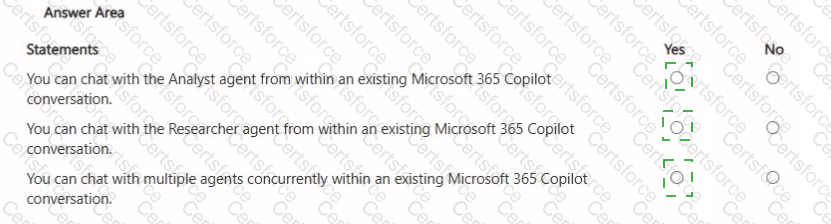
For each of the following statements, select Yes if the statement is true. Otherwise, select No. NOTE: Each correct selection is worth one point.
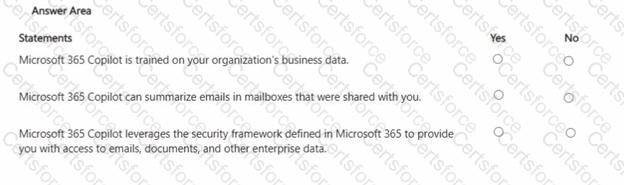
Question # 8


Expert Solution
Questions # 9:

You use Microsoft 365 Copilot.

You discover that you had a conversation that used a knowledge source that contains confidential information.

You need to delete the conversation data without requiring administrative approval. You must retain your other conversations, if possible.

What should you use?

Options:

A.

the Microsoft 365 Copilot app


B.

the Microsoft 365 admin center


C.

the Microsoft Purview compliance portal


D.

the My Account portal in Microsoft 365 Copilot


Expert Solution
Questions # 10:

You sign in to the Microsoft 365 Copilot app by using your work account as shown in the following exhibit
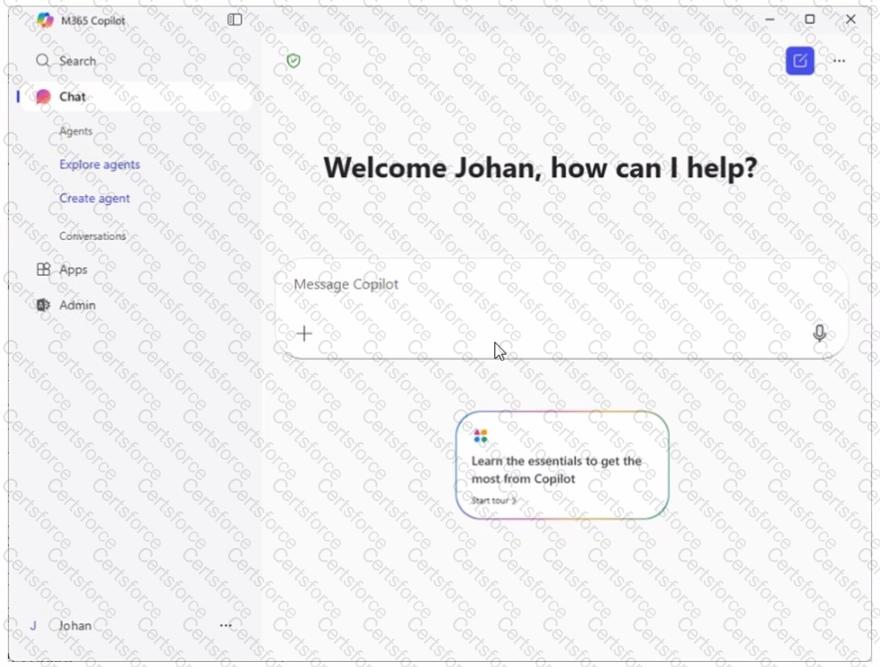
Question # 10

A colleague tells you that when they open the Microsoft 365 Copilot app, they have access to the Researcher agent. You need to access to the Researcher agent.

What should you do?
Options:

A.

From Microsoft Edge, use your work account to sign in to https://copilot.microsoft.com.


B.

Select Explore agents and then search for Researcher.


C.

Sign in to the Copilot app by using a personal account


D.

Request a Microsoft 365 Copilot license from an administrator.


Expert Solution
Viewing page 1 out of 3 pages
Viewing questions 1-10 out of questions