
Does this correctly describe how the Virtual Switching Extension (VSX) fabric reacts to various component failure scenarios?
Solution: The ISL and keepalive goes down, and after a few seconds, the keepalive link restores. Switch-l and Switch-2 remains up. The Split-recovery mode is enabled. In this case the secondary switch shutdowns SVls when keepalive is restored.
Is this a way that Virtual Switching Extension (VSX) differs from Virtual Switching Framework (VSF)?
Solution: VSX permits admins to select which features to synchronize between members while VSF requires manual configuration of Identical features on each member of the VSF fabric.
Refer to the exhibits.

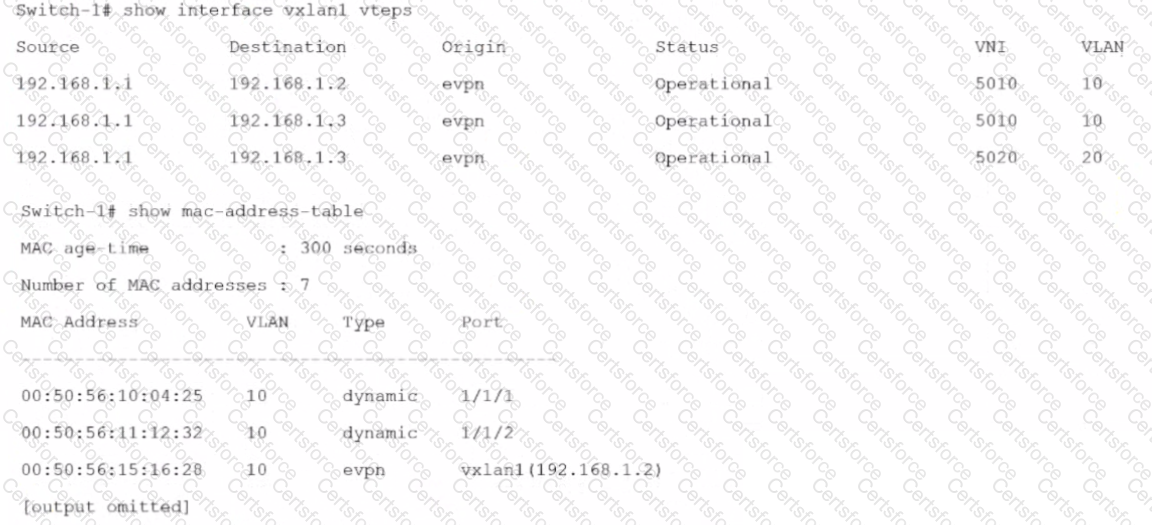
Is this how the switch-1 handles the traffic?
Solution: A broadcast arrives in VLAN 10 on Switch-1. Switch 1 forwards the frame on all interfaces assigned to VLAN10. except the incoming interface. It replicates the broadcast, encapsulates each broadcast with VXLAN. and sends the VXLAN traffic to 192.168.1.2 and 192.168.1.3.
Can you attach this type of ArubaOS-CX interface to a VRF?
Solution: A physical interface using Layer 2 mode
Is this something that NetEdit 2.0 does after it discovers a switch?
Solution: It collects Information about the switch hardware.
Is this a use case for disabling split-recovery mode on ArubaOS-CX switches in a Virtual Switching Extension (VSX) fabric?
Solution: You want to prevent any possibility of a split brain situation from occurring if the keepalive link fails some time after the ISL.
Is this a best practice when positioning ArubaOS-CX switches in data center networks?
Solution: Deploy Aruba CX 6300 switches as data center spine switches.
You are using NetEdit to manage AruDaOS-CX switches. You want to deploy a standard config to the switches, but need the config to include a few device-specific settings such as hostname and IP address.
Is this what you should do?
Solution: omit the device-specific settings from the configuration plan and include them in command scripts instead.
