Summer Certification Special Limited Time 70% Discount Offer - Ends in 0d 00h 00m 00s - Coupon code: force70

Pass the Fortinet Fortinet Certified Professional Security Operations NSE7_SOC_AR-7.6 Questions and answers with CertsForce

Viewing page 2 out of 3 pages
Viewing questions 11-20 out of questions
Questions # 11:

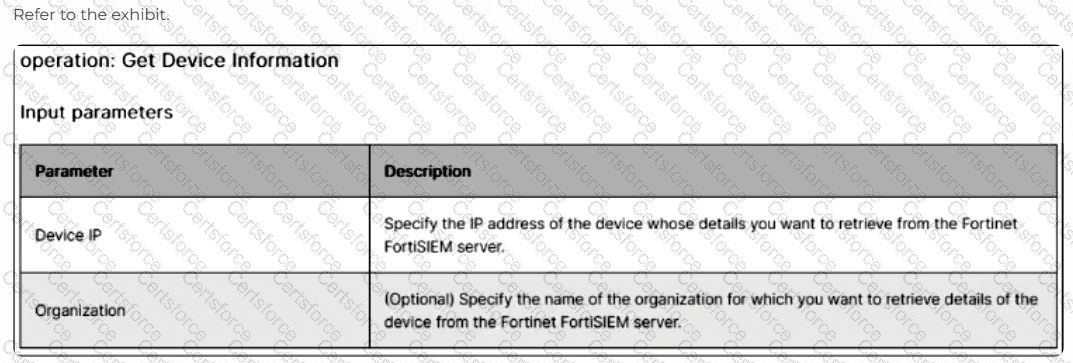
Refer to the exhibit.
Question # 11

The input of a FortiSIEM connector action is shown.

You want to create a playbook on FortiSOAR that allows you to accomplish the following:

Manually input an IP address.

Use the connector action in the exhibit to retrieve a device from the FortiSIEM configuration management database (CMDB) with that IP address.

Ask the SOC manager to review the information pulled from FortiSIEM about that device.

If the manager approves, an asset record is created.

Which combination and order of step operations fulfills the requirements with the fewest required playbook steps?

Options:

A.

Manual trigger, 2) Connector action, 3) Approval, 4) Create Record


B.

Manual trigger, 2) Set Variable, 3) Connector action, 4) Set Variable, 5) Approval, 6) Create record


C.

On Create trigger, 2) Connector action, 3) Manual Task, 4) Create record


D.

Connector action, 2) Approval, 3) Create record, 4) Update record


Expert Solution
Questions # 12:

Refer to the exhibits.

You configured a spearphishing event handler and the associated rule. However. FortiAnalyzer did not generate an event.

When you check the FortiAnalyzer log viewer, you confirm that FortiSandbox forwarded the appropriate logs, as shown in the raw log exhibit.

What configuration must you change on FortiAnalyzer in order for FortiAnalyzer to generate an event?

Options:

A.

In the Log Type field, change the selection to AntiVirus Log(malware).


B.

Configure a FortiSandbox data selector and add it tothe event handler.


C.

In the Log Filter by Text field, type the value: .5 ub t ype ma Iwa re..


D.

Change trigger condition by selecting. Within a group, the log field Malware Kame (mname > has 2 or more unique values.


Expert Solution
Questions # 13:

Which two best practices should be followed when exporting playbooks in FortiAnalyzer? (Choose two answers)

Options:

A.

Disable playbooks before exporting them.


B.

Include the associated connector settings.


C.

Move playbooks between ADOMs rather than exporting playbooks and re-importing them.


D.

Ensure the exported playbook’s names do not exist in the target ADOM.


Expert Solution
Questions # 14:

Refer to Exhibit:

You are tasked with reviewing a new FortiAnalyzer deployment in a network with multiple registered logging devices. There is only one FortiAnalyzer in the topology.

Which potential problem do you observe?

Options:

A.

The disk space allocated is insufficient.


B.

The analytics-to-archive ratio is misconfigured.


C.

The analytics retention period is too long.


D.

The archive retention period is too long.


Expert Solution
Questions # 15:

Which two ways can you create an incident on FortiAnalyzer? (Choose two.)

Options:

A.

Using a connector action


B.

Manually, on the Event Monitor page


C.

By running a playbook


D.

Using a custom event handler


Expert Solution
Questions # 16:

Refer to the exhibit.

Question # 16

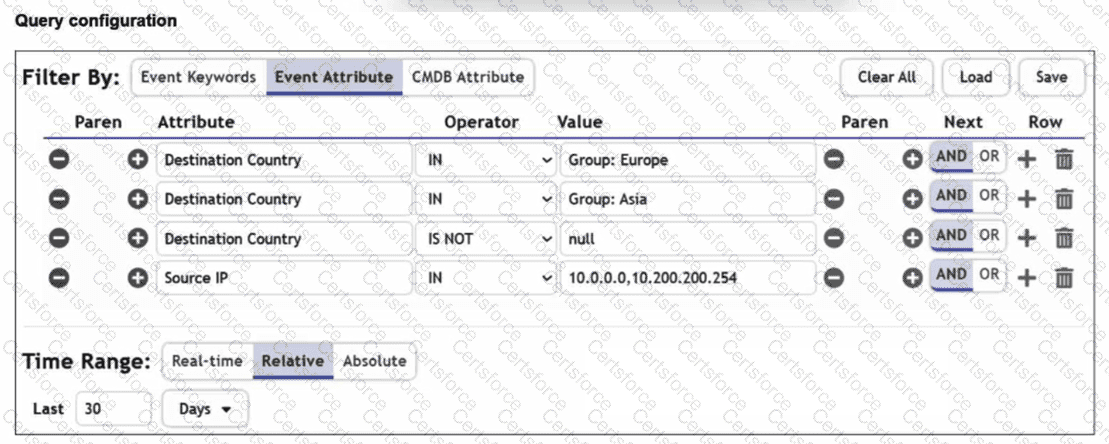
You are trying to find traffic flows to destinations that are in Europe or Asia, for hosts in the local LAN segment. However, the query returns no results. Assume these logs exist on FortiSIEM.

Which three mistakes can you see in the query shown in the exhibit? (Choose three answers)

Options:

A.

The null value cannot be used with the IS NOT operator.


B.

The time range must be Absolute for queries that use configuration management database (CMDB) groups.


C.

There are missing parentheses between the first row (Group: Europe) and the second row (Group: Asia).


D.

The Source IP row operator must be BETWEEN 10.0.0.0, 10.200.200.254.


E.

The logical operator for the first row (Group: Europe) must be OR.


Expert Solution
Questions # 17:

Which two statements about the FortiAnalyzer Fabric topology are true? (Choose two.)

Options:

A.

Downstream collectors can forward logs to Fabric members.


B.

Logging devices must be registered to the supervisor.


C.

The supervisor uses an API to store logs, incidents, and events locally.


D.

Fabric members must be in analyzer mode.


Expert Solution
Questions # 18:

Refer to this partial incident output:

Condition: if this pattern occurs within any 1800-second time window.

Host Interface Name: Red Hat VirtIO Ethernet Adapter

Recv Packet Errors: 0

Sent Packet Errors: 0

Recv Packet Discards: 37

Sent Packet Discards: 0

Recv Packet Error Pct: 0.00

Sent Packet Error Pct: 0.00

Recv Packet Discard Pct: 7.17

Sent Packet Discard Pct: 0.00

Avg Recv Interface Error: 0.00

Avg Sent Interface Error: 0.00

Avg Recv Interface Discard: 16.45

Avg Sent Interface Discard: 0.00

Which conclusion can you make about this incident? Choose one answer.

Options:

A.

It was triggered by a baseline profile incident rule.


B.

It was triggered from a FortiAI machine learning rule.


C.

It was triggered by a correlation rule.


D.

It was triggered by a lookup table.


Expert Solution
Questions # 19:

Which two statements accurately describe the process to create a new rule from a search using FortiSIEM analytics? Choose two answers.

Options:

A.

Raw event logs cannot be used for incident rule creation.


B.

The incident action is automatically configured based on the event type.


C.

All search filter rows are added into a single subpattern.


D.

The default aggregate condition will always be COUNT(Matched Events) > = 1 .


Expert Solution
Questions # 20:

Refer to the exhibit.

Question # 20

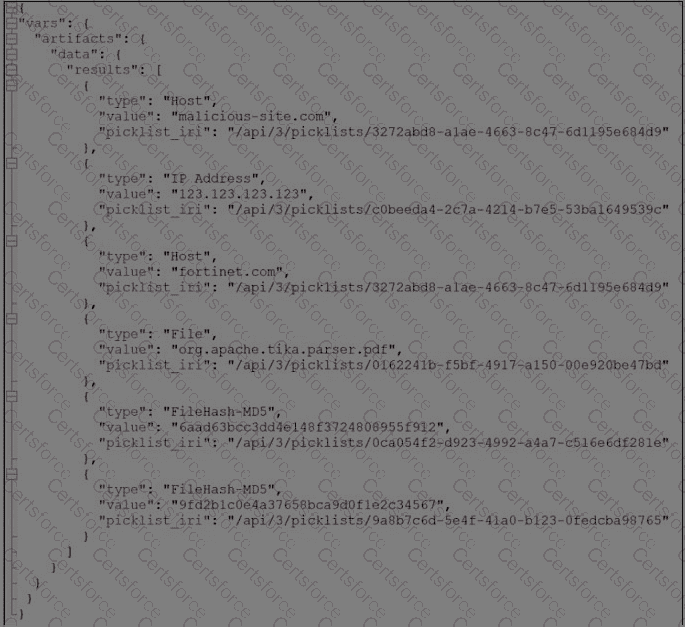
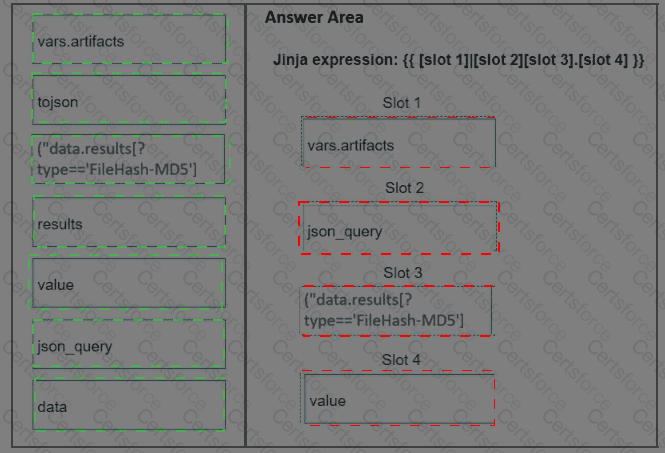
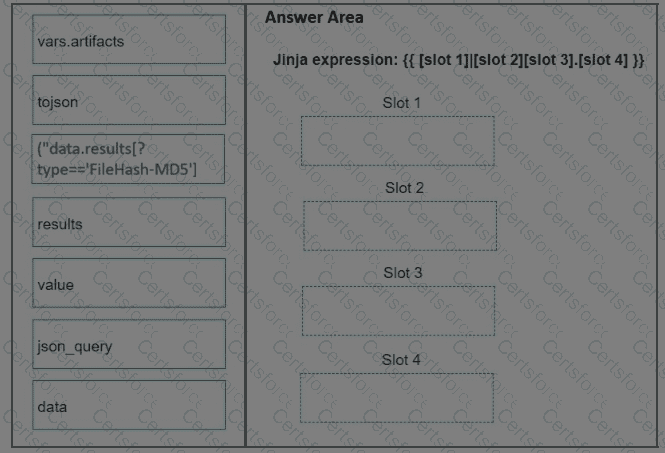
What is the correct Jinja expression to filter the results to show only the MD5 hash values?

{{ [slot 1]|[slot 2] [slot 3].[slot 4] }}

Select the jinja expression in the left column, hold and drag it to a blank position on the right. Place the four correct steps in order, placing the first

step in the first slot. Once you place an expression, you can move it again if you want to change your answer before moving to the next question. You

need to drop four jinja expressions in the work area.

Select and drag the screen divider to change the viewable area of the source and work areas.
Question # 20


Expert Solution
Viewing page 2 out of 3 pages
Viewing questions 11-20 out of questions