Weekend Sale Special Limited Time 75% Discount Offer - Ends in 0d 00h 00m 00s - Coupon code: CFsave75

Pass the Fortinet NSE 5 Network Security Analyst NSE5_FWB_AD-8.0 Questions and answers with CertsForce

Viewing page 1 out of 1 pages
Viewing questions 1-10 out of questions
Questions # 1:

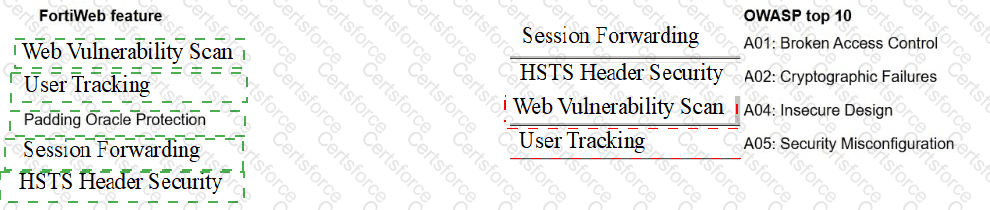
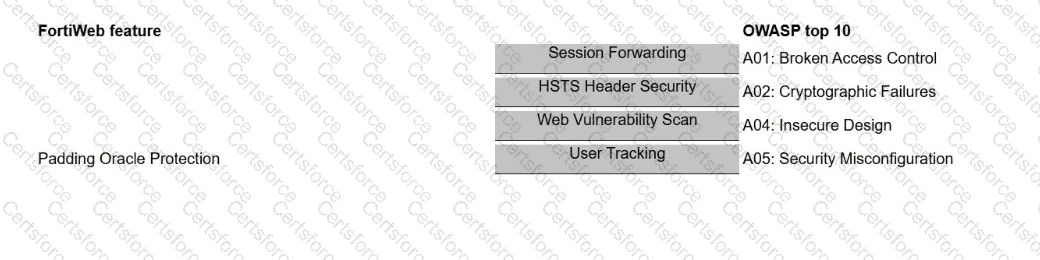
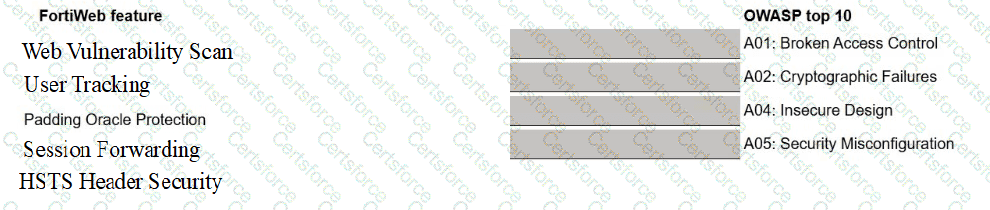
A FortiWeb administrator is reviewing issues found during a security audit. The audit lists shortcomings based on behavior, configuration, and data protection.

The administrator must break down the findings and match them with the correct FortiWeb feature.

Select each FortiWeb feature in the left column, hold and drag it to the blank space next to the OWASP issue in the column on the right. Once you match a FortiWeb

feature to the OWASP issue, you can move it again if you want to change your answer by clicking on the FortiWeb feature. You need to match five FortiWeb features to

the OWASP issue in the work area.
Question # 1


Expert Solution
Questions # 2:

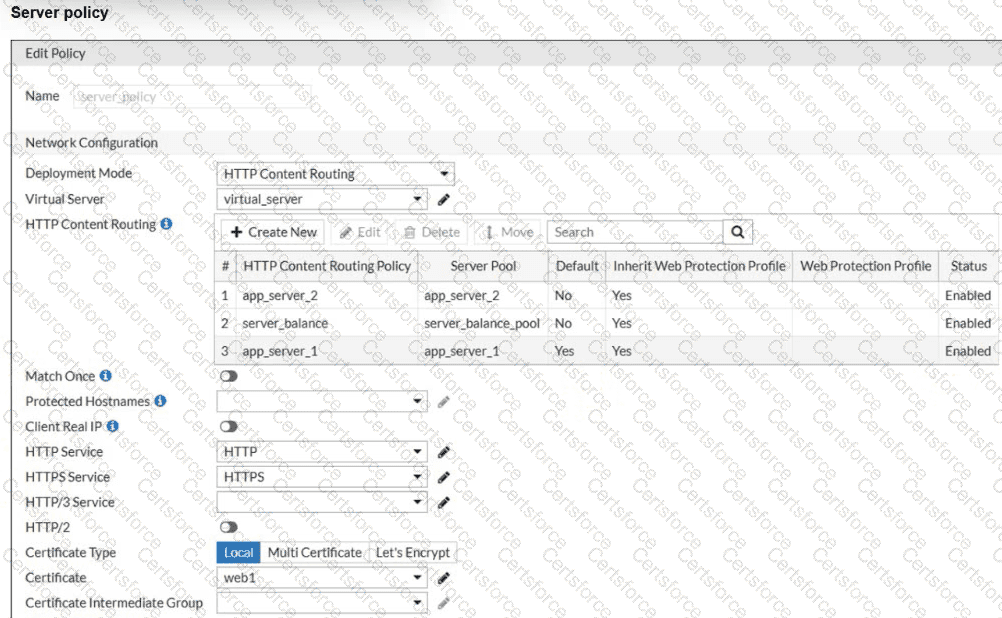
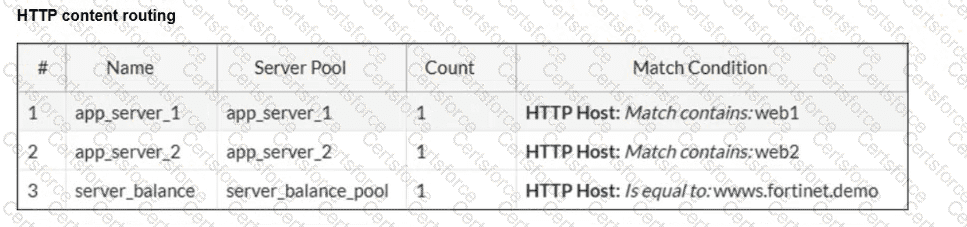
Refer to the exhibits.

Question # 2

Question # 2

A new domain, https://finance.fortinet.demo, was added but not explicitly mapped. Users report the site loads correctly, but you’re unsure which back-end server is being used.

Why is this request succeeding despite no explicit routing rule for finance.fortinet.demo?

Options:

A.

The inherited certificate has a wildcard entry for all subdomains.


B.

FortiWeb auto-generates fallback policies for new domains.


C.

The connection is passed to FortiGate for secondary routing.


D.

The request defaults to app_server_1 because it is marked as the default route.


Expert Solution
Questions # 3:

You recently deployed two FortiWeb devices in an active-active (A-A) high availability (HA) cluster.

During routine maintenance, you want to confirm that the cluster is synchronizing the correct configuration areas and that both FortiWeb devices behave consistently in production.

As the FortiWeb administrator, which two configuration areas should you examine to verify that HA synchronization is functioning correctly? (Choose two.)

Options:

A.

Check the network configuration on both FortiWeb devices—such as interfaces and static routes—to ensure they are aligned.


B.

Review policy configurations, including server policies and protection profiles, to confirm they match across the cluster.


C.

Review inspection and mitigation log files to determine if they are being replicated across both FortiWeb devices.


D.

Verify whether firmware images and upgrade history are synchronized between the FortiWeb devices.


Expert Solution
Questions # 4:

A FortiWeb administrator wants to stop coordinated scraping traffic coming from several IP addresses, each making only a few requests so thresholds never trigger.

Which tactic should the administrator deploy to identify botnets using shared behavioral signals instead of volume?

Options:

A.

A DoS protection profile with extremely low request limits for the entire site.


B.

A static blocklist for all IP addresses seen in logs, even if most appear only once.


C.

Bot mitigation with device fingerprinting to correlate clients by behavior, headers, and JavaScript challenges instead of IP address volume.


D.

A web application firewall (WAF) rule that blocks every user agent that is not on a manually created allowlist.


Expert Solution
Questions # 5:

Which situation best explains when a FortiWeb administrator should enable automatic HTTP-to-HTTPS redirection?

Options:

A.

The organization prefers to keep both HTTP and HTTPS available for flexibility.


B.

Users are accessing a static website that does not handle sensitive data.


C.

The back-end server uses only HTTP and cannot support encryption.


D.

The web application handles logins or personal data and must ensure encrypted communication.


Expert Solution
Questions # 6:

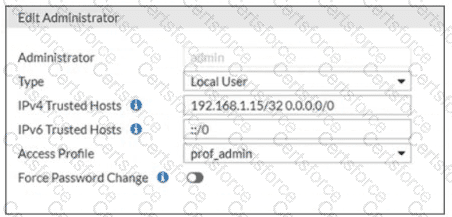
Refer to the exhibit.

Question # 6

There is only one administrator account configured on FortiWeb and IPv6 is not configured on any interface.

Which action should an administrator take to restrict any brute force attacks that attempt to gain access to the FortiWeb management GUI?

Options:

A.

Make configuration changes on the upstream device.


B.

Replace 0.0.0.0/0 with a specific IP address.


C.

Delete the built-in administrator user and create a new one.


D.

Change the setting in the Access Profile field to Read_Only .


Expert Solution
Questions # 7:

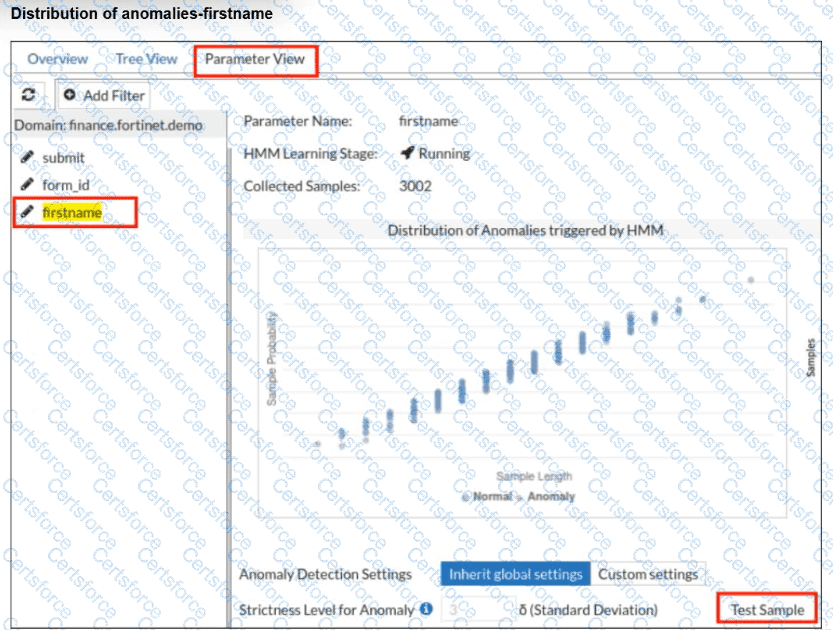
Refer to the exhibit.

Question # 7

Question # 7

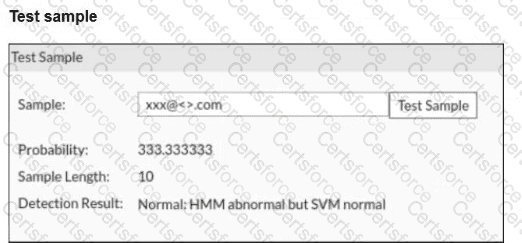
A FortiWeb administrator tests a new form input value after training the machine learning (ML) anomaly detection system.

The hidden Markov model (HMM) flags the input as abnormal, while the support vector machine (SVM) model classifies it as normal. FortiWeb allows the request.

What does this result indicate about the FortiWeb ML anomaly detection behavior?

Options:

A.

The anomaly detection thresholds are too low and must be increased.


B.

One of the ML models should be disabled to avoid inconsistent results.


C.

FortiWeb is correctly allowing an unusual but non-malicious input based on combined HMM and SVM evaluation.


D.

FortiWeb failed to detect an attack and should have blocked the request.


Expert Solution
Questions # 8:

You are a FortiWeb administrator investigating an SQL injection attack on your company’s customer portal. The network firewall and intrusion prevention system (IPS) did not stop the attack.

You decide to deploy a web application firewall (WAF) to help prevent this type of attack.

Which two actions can you take to block application-layer threats? (Choose two.)

Options:

A.

Focus on client-side risks, such as protecting user browsers.


B.

Inspect general network traffic equally between clients and servers.


C.

Detect and block threats like SQL injection, cross-site scripting (XSS), and other Layer 7 attacks.


D.

Filter and analyze HTTP/S requests to block attacks targeting the web server.


Expert Solution
Questions # 9:

Refer to the exhibit.

Question # 9

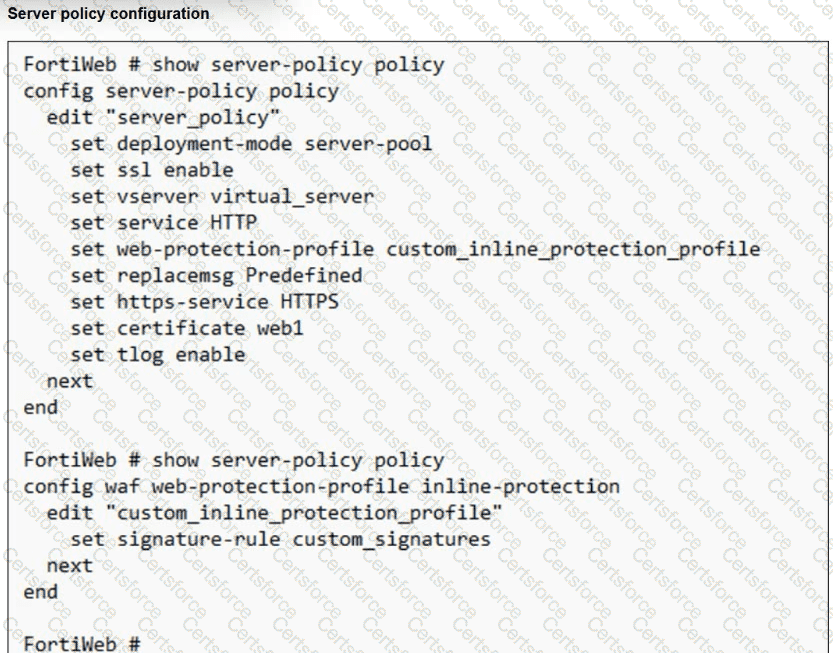
You have deployed FortiWeb behind a FortiGate that is configured as a reverse proxy and inserts the X-Forwarded-For HTTP header when forwarding HTTP and HTTPS traffic.

FortiWeb is using a custom inline protection profile, and logging is enabled, as shown in the exhibit.

You notice that FortiWeb is blocking legitimate users, and all requests in the attack logs appear to come from the FortiGate IP address, not the original client IP address.

Which action should you take to fix this issue?

Options:

A.

Replace the current deployment mode with a one-arm proxy to expose source IP addresses.


B.

Disable IP-based detection features on FortiWeb to avoid IP-related blocking.


C.

Recreate the server policy using the predefined profile instead of a custom one.


D.

Modify the protection profile to use the X-Forwarded-For header for client IP address detection.


Expert Solution
Questions # 10:

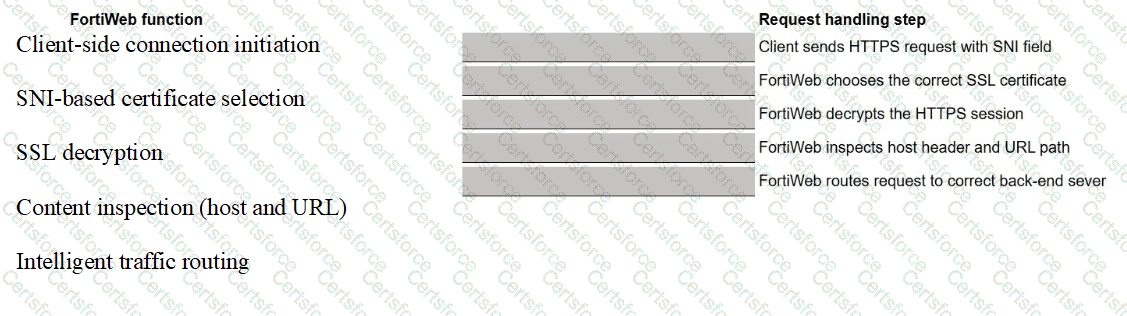
You are hosting multiple secure web applications behind a single public IP address on FortiWeb.

When a client connects to a service, FortiWeb needs to:

    Identify the correct SSL certificate.

    Decrypt the request.

    Route the request to the correct back-end server.

Match each FortiWeb function to the request handling step that performs the function.
Question # 10


Expert Solution
Viewing page 1 out of 1 pages
Viewing questions 1-10 out of questions