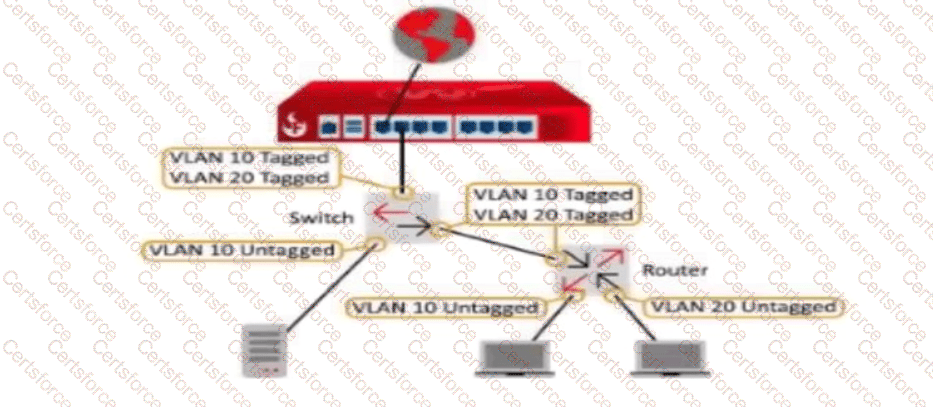
You have an existing network infrastructure built out that uses tagged and untagged VLAN networks. Based on the diagram below, which VLANs must you add to the Firebox interface? (Select one.)
A.
VLAN 10 Untagged and VLAN 20 Untagged
B.
VLAN 10 Tagged and VLAN 20 Tagged
C.
VLAN 10 Untagged and VLAN 20 Tagged
D.
VLAN 10 Tagged and VLAN 20 Untagged
E.
VLAN 10 Untagged, VLAN 10 Tagged, and VLAN 20 Tagged
Under 802.1Q VLAN encapsulation standards, an Ethernet interface can send and receive frames that carry a 4-byte 802.1Q VLAN tag (tagged) or carry no tag header (untagged). When connecting a Firebox interface to an intermediate managed network switch over an 802.1Q trunk link carrying multiple virtual networks, the interface configuration on the Firebox must match the trunk configuration on the switch port.
The topology diagram shows the physical link between the Firebox and the switch carrying:
- VLAN 10 Tagged
- VLAN 20 Tagged
Because the switch forwards frames for both VLAN 10 and VLAN 20 across that uplink with IEEE 802.1Q headers intact, the Firebox physical interface must be configured as a member of VLAN 10 (Tagged) and VLAN 20 (Tagged). This ensures the Fireware network driver processes 802.1Q tags, demultiplexes incoming frames to their respective virtual VLAN sub-interfaces (vlan10 and vlan20), and tags outbound return traffic appropriately.
[Reference: WatchGuard Network Security Essentials — Networking, Policies, and NAT: VLAN Configuration, 802.1Q Tagging, and Trunk Interfaces., ――――――――――――――――――――――――――――――――――――――――――――――――――――――――――]
Contribute your Thoughts:
Chosen Answer:
This is a voting comment (?). You can switch to a simple comment. It is better to Upvote an existing comment if you don't have anything to add.


Submit