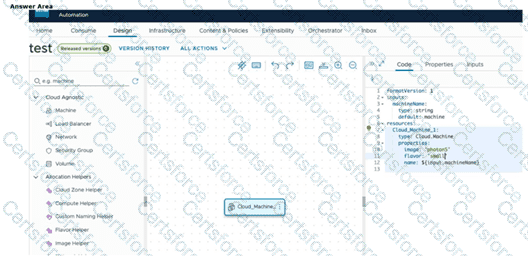
Click on the "Machine" resource under the "Cloud Agnostic" category in the left-side resource palette.
In the VCF 9.0 Automation Design Canvas, the platform provides built-in schema documentation and syntax assistance to help administrators build valid YAML blueprints. To find specific guidance for the cloudConfig stanza—which is used to pass cloud-init or post-provisioning scripts to a guest OS—the administrator should use the resource palette on the left side of the screen.
By clicking on the "Machine" resource (typically found under the Cloud Agnostic category), the interface displays a context-sensitive help pane or schema view. This pane lists all available properties for the Cloud.Machine resource type, including detailed descriptions and examples for cloudConfig. This documentation is essential because cloudConfig requires specific YAML indentation and key-value pairings (such as users: or runcmd:) to be correctly interpreted by the cloud-init agent within the virtual machine. This integrated "just-in-time" assistance ensures that administrators can quickly reference the correct syntax without leaving the design environment, reducing errors in complex multi-cloud template development.
Contribute your Thoughts:
Chosen Answer:
This is a voting comment (?). You can switch to a simple comment. It is better to Upvote an existing comment if you don't have anything to add.



Submit