
Renaming the Omitted Column to Cancelled:
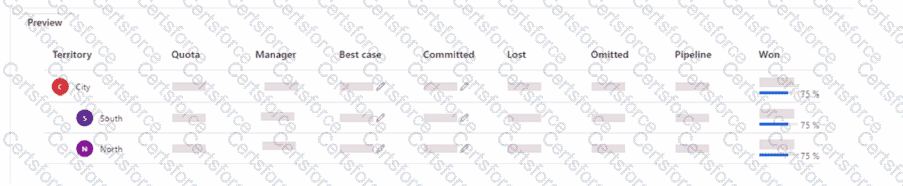
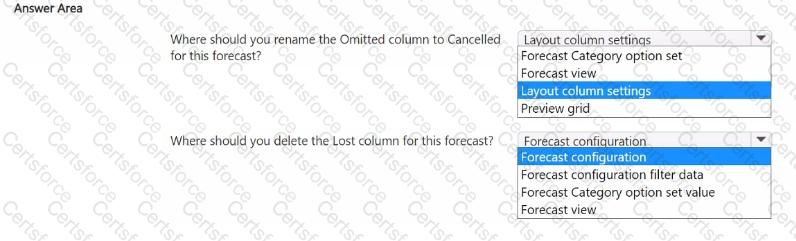
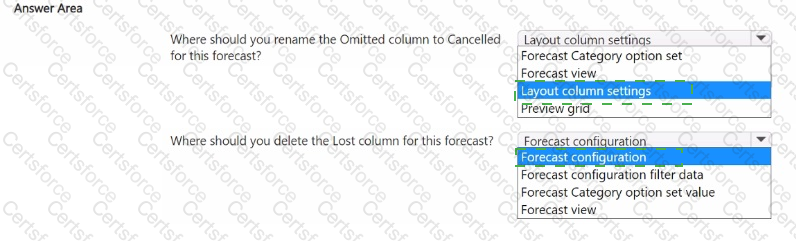
To rename a column in the forecast layout, such as changing Omitted to Cancelled, you should go to Layout column settings. This setting allows you to customize how columns appear in the forecast view, including renaming columns to better match your business terminology.
Renaming within Layout column settings will directly change how this column is labeled in the user interface for clarity and consistency with business terms.
[Reference: Microsoft Documentation - Configure Forecast Layout and Column Settings, Deleting the Lost Column from the Forecast:, To remove a column entirely, such as the Lost column, you should adjust the Forecast configuration. This configuration setting allows you to add or remove columns from the forecast grid., Modifying Forecast configuration affects the structural aspects of the forecast, such as which columns are included, based on what is necessary for reporting and analysis., Reference: Microsoft Documentation - Configure and Manage Forecasts, By utilizing the Layout column settings for renaming columns and the Forecast configuration for adding or removing columns, you can tailor the forecast layout to meet specific business requirements, ensuring the forecast view is both relevant and easy for users to interpret., , , ]


Submit