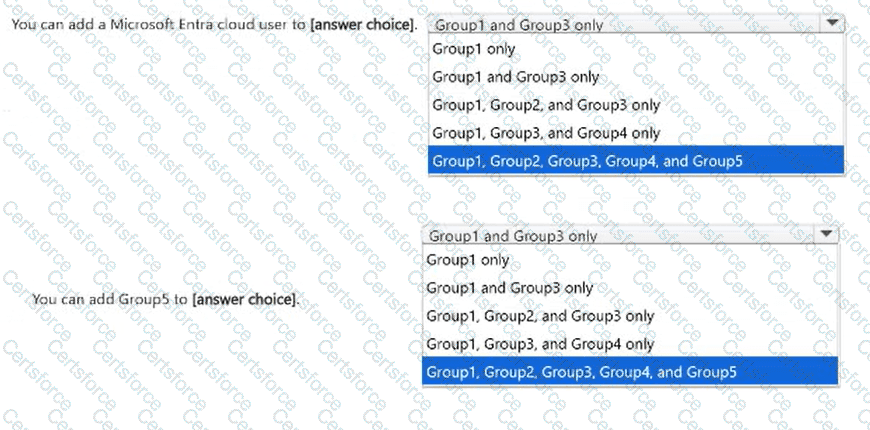
You can add a Microsoft Entra cloud user to: Group1, Group2, and Group3; You can add Group5 to: Group1 and 3 only
Microsoft Entra group membership is governed by group type, membership assignment method, and source of authority.
First selection: Group1, Group2, and Group3.
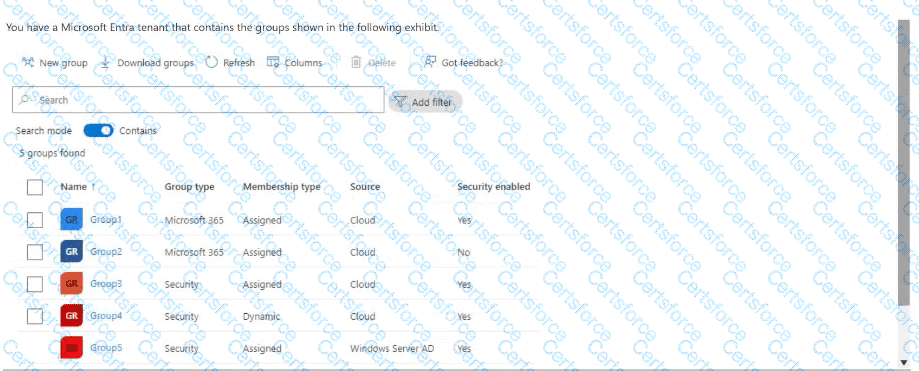
The exhibit identifies Group1 and Group2 as cloud-managed Microsoft 365 groups using assigned membership. Microsoft 365 groups support user membership regardless of whether the group ' s Security enabled property is set to Yes or No.
Group3 is a cloud-managed security group with assigned membership, so administrators can also add a Microsoft Entra user directly.
Group4 uses dynamic membership, meaning users are included automatically according to configured rules rather than manually assigned.
Group5 originates from Windows Server Active Directory. Its membership is managed by the authoritative on-premises directory.
Second selection: Group1 and Group3 only.
Microsoft Entra supports nesting security groups within other compatible security groups. Consequently, Group5 can be added as a member of Group3.
Microsoft 365 groups do not support groups as members, and dynamic group membership cannot be manually modified.
The first answer above reflects Microsoft ' s documented group membership behavior rather than simply reproducing the recording ' s selected response.
Microsoft References:
https://learn.microsoft.com/en-us/graph/api/group-post-members



Submit