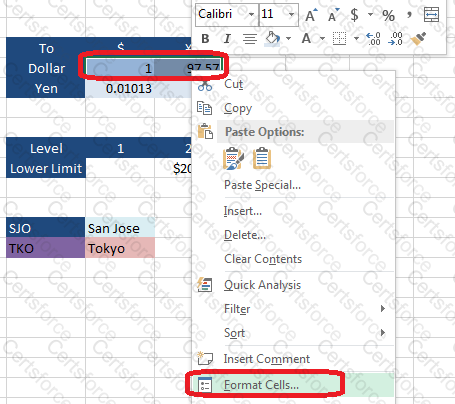
Step 1:Click cell I7, Shift-click cell J7, right-click in this area, and from the context menu select Format Cells.
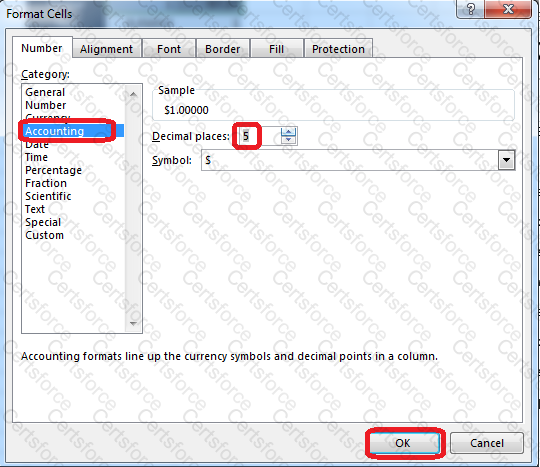
Step 2:In the Format Cells dialog box select Category Accounting, change Decimal places to: 5, and click OK.
Step 3:Click cell I8, shift-click cell J8,right-click in this area, and from the context menu select Format Cells.
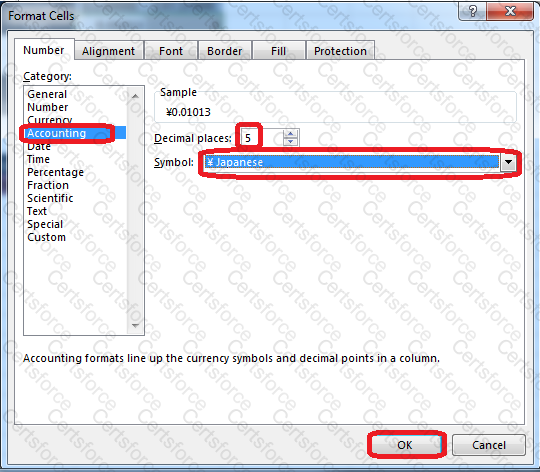
Step 4:In the Format Cells dialog box select Category Accounting, change Decimal places to: 5, set Symbol to: ¥ Japanese, and click OK.
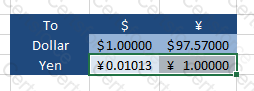
Result will be like:
Contribute your Thoughts:
Chosen Answer:
This is a voting comment (?). You can switch to a simple comment. It is better to Upvote an existing comment if you don't have anything to add.


Submit