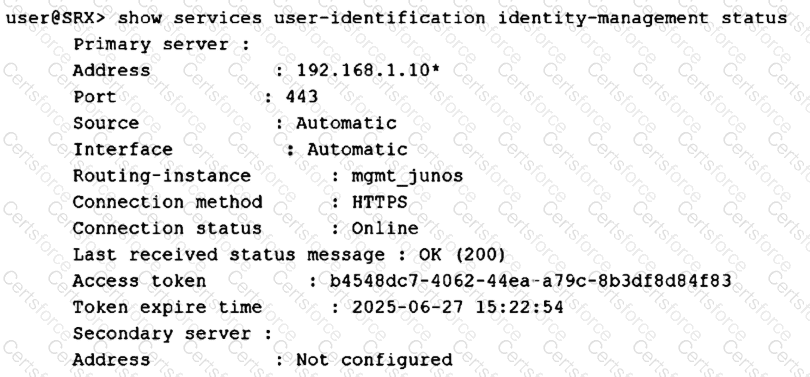
The correct answers are B and D. The command output is from the SRX Series device: show services user-identification identity-management status. Under Primary server, the exhibit shows Address: 192.168.1.10, Port: 443, Connection method: HTTPS, and Connection status: Online. In Juniper Identity Management Service integration, the SRX is the client that connects to the configured primary JIMS server. Juniper’s configuration workflow specifically describes configuring “the IP address of the primary JIMS server” under services user-identification identity-management connection primary address, and the verification output shows that primary server address with its connection status.
Option A is wrong because 192.168.1.10 is listed under Primary server, not as the local SRX address. Option C is also wrong because this SRX command verifies the SRX-to-JIMS identity-management connection, not the backend JIMS-to-domain-controller connection. Domain controller reachability would be validated from JIMS or through JIMS-specific status/monitoring, not by this SRX-side output. The displayed Online state and OK (200) status confirm that the SRX successfully reached the JIMS HTTPS service and received a valid response. Juniper examples use the same status command to validate that the SRX identity-management connection to JIMS is online.
Chosen Answer:
This is a voting comment (?). You can switch to a simple comment. It is better to Upvote an existing comment if you don't have anything to add.


Submit