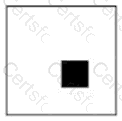
The correct coordinate is 50,50. In an HTML5 canvas, the coordinate system begins at the upper-left corner of the canvas. The x-coordinate increases as you move to the right, and the y-coordinate increases as you move downward. Therefore, 0,0 represents the top-left corner of the entire white canvas area. In the displayed image, the filled black square is not positioned at the top-left edge, top-center, or left-center of the canvas. Instead, its upper-left corner is offset both horizontally and vertically from the origin. Among the available choices, 50,50 is the only coordinate that moves the square 50 units to the right and 50 units down from the canvas origin. This matches the visual placement of the filled square inside the white canvas. Option A would place the square at the canvas origin. Option B would place it along the left side, halfway down. Option C would place it along the top edge, halfway across. References/topics: HTML5 canvas coordinate system, x/y positioning, drawing rectangles, fillRect(x, y, width, height).
Contribute your Thoughts:
Chosen Answer:
This is a voting comment (?). You can switch to a simple comment. It is better to Upvote an existing comment if you don't have anything to add.


Submit