
Black Friday Reward - Upto 75% off - Ends in 0d 00h 00m 00s - Coupon code: CFsave75

HPE Network Security Expert Written Exam HPE7-A10 Question # 2 Topic 1 Discussion

HPE Network Security Expert Written Exam HPE7-A10 Question # 2 Topic 1 Discussion

HPE7-A10 Exam Topic 1 Question 2 Discussion:
Question #: 2
Topic #: 1

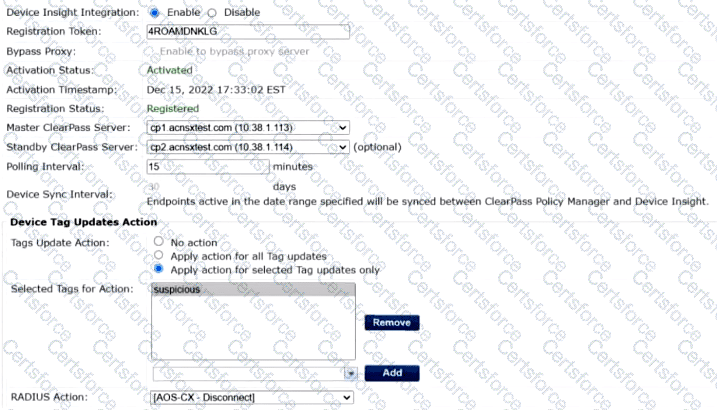
Refer to the exhibit.

Device Insight Integration:

* Device Insight Integration: Enable

* Registration Token: 4ROAMDMNKLG

* Registration Status: Registered

* Master ClearPass Server: cp1.acnsxtest.com (10.38.1.113)

* Polling Interval: 15 minutes

Device Tag Updates Action:

* Tags Update Action: Apply action for selected Tag updates only

* Selected Tags for Action: `suspicious`

* RADIUS Action: `[AOS-CX - Disconnect]`

HPE Aruba Networking ClearPass Policy Manager (CPPM) uses the settings displayed in the exhibit. You use the tag shown in the exhibit in enforcement policies associated with several NAS types, including HPE Aruba Networking APs, HPE Aruba Networking gateways, and AOS-CX switches.
HPE7-A10 Question 2

What should you do to ensure clients are reclassified and receive the proper treatment based on the tag?


A.

Set the Tags Update Action to No Action. Then instead enable the RADIUS CoAs using enforcement profiles in the rules that match clients with the tag shown in the exhibit.


B.

Change the RADIUS action to [Aruba Wireless - Bounce Switch Port] which is supported by all the NASes in question.


C.

Enable profiling in each service using one of these enforcement profiles. Set the profiling action to the correct one for the NASes using that service.


D.

Change the RADIUS action to [Aruba Wireless - Terminate Session] which is supported by all the NASes in question.


Get Premium HPE7-A10 Questions

Contribute your Thoughts:


Chosen Answer:
This is a voting comment (?). It is better to Upvote an existing comment if you don't have anything to add.