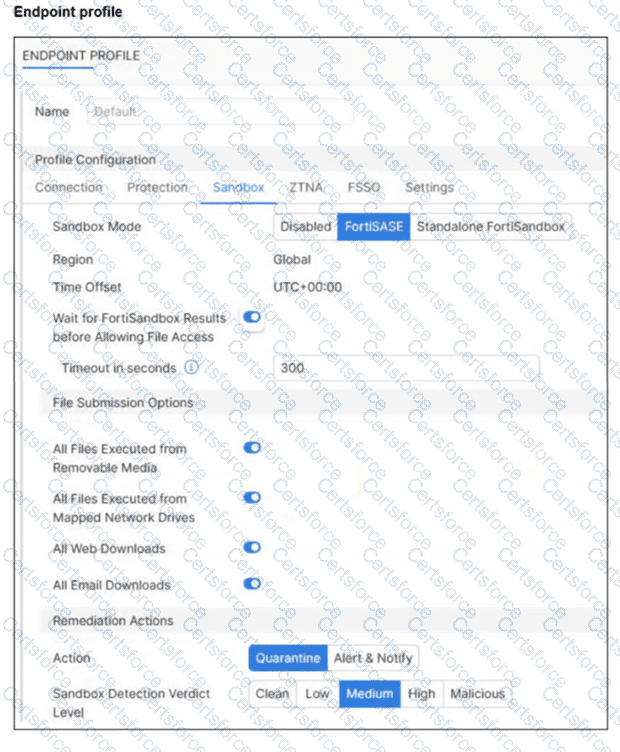
The exhibit ( image_595357.jpg ) illustrates the Sandbox configuration tab within a FortiSASE Endpoint Profile . This profile dictates how the managed FortiClient agent handles suspicious files and interacts with the sandbox service.
Profile-Based Enforcement: In the FortiSASE architecture, security features are not applied globally by default; they are enabled through specific profiles assigned to endpoints. Therefore, the sandbox inspection and remediation logic will only be active for endpoints that have been assigned a profile where the Sandbox feature is enabled.
Removable Media Protection: Under the File Submission Options in the exhibit, the setting All Files Executed from Removable Media is toggled on. This ensures that any file executed from a USB drive or other external storage is sent to the FortiSandbox for analysis before being permitted to run on the endpoint.
Sandbox Mode: The Sandbox Mode is set to FortiSASE , indicating that files are sent to the integrated cloud-native sandbox rather than an on-premises appliance. This makes Option A incorrect.
Quarantine Threshold: The Remediation Actions show that the Action is set to Quarantine for files meeting the Sandbox Detection Verdict Level of Medium . This acts as a minimum threshold; FortiClient will quarantine files identified as Medium, High, or Malicious. Option B is incorrect because it implies only medium-level files are quarantined, whereas higher-risk levels would also be blocked.
Contribute your Thoughts:
Chosen Answer:
This is a voting comment (?). You can switch to a simple comment. It is better to Upvote an existing comment if you don't have anything to add.


Submit