New Year Sale Limited Time 70% Discount Offer - Ends in 0d 00h 00m 00s - Coupon code: simple70

Pass the Autodesk Autodesk Certified Professional RVT_ELEC_01101 Questions and answers with CertsForce

Viewing page 2 out of 2 pages
Viewing questions 11-20 out of questions
Questions # 11:

Refer to exhibit.

Question # 11

Options:

A.

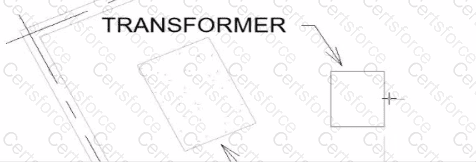
Select the callout and choose a detail view under Reference Other View.


B.

Select the callout and change its type from the Type Selector.


C.

Delete the existing callout and create a new one with the correct type.


D.

Open the callout view from the Project Browser and change its type.


Expert Solution
Questions # 12:

Refer to exhibit.

Question # 12

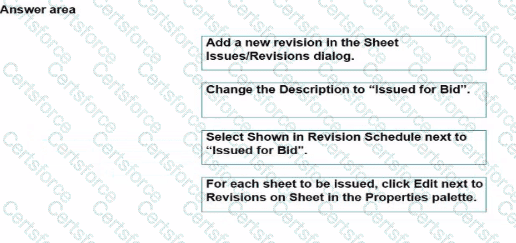
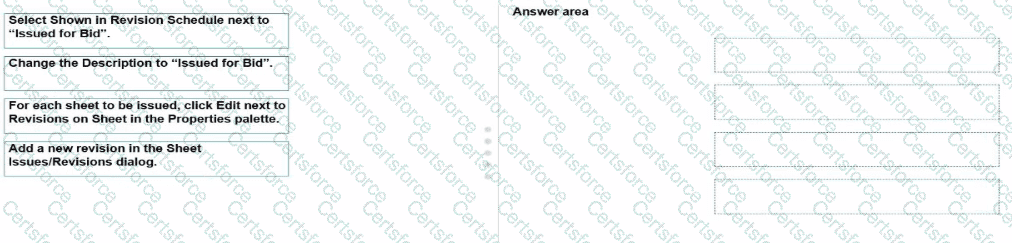
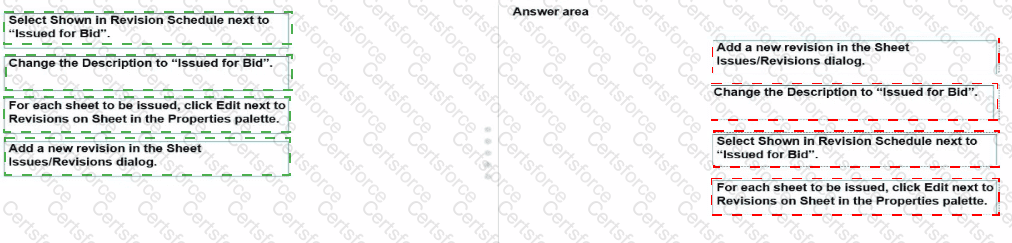
An electrical designer is issuing several sheets and wants 'Issued for Bid" to appear in the revision schedule of the title block. Drag and drop into the correct order to indicate how this can be accomplished to only the sheets that are being issued.
Question # 12


Expert Solution
Questions # 13:

Refer to the exhibit.

Question # 13

Options:

A.

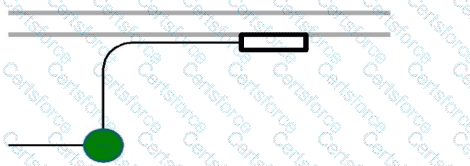
Project Browser > Conduits > Conduits with Fittings > Single Line Symbology


B.

Properties > Edit Type > Single Line Symbology


C.

Object Styles > Conduits > Rise/Drop > Single Line Symbology


D.

Electrical Settings > Conduit Settings > Rise Drop > Single Line Symbology


Expert Solution
Questions # 14:

Refer to exhibit.

Question # 14

An electrical designer wants to place electrical equipment on the pad.

How should the component be aligned to the pad before placement?

Options:

A.

Start the Align tool. tab to select the object edge, and then select the equipment edge.


B.

Start the Align tool and select the edges to be aligned.


C.

Place the cursor over an edge of the object and then press Spacebar.


D.

Place the cursor anywhere over the object and then press Spacebar.


Expert Solution
Questions # 15:

An electrical designer needs to add a drafting view to a model from another project. What is the method to do this?

Options:

A.

Select Transfer Project Standards, select the desired project, and then select the drafting view.


B.

Select Open, select the desired project, right-click the desired drafting view, and then copy/paste


C.

Select Link Revit, browse to the desired model, and then select desired drafting view


D.

Select Insert from File, select Insert Views from File, browse to the desired project, and then select the drafting view.


Expert Solution
Questions # 16:

Refer to exhibit.

Question # 16

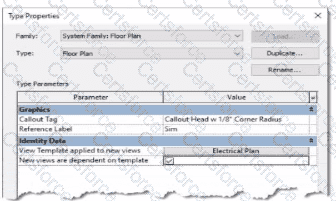
An electrical designer is reviewing the Type Properties for a floor plan view. How will the view behove when creating a new floor plan?

Options:

A.

The Electrical Plan view template will be assigned to a new floor plan view created with the Floor Plan tool with the Floor Plan type selected


B.

Creating a new floor plan view using the Floor Plan tool with the Floor Plan type selected will create a new Electrical Plan view template.


C.

When duplicating a floor plan view of any type, the Electrical Plan view template will be assigned to the new floor plan view.


D.

A new floor plan view created by duplicating a floor plan view of the Floor Plan type will be duplicated as a dependent view.


Expert Solution
Questions # 17:

An electrical designer needs to directly connect panel B to panel A without a breaker. Panel A's load must reflect the entire load from panel B. Which conditions must be met to ensure that panel B is correctly connected to panel A?

Options:

A.

Both panels are assigned to the same switchboard, and the subfeed lug breaker option is selected.


B.

Both panels are assigned to the same distribution system, and the circuit subfeed panel type option is selected.


C.

Both panels are assigned to the same distribution system, and the connection type is set to feed through lugs.


D.

Both panels are connected via a transformer, and the connection type is set to feed through lugs.


Expert Solution
Questions # 18:

Refer to exhibit.

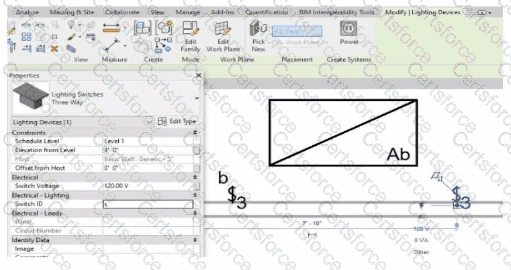
(The image is presented in Imperial units: 1 In = 25 mm [Metric units rounded].)
Question # 18

An electrical designer is trying to add the selected three-way switch to the existing switch system "b". The designer is unable to add the switch to the switch system.

Why is this problem occurring?
Options:

A.

Revit is not in Edit Switch System mode.


B.

The switch's Switch ID parameter does not match the switch system.


C.

The switch is not powered.


D.

A switch system can contain only one switch.


Expert Solution
Viewing page 2 out of 2 pages
Viewing questions 11-20 out of questions