A developer wants to create an automation in which the input from the user and pre-defined conditions determine the transition between stages. In UiPath Studio, which is the recommended type of workflow that meets the requirement?
What is the primary role of the UiPath Remote Runtime component in automation projects involving virtual environments?
What is the purpose of the Invoke Code activity in UiPath?
You need to create a process where multiple events happen at the same time, and triggers must handle these events simultaneously in an attended automation.
How can you set up this parallel execution of triggers?
Following UiPath best practices, which project structure is best-suited for complex processes in UiPath Studio?
What are the four job types present in the Job Type field according to the place of execution and robot impersonation?
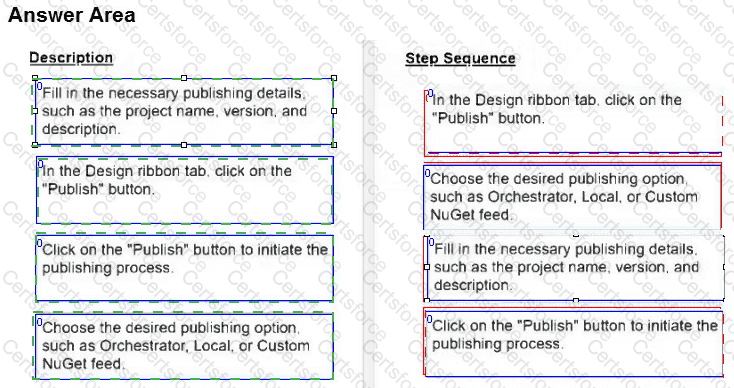
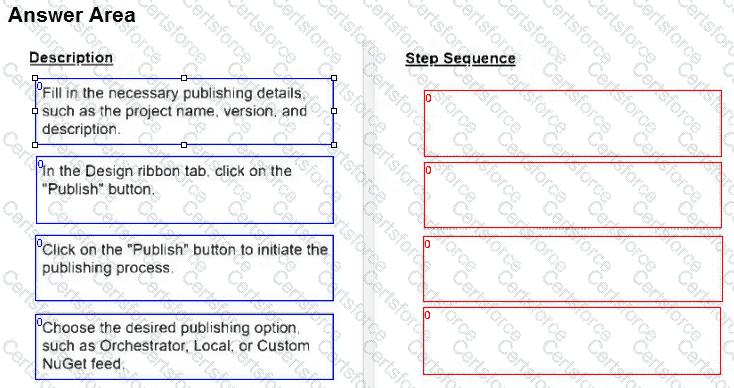
What are the steps to publish a project from UiPath Studio?
Instructions: Drag the Description found on the " Left " and drop on the correct Step Sequence found on the " Right " .
A developer is building a process that types data into input fields using the Hardware Events input method. Which property of the Type Into activity should be modified to reduce the pace at which the input string characters are typed into the fields?
A user is working on their computer while an automation is running in PiP mode. What can the user do while the process runs?
In the Robotic Enterprise (RE) Framework, at which point should a developer log a clear message with the Logging Level set to " Information, " adhering to the best practices for automating a production-level process?