New Year Sale Limited Time 70% Discount Offer - Ends in 0d 00h 00m 00s - Coupon code: simple70

Pass the Oracle Oracle CPQ Cloud 1z0-1033-25 Questions and answers with CertsForce

Viewing page 2 out of 4 pages
Viewing questions 11-20 out of questions
Questions # 11:

A customer attempts to set up Subscription Ordering on their site using the steps outlined in the ABO Implementation Guide. The site has been previously set up with BOM Mapping for a specific model. Upon testing the Subscription Ordering functionality for this model, they notice that no values are populated in the Action Code Transaction Line level attribute when adding line items to their Transaction.

Which statement is true?

Options:

A.

They added an incorrect reverse mapping entry for the model in the Oracle_aboPart2Model table (Admin > Data Tables).


B.

They selected an incorrect function for the “BML Util Function” selection under BOM settings (Admin > BOM > Declare Util Function).


C.

They specified an incorrect site URL in the abo_initializeContext BML Util Library function (Admin > BML Library).


D.

They provided incorrect BOM Mapping values for the model in the BOM Item Definition and BOM Item Mapping tables (Admin > Data Tables).


E.

They failed to incorporate conditionals to handle action code statuses in the formula for the Price (List) Transaction attribute (Admin > Process Definition > Formulas).


Expert Solution
Questions # 12:

Which two fields are required when adding a new user to the CPQ Cloud site?

Options:

A.

Email


B.

Last Name


C.

First Name


D.

Type


E.

Password


Expert Solution
Questions # 13:

Identify the three data types available for part custom fields. (Choose three.)

Options:

A.

“Date,” can include time


B.

“String,” can be changed to “Single Select Menu”


C.

“Boolean”


D.

“Float,” can be changed to “Integer”


E.

“Currency”


F.

“Multi Select menu”


Expert Solution
Questions # 14:

Your customer has a Configurator on a site with two Commerce processes. Which two options allow you to control in which Commerce process a new transaction will be created when starting from the Configurator?

Options:

A.

Populate the Target Commerce Process field with configuration recommended item rules.


B.

For one invocation action, define two different invocation rules with condition BML functions.


C.

For each Commerce process, create a “Create transaction” button by generating an invocation action.


D.

Assign a user or a user group to the Commerce process action permissions.


Expert Solution
Questions # 15:

What is the correct order of execution of Configuration rules for an attribute that has both Recommendation and Constraint rules written on it?

Options:

A.

Recommendation, Constraint, Hiding, Recommended Item


B.

Constraint, Hiding, Recommendation, Recommended Item


C.

Constraint, Recommendation, Constraint, Hiding, Recommended Item


D.

Hiding, Constraint, Recommendation, Recommended Item


E.

Recommendation, Recommended Item, Hiding, Constraint


Expert Solution
Questions # 16:

Your users receive a notification for a transaction from CPQ when an approval has been retracted and is no longer needed. The notification contains a generic message about this action. However, users would like to get more details about the transaction.

What is the Oracle-recommended best practice to fulfill this requirement in CPQ?

Options:

A.

Trigger an email action to notify users by custom defining the email’s subject and body, which contain the transaction details, by using the advanced function available in the Revise action.


B.

When a transaction needs to be revised, allow the transaction owner to send a parallel email to approvers, which should include the necessary transaction details.


C.

Switch the system-generated email-to-email template, which will include the desired transaction information when approvers are notified.


Expert Solution
Questions # 17:

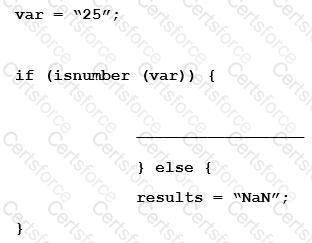
Given the following code:

Question # 17

Which statement will return the value for results as 25.0 when it is put in place of the blank line shown above the “}else{” statement?

Options:

A.

results = atoi (var);


B.

results = atof (var);


C.

results = stringtointeger (var);


D.

results = stringtofloat (var);


Expert Solution
Questions # 18:

Which three discount types are available in pricing? (Choose three.)

Options:

A.

amount discount


B.

absolute price


C.

promotion discount


D.

quantity-dependent discount


E.

percent discount


Expert Solution
Questions # 19:

You want to enable the display of ABO Delta Pricing in the Line Item Grid of the transaction layout. This requires the creation of new Commerce attributes to support this functionality.

What type of attributes should you create to enable Delta Pricing in the Line Item Grid of the transaction layout?

Options:

A.

Delta Pricing Array Set


B.

ABO Delta Pricing Set


C.

Delta Pricing Set


D.

Delta Currency Set


Expert Solution
Questions # 20:

Your customer wants to create a user that has complete access to the site and has the ability to add and edit new users.

Which procedure should you follow to accomplish this?

Options:

A.

Click the Add button on the User Administration List page; enter values for the required fields (Login, Password, Email, First Name, Last Name, and Phone Number); set the Type field to Admin; click the Add button to add the user to the system; click the new user’s name on the User Administration List page to edit the user; select the Add New Users check box; and click the Add button to save the changes.


B.

Click the Add button on the User Administration List page; enter values for the required fields (Login, Email, and First Name); click the Add button to add the user to the system; click the new user’s name on the User Administration List page to edit the user; select the Create/Modify Users check box; and click the Update button to save the changes.


C.

Click the Add button on the User Administration List page; enter values for the required fields (Login, Email, and First Name); set the Type field to FullAccess; select the Create/Modify Users check box, and click the Add button to add the user to the system.


D.

Click the Add button on the User Administration List page, set the Type field to Admin, click the Add button to add the user to the system, click the new user’s name on the User Administration List page to edit the user, select the Create/Modify Users check box, and click the Update button to save the changes.


E.

Click the Add button on the User Administration List page; enter values for the required fields (Login, Email, and First Name); set the Type field to FullAccess; click the Add button to add the user to the system; click the new user’s name on the User Administration List page to edit the user, select the Create/Modify Users check box; and click the Update button to save the changes.


Expert Solution
Viewing page 2 out of 4 pages
Viewing questions 11-20 out of questions