
New Year Sale Limited Time 70% Discount Offer - Ends in 0d 00h 00m 00s - Coupon code: simple70

Pass the Google G Suite Certification GSuite Questions and answers with CertsForce

Viewing page 2 out of 2 pages
Viewing questions 11-20 out of questions
Questions # 11:

In a Google Hangouts video call, your customer asks if there are any summer discounts. You want to show them a draft document without giving them direct access to the Google Docs document. What should you do? (Choose two.)

Options:

A.

From your Gmail inbox, send your customer an attachment of the summer discount flyer


B.

From Google Drive, add the customer as a collaborator to the folder with the summer discount flyer document


C.

From the Google Hangouts video call, present only the window with the summer discount flyer


D.

From Google Docs, add the customer as a collaborator to the summer discount flyer document


E.

From the Google Hangouts video call, present your entire screen


Expert Solution
Questions # 12:

Overview

In the following tasks, you will demonstrate your ability to work in Google Docs. Dream Digital Design is a web design company known for building exceptional websites. You will be editing the job description for the new web designer role that will open shortly. Use the Dream Digital Design Job Description for all the tasks in this scenario.
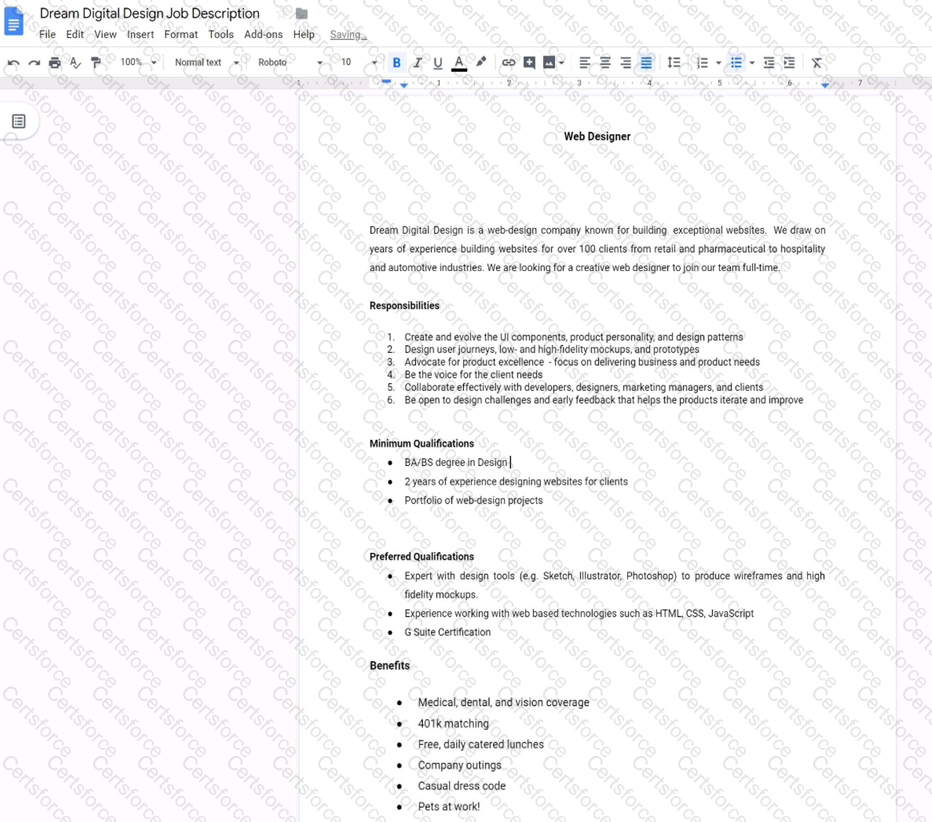
Question # 12

Change the font of all the text in the document to Arial, font size 11.


Expert Solution
Questions # 13:

You want to link to your Google Slides presentation from the company’s website. The web developer has asked you to provide a hyperlink that will start the slideshow as soon as the user clicks the link. What should you do?

Options:

A.

Click Insert and then click Link


B.

Click File, click Download as, and then click Microsoft PowerPoint (.pptx)


C.

Click Share and then click Get shareable link


D.

Click File, click Publish to the web, click Link, and then click Publish


Expert Solution
Questions # 14:

You need to find an audio file on Google Drive that your manager shared with you recently. You know that the type of file you are looking for is audio, and the owner of the file is lisa@kelvincars.com. What should you do to quickly find the file on Google Drive?

Options:

A.

Click on the dropdown menu in the search bar of Google Drive, select audio as the typo of file, select owned by me as owner, and then click Search.


B.

Click on the dropdown menu in the search bar of Google Drive, select audio as the type of file, enter lisa@kelvincars.com as owner, and then click Search.


C.

In the search bar of Google Drive, enter type:video owner:me


D.

In the search bar of Google Drive, enter type:video owner:lisa@kelvincars.com


Expert Solution
Viewing page 2 out of 2 pages
Viewing questions 11-20 out of questions