
Pre-Summer Special Limited Time 70% Discount Offer - Ends in 0d 00h 00m 00s - Coupon code: force70

Pass the F5 F5-CA F5CAB1 Questions and answers with CertsForce

Viewing page 2 out of 2 pages
Viewing questions 11-20 out of questions
Questions # 11:

Refer to the exhibit.
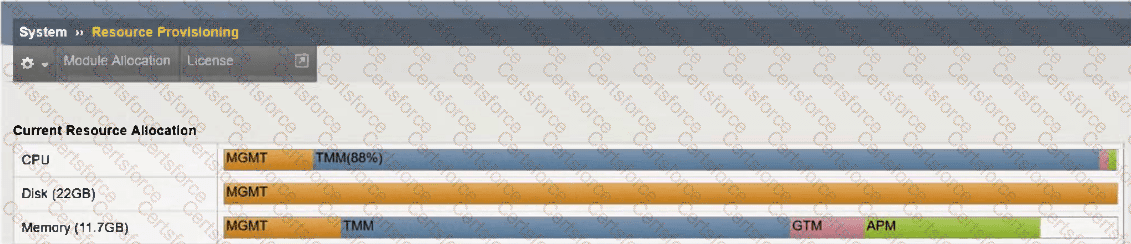
Question # 11

An organization has purchased a BIG-IP license that includes all available modules but has chosen to provision only the modules they require.

The exhibit displays the current resource allocation from the System → Resource Provisioning page.

Based on the information provided, which F5 modules have been provisioned?

Options:

A.

LTM, APM


B.

DNS, APM


C.

LTM, DNS, APM


D.

TMM, DNS, APS


Expert Solution
Questions # 12:

An organization is planning to upgrade a BIG-IP system from 16.1.x to 17.1.x .

For a successful upgrade, the Service Check Date must be equal to or newer than the License Check Date required for 17.1.x.

Which command will show the Service Check Date on the BIG-IP system being upgraded?

Options:

A.

grep " Service check date " /config/bigip.license


B.

grep " Service check date " /config/bigip.conf


C.

grep " Service check date " /config/svc_chk_date.dat


D.

grep " Service check date " /config/BigDB.dat


Expert Solution
Questions # 13:

How can the BIG-IP Administrator tell when an unlicensed module has been provisioned?

Options:

A.

A BIG-IP does not allow unlicensed modules to be provisioned.


B.

When provisioning an unlicensed module, a warning will appear.


C.

A Provisioning Warning will be displayed in the GUI in the upper left corner.


Expert Solution
Questions # 14:

A BIG-IP Administrator needs to install a HotFix on a standalone BIG-IP device.

The device currently has HD1.1 as the Active Boot Location.

The administrator has already reactivated the license and created a UCS archive.

In which sequence should the administrator perform the remaining steps ?

Options:

A.

Install HotFix in HD1.2, Install base Image in HD1.2, Activate HD1.2


B.

Install HotFix in HD1.1, Reboot the BIG-IP device, Install UCS Archive


C.

Install base Image in HD1.2, Install HotFix in HD1.2, Activate HD1.2


D.

Activate HD1.2, Install base Image in HD1.2, Install HotFix in HD1.2


Expert Solution
Viewing page 2 out of 2 pages
Viewing questions 11-20 out of questions