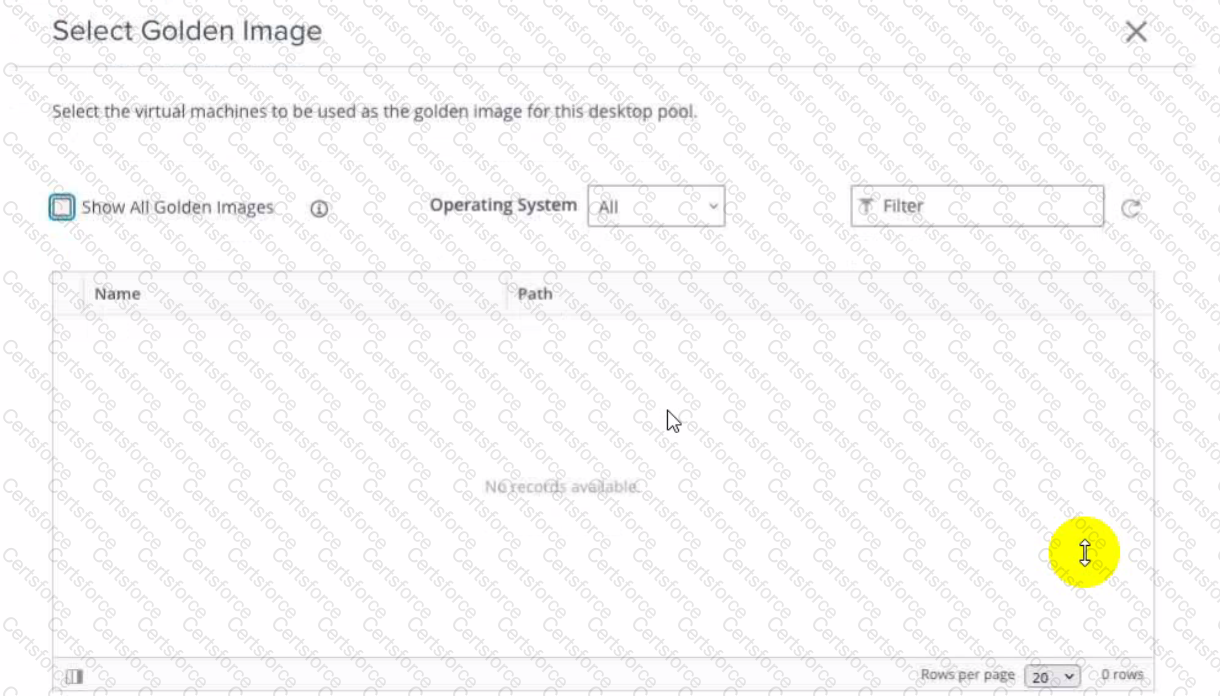
The administrator can take two actions to make the golden image show up in the Golden Image selection window. First, they can login to the vSphere Client, select the Golden Image virtual machine and create a snapshot. This will make the golden image available in the selection window. Second, they can login to the vSphere Client, select the Golden Image virtual machine and convert it to a template. This will also make the golden image available in the selection window.
A golden image is a virtual machine that contains the operating system, applications, and settings that are required for an instant clone desktop pool. To create an instant clone desktop pool, the administrator must select a golden image and a snapshot from the vSphere inventory. The snapshot must be taken after installing and configuring the Horizon Agent on the golden image1. If there is no snapshot or no template available, the golden image will not show up in the selection window.
The other options are not correct for this scenario:
Login to the vSphere Client, select the Golden Image virtual machine and delete all snapshots. This option is not correct because deleting all snapshots will not make the golden image show up in the selection window. In fact, it will prevent the administrator from creating an instant clone desktop pool, as a snapshot is required for instant cloning2.
Refresh the Select Golden Image view and select the Golden Image. This option is not correct because refreshing the view will not change the availability of the golden image in the selection window. The administrator must create a snapshot or a template of the golden image before it can be selected.
Login to the vSphere Client, select the Golden Image virtual machine and clone it to a new virtual machine. This option is not correct because cloning the golden image to a new virtual machine will not make it show up in the selection window. The administrator must still create a snapshot or a template of the cloned virtual machine before it can be selected.
References:
Preparing a Golden Image Virtual Machine for Instant-Clones
Snapshot vmdk files of the golden image used to publish Instant clone …
Create an Automated Instant-Clone Desktop Pool
Instant Clone Desktop Pools
[VMware Horizon 8.x Professional]


Submit