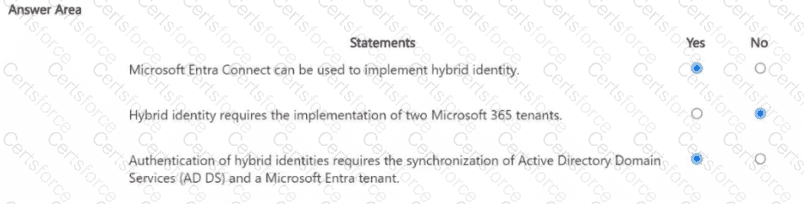
Microsoft’s hybrid identity guidance explains that Microsoft Entra Connect (formerly Azure AD Connect) is the tool used to synchronize identities from on-premises AD DS to a Microsoft Entra tenant, enabling hybrid identity. Microsoft states that hybrid identity is achieved by connecting your on-premises directory with your cloud directory so users have a single identity to access both environments. This does not require two Microsoft 365 tenants; rather, it requires one Microsoft Entra tenant integrated with your on-premises AD DS. For authentication models—Password Hash Synchronization (PHS), Pass-through Authentication (PTA), or federation (AD FS)—Microsoft specifies that directory synchronization is required so that user objects exist in Entra ID and can authenticate to cloud services while maintaining a consistent identity. Thus, Entra Connect is used to implement the synchronization underpinning hybrid identity; two M365 tenants are unnecessary; and synchronization between AD DS and Entra ID is required for authenticating hybrid identities across Microsoft cloud services.
Contribute your Thoughts:
Chosen Answer:
This is a voting comment (?). You can switch to a simple comment. It is better to Upvote an existing comment if you don't have anything to add.




Submit