Microsoft Administering Windows Server AZ-802 Question # 53 Topic 6 Discussion
AZ-802 Exam Topic 6 Question 53 Discussion:
Question #: 53
Topic #: 6
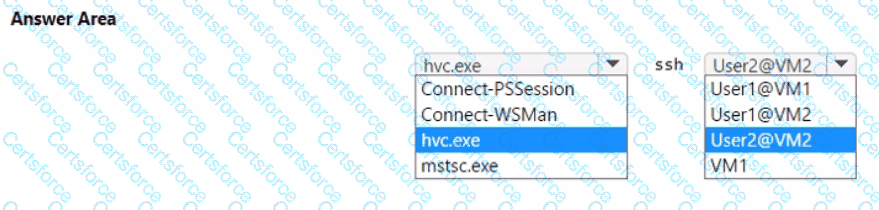
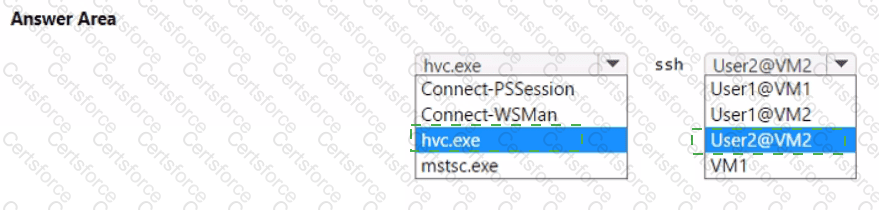
You need to meet the technical requirement for HyperV1. Which command should you run? To answer, select the appropriate options in the answer area. NOTE: Each correct selection is worth one point.
The requirement is to use a direct SSH session to manage all the supported virtual machines on HyperV1, without relying on a network path to the guest. Hyper-V provides hvc.exe, a helper used as an SSH ProxyCommand, that opens an SSH session to a virtual machine over the VMBus (the internal Hyper-V socket/console channel) rather than over the network, which works even when the guest has no reachable IP configuration and only default management tools installed, matching the stated environment. Direct SSH management this way requires the guest to run an SSH server; of the three VMs, only VM2 runs Red Hat Enterprise Linux, which includes OpenSSH server support out of the box, so it is the only VM realistically " supported " for this direct SSH scenario as described, and the account to use is User2, the local account that exists on VM2. VM1 and VM3 both run Windows Server, so " direct SSH, " as intended by this requirement, targets the Linux guest. Connect-PSSession and Connect-WSMan are PowerShell remoting tools, not SSH, and mstsc.exe launches a graphical Remote Desktop session rather than a console-mode SSH session, so none of those alternatives fit. The correct combination is hvc.exe used as the SSH proxy, connecting as User2@VM2.
Contribute your Thoughts:
Chosen Answer:
This is a voting comment (?). You can switch to a simple comment. It is better to Upvote an existing comment if you don't have anything to add.


Submit