
To make a chatbot use uploaded company data from the Chat playground (“use your data”) , your code must:
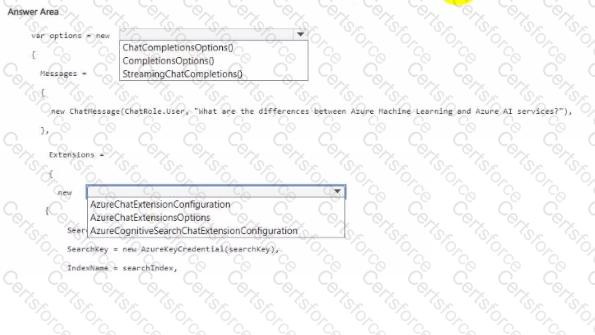
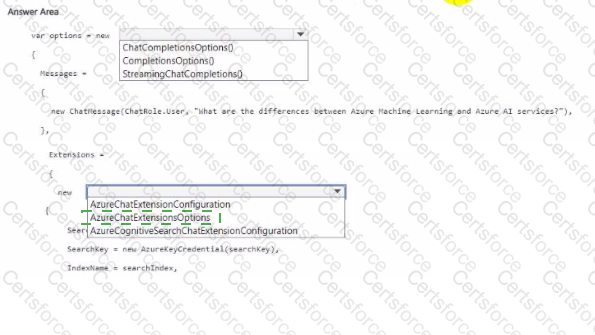
Create a chat request (not a plain completion), so you need the ChatCompletionsOptions type for the request options.
This is the options class used for chat completions across Azure OpenAI SDKs and is the one that supports attaching data sources (extensions).
Configure the Azure AI Search data source as a chat extension so the model grounds answers on your indexed documents.
In the SDK, this is done by adding an AzureCognitiveSearchChatExtensionConfiguration entry under the extensions/dataSources collection and setting properties like SearchKey and IndexName . This is the specific configuration object for Azure AI Search integration with Chat Completions.
Therefore, the two dropdowns should be completed as:
First dropdown: ChatCompletionsOptions()
Second dropdown: AzureCognitiveSearchChatExtensionConfiguration
This matches how “Use your data (RAG)” is implemented in Azure OpenAI—chat request + Azure AI Search chat extension—so the bot can answer questions using your uploaded/company data. Microsoft Learn
Microsoft Azure AI Solution References
Azure OpenAI “Use your data” (concepts): how chat uses data sources like Azure AI Search. Microsoft Learn
Azure OpenAI client library for .NET (overview of chat options and extensions support). Microsoft Learn
Chat Completions Options (SDK docs, shows dataSources/extensions concept in chat options).
Examples/discussion of AzureCognitiveSearchChatExtensionConfiguration usage with SearchKey/IndexName.
=========================


Submit