Answer Area
Correct Selection
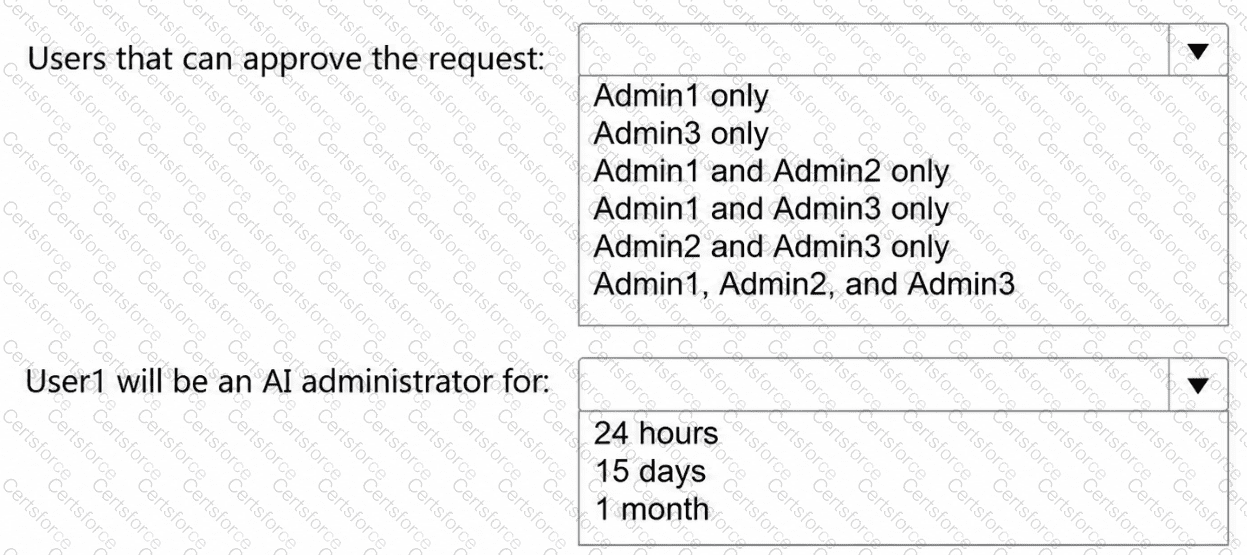
Users that can approve the request
Admin1 and Admin3 only
User1 will be an AI administrator for
24 hours
Microsoft Entra Privileged Identity Management (PIM) enables eligible users to activate privileged administrator roles temporarily, subject to approval and activation-duration restrictions.
First selection: Admin1 and Admin3 only.
The Contoso case study specifies that approval is required to activate the AI Administrator role, but the Approvers setting is None.
According to Microsoft documentation, when no specific approvers are configured, active Global Administrators and Privileged Role Administrators become the default approvers.
Therefore:
Admin1: Global Administrator — can approve.
Admin2: AI Administrator — cannot approve merely by holding this role.
Admin3: Privileged Role Administrator — can approve.
Second selection: 24 hours.
The PIM configuration specifies an Activation maximum duration of 24 hours.
This means User1 can activate the AI Administrator role for a maximum of 24 hours following approval. After the activation period expires, PIM automatically removes the active privileges.
The one-month eligible assignment expiration controls how long User1 remains eligible to request activation. The 15-day active assignment expiration applies to separately assigned time-bound active roles, not this eligible role activation.
User1 can request a shorter activation duration, but 24 hours is the maximum permitted by the configuration.
Microsoft References:


Submit