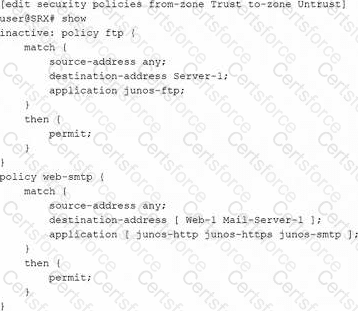
You just made a configuration change to a security policy on your SRX Series Firewall. Your users alert you that an application that uses FTP is no longer working.
Referring to the exhibit, what are two ways to solve this problem? (Choose two.)
A.
Enter the rollback 1 command followed by a commit command.
B.
Activate the FTP security policy and commit the configuration.
C.
Insert the FTP security policy before the web-smtp security policy.
D.
Change the destination address in the FTP security policy to any and commit the configuration.
The exhibit shows that the FTP policy is marked inactive, so it remains in the configuration but does not take effect when the configuration is committed. Juniper documentation explains that inactive configuration elements are ignored and are not applied during commit. One valid fix is to activate the FTP policy and commit the configuration so that the policy becomes active again. Another valid fix is to use rollback 1 to return to the previously committed configuration, then commit that restored configuration. Simply moving the inactive FTP policy before another policy would not help because an inactive policy is still ignored. Changing the destination address to any is unnecessary because the primary problem shown is the inactive FTP policy.
Contribute your Thoughts:
Chosen Answer:
This is a voting comment (?). You can switch to a simple comment. It is better to Upvote an existing comment if you don't have anything to add.


Submit