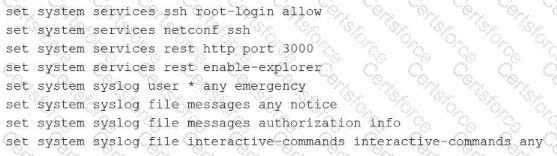
The exhibit illustrates a Junos configuration rendered as a sequence of flat, executable lines that each begin with the set keyword. This is commonly referred to as the " set format. " By default, Junos OS displays the configuration in a hierarchical, brace-delimited format (often called " staza " or " curly brace " format). While the default format is excellent for visualizing the structural relationship between different configuration objects, the set format is often preferred for documentation, scripting, or copying specific configuration snippets between different devices.
To produce the output seen in the exhibit, an administrator must append the pipe filter | display set to the show configuration command. This filter instructs the CLI parser to flatten the hierarchical structure and prepend the necessary context to every individual leaf statement. These lines are highly functional because they can be pasted directly into the CLI of another device while in configuration mode to recreate the exact settings. In contrast, display inheritance is used to reveal hidden settings applied via configuration groups, and display detail provides additional technical metadata about the objects. Neither of those options would transform the output into the discrete set command lines shown in the exhibit. Understanding how to toggle between these display formats is a fundamental skill for any architect managing Junos infrastructures through the Command Line Interface.
Chosen Answer:
This is a voting comment (?). You can switch to a simple comment. It is better to Upvote an existing comment if you don't have anything to add.


Submit