According to the Huawei HCIA-Cloud Computing documentation, FusionAccess application policies are critical for tailoring the virtual desktop experience to specific security and performance requirements. The Huawei Desktop Protocol (HDP) management interface allows administrators to configure granular controls over data flow, display quality, and session behavior.
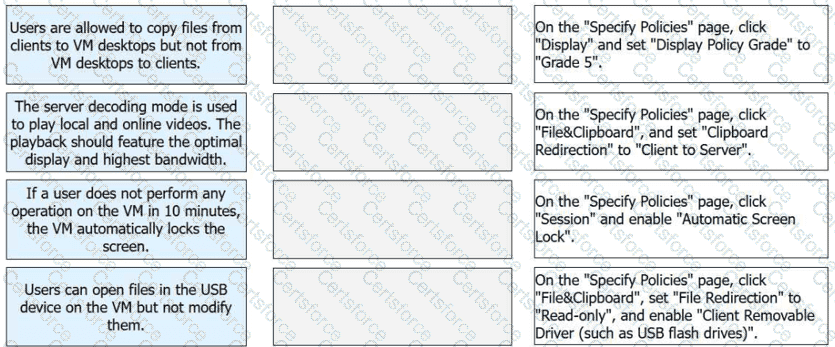
For Scenario 1, setting Clipboard Redirection to "Client to Server" ensures a one-way data flow. This allows users to copy text or files from their local physical client into the virtual machine (VM) while preventing the extraction of data from the VM back to the local device, thus protecting sensitive corporate information. In Scenario 2, the Display Policy Grade determines the balance between visual fidelity and network consumption. Grade 5 is the highest setting, designed for high-performance networks (25 Mbit/s or higher), and is optimized for server-side video decoding to provide the best possible playback quality.
Scenario 3 addresses security during periods of inactivity. By enabling the "Automatic Screen Lock" under the Session policy, the system monitors user input and automatically secures the desktop if no activity is detected within the specified interval (such as 10 minutes), preventing unauthorized access to an unattended terminal. Finally, Scenario 4 utilizes File Redirection to control external hardware access. By setting this policy to "Read-only" and enabling "Client Removable Driver," users can view and open files stored on their local USB flash drives within the VM environment but are strictly prohibited from saving or modifying any data back onto those physical devices. These configurations demonstrate the robustness of Huawei’s VDI policy engine in balancing user productivity with stringent security protocols.
Contribute your Thoughts:
Chosen Answer:
This is a voting comment (?). You can switch to a simple comment. It is better to Upvote an existing comment if you don't have anything to add.



Submit