Comprehensive and Detailed In-Depth Explanation:
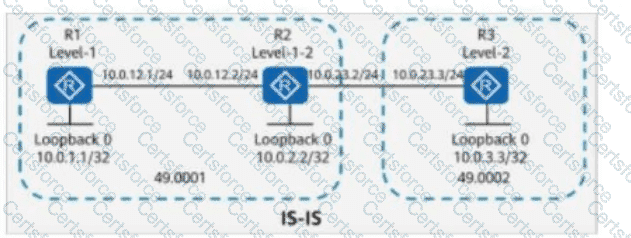
Understanding the IS-IS Topology in the Question:
R2 connects Level-1 and Level-2 areas, making it an inter-area router.
R3 (Level-2 Router) connects to R2.
The loopback addresses are:
R1: 10.0.1.1/32
R2: 10.0.2.2/32
R3: 10.0.3.3/32
Key Command Used: default-route-advertise always level-1
Level-1 routers (like R1) do not have visibility into Level-2 routes unless a default route is provided by an L1-L2 router (R2 in this case).
Analyzing Each Option:
If R1 pings an unknown address like 10.0.4.4, it will use the default route if available. However, if no such route exists, it will not send any packets.
This behavior is expected, so this statement is true.
Option B (TRUE):
10.0.2.2 (R2) is a Level-1-2 router, and it can communicate with 10.0.3.3 (R3), which is a Level-2 router.
Since R2 and R3 are both in Level-2, they can exchange routes.
So, 10.0.2.2 can ping 10.0.3.3. This statement is true.
Option C (TRUE):
10.0.1.1 (R1) is a Level-1 router, and 10.0.2.2 (R2) is a Level-1-2 router.
Since R2 is Level-1-2, it shares Level-1 routes with R1, allowing communication between R1 (10.0.1.1) and R2 (10.0.2.2).
Therefore, this statement is true.
Option D (FALSE - Correct Answer):
10.0.1.1 (R1) is a Level-1 router, which means it only knows about Level-1 routes.
10.0.3.3 (R3) is a Level-2 router, and its route is only known by Level-2 routers (R2 & R3).
Since Level-1 routers do not learn Level-2 routes directly (unless specific redistribution is done), R1 does not have a route to 10.0.3.3.
Therefore, R1 (10.0.1.1) cannot ping R3 (10.0.3.3), making this statement false.
Conclusion:
The false statement is Option D (10.0.1.1 can ping 10.0.3.3).
[Reference:, HCIP-Datacom-Advanced Routing & Switching Technology V1.0 – IS-IS Route Types and Forwarding Principles, Huawei Official HCIP-Datacom Study Guide – IS-IS Level-1 and Level-2 Routing Concepts, Huawei Documentation on default-route-advertise always level-1 Command, , , , ]


Submit